Buy anything from 5,000+ international stores. One checkout price. No surprise fees. Join 2M+ shoppers on Desertcart.
Desertcart purchases this item on your behalf and handles shipping, customs, and support to Congo.
🖱️ Lefties, level up your game with precision and speed designed just for you!
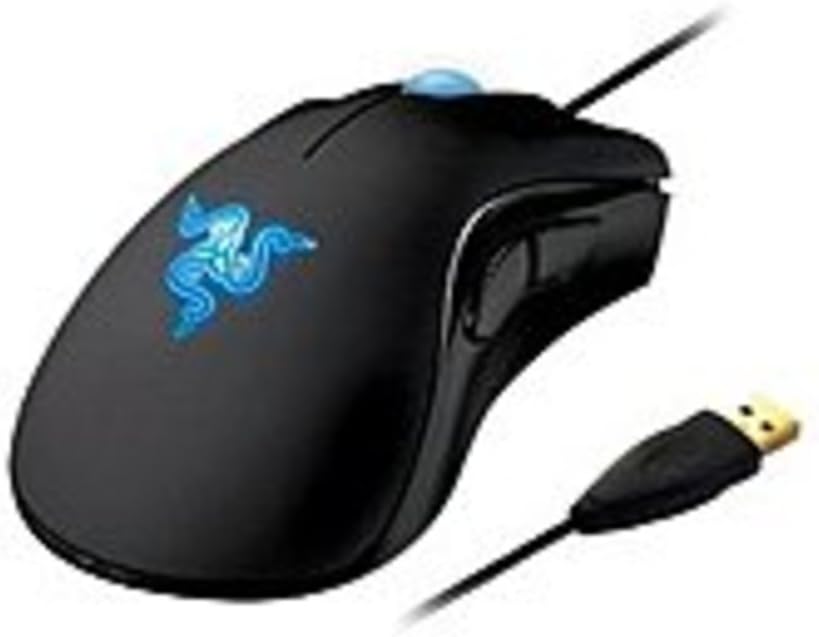
The Razer DeathAdder Essential is the pioneering left-handed esports gaming mouse featuring a 3500 DPI 3.5G infrared sensor, 1000Hz ultrapolling for 1ms response time, and an ergonomic design tailored for extended comfort. Engineered to give left-handed gamers a professional-grade edge, it combines precision, speed, and durability in a sleek wired package.
| ASIN | B003EUPCZG |
| Additional Features | Ergonomic Design |
| Antenna Location | Gaming |
| Are Batteries Included | No |
| Are Batteries Required | No |
| Best Sellers Rank | #19,150 in Video Games ( See Top 100 in Video Games ) #698 in PC Gaming Mice |
| Brand | Razer |
| Built-In Media | USB cable |
| Button Quantity | 5 |
| Color | Black |
| Compatible Devices | Personal Computer, Laptop, Gaming Console |
| Connectivity Technology | USB, Wired |
| Customer Reviews | 4.0 out of 5 stars 628 Reviews |
| Enclosure Material | Plastic |
| Global Trade Identification Number | 00191120006185, 08886419330172 |
| Hand Orientation | Left |
| Hardware Platform | PC |
| Item Part Number | rz01-00151700-w1m1 |
| Item Weight | 0.33 Pounds |
| Manufacturer | Razer USA |
| Mfr Part Number | RZ01-00151700-W1M1 |
| Minimum Required Operating System Version | Windows 11 |
| Model Name | DeathAdder Essential |
| Model Number | RZ01-00151700-W1M1 |
| Mouse Maximum Sensitivity | 3500 Dots per Inch |
| Movement Detection | Optical |
| Movement Detection Technology | Optical |
| Number of Buttons | 5 |
| Operating System | Windows |
| Power Source | Corded Electric |
| Range | 8.0 meters |
| Special Feature | Ergonomic Design |
| Style Name | DeathAdder Essential - Left Hand |
| Theme | Gaming |
| UPC | 803982982896 191120006185 732444766661 777785829484 897126000904 168141473029 807320188339 |
| Unit Count | 1.0 Count |
| Warranty Description | 2 years |
R**O
A real ergonomic mouse for left handed people. Thank you, Razer.
Razer deserves significant respect for putting this product out there. There are next to zero options for left handers on comfortable mouses, mostly because it's "not profitable" or something. This is a very comfortable and satisfying mouse to use and I appreciate Razer treating us like regular people instead of some genetic mistake that needs some weird nonsensical vertical mouse design. A great mouse with a few slight flaws. Pros: 1- It's ergonomic, it's left handed, and great compared to the ambidextrous designs. 2- I don't do MMOs, online FPSs, or other fast paced quick reaction time games, so I can't comment on speed but I've had zero problems using the mouse or with it's response time. 3-Two buttons on the side for some degree of customization. 4- Haven't had anything break or problems with the LEDs or mouse wheel. Seems durable to me. Just don't smash it on the desk, that's why I'm on my second one. Cons: 1- The oil from your hands builds up quickly on this and I clean it at least twice a week. Make sure you only use water. I tried using a cleaning wipe on my old one and I think it stripped the finish off. 2- Out of the box it comes with the mouse buttons switched, so left click is right and right click is left. You need the software to fix it and if for some reason you can't load the software...it won't remember your settings. I've since turned off automatic updating ever since they had an incident and my mouse was stuck reversed. 3- Only blue lighting options, oh, and the logo pulsates slowly. Kind of clashes with my red LED only keyboard but oh well, doesn't bother me. 4- No wireless option.
G**Z
Fantastic mouse, would enjoy a simpler version for work (Revised)
PROS: 1) The ergo design is unbelievably comfortable, that you can get used it no matter what your preference. I am right-handed but because of severe carpal tunnel, I had to learn to use a left handed mouse. I tried a couple and I was able to fully adapt to this one in an hour. 2) Hard-wired reversed buttons. You don't have to change the left click in Windows, because your left-hand index finger acts as the primary click on this mouse. As far as Windows is concerned its a standard mouse. 3) Some useful software controls. You can turn off the glow if it bothers you (only via Razer software), adjust the tracking DPI, and just about anything else you could think of adjusting on a mouse, and some things you may not have thought of. 4) Accurate - Once adjusted, this mouse is has Razer sharp accuracy. :P CONS: Limited use - it works with most versions of Windows and a few versions of MAC, but not all. It is problematic in some of virtual machines. I would ask the following of Razer for those of us who need a left handed mouse, it would be awesome to create a separate business/work version of this mouse: 1) Don't touch the design. The casing and buttons are all perfect. 2) Remove the LED's, not needed for work. 3) Create a simple driver, that can be installed through Windows Update or separately from your website, requiring no additional software to be installed.
H**S
Great Left Handed mouse
A little background: Though I write with my right hand, I have always gamed with the mouse in my left hand. Finding left handed mice is difficult and I have been a Razer user for years, I started using them because of their ambidextrous design, back with the original Razer Boomslang, then a Boomslang special Edition CE. I loved both of these and would buy another one in a heartbeat. They stopped updating the drivers for the Boomslang CE, so I started having problem with the mouse not working properly with the latest games. I then tried a Razer Ourobouros,(ambidextrous again) but the one I got would not work wirelessly, only wired. Returned it, since it is a very expensive mouse, and instead of getting a replacement I was reimbursed for the cost. The side buttons on the Ourobourous were awkward to use so I decided to look for something else. Review: This is my first "from the ground up" lefthanded mouse and I have been very pleased with it. The form fit is good for my (large but not huge) hand, the side buttons are within easy reach for my grip (I use a "palm" grip, see the razerzone.com website for an explanation of the three basic grip types). The mouse is very responsive and works well with the type of games I play (BF4 lately) I would have preferred green lights rather then blue but that is no big deal. I use a Razer Vespula mousepad and this mouse works very well with it. The only reason it does not get five stars is the user interface. I have not had any technical issues with the synapse software, but making any changes on the buttons for the lefthanded mouse is counterintuitive to say the least, but you could easily call it damn annoying. Once you have made the changes there is little reason to mess with it again (I don't use multiple profiles, I have no need for it). So for a mouse that is one third of the price of the Ourobouros I am very happy.
N**M
This mouse is fantastic.
As a lefty, I've been using ambidextrous mice my whole life. In the past I've tried right-handed mice with my right hand, just to see what they felt like (I was jealous). However, when I first laid my hand on this mouse, I was amazed at how comfortable it was. I would recommend this mouse to any left-handed PC user, not just a gamer (although it is great for gaming) because it's so comfortable. Pros: Specifically made for lefties (duh) It's precise, sensitive, and fast. The cord is braided, and is a lot tougher than most mouse cords. This might be important if you want to lug it around with a laptop. It looks great. Clicking is quiet (audible but not obnoxious) and comfortable. The Mouse 4 and Mouse 5 buttons on the right side are really convenient for games or just web browsing; these buttons are missing from most ambidextrous mice. Cons: Other people have said this too, but the primary and secondary mouse buttons are switched by default. I haven't had that much of a problem with it though, because it's pretty easy to switch the buttons back by changing mouse settings. For the average lefty who's been trained for right-handed mouse buttons, this is only a problem for about two minutes. The surface of the mouse is a matte rubberized plastic material. It will grab onto any moisture or oil on your hand, and could be annoying to a neat-freak, but it's quite easy to clean off. The mouse is rather large, but I have large hands, and it is extremely comfortable. But for someone with smaller hands, I doubt it would be uncomfortable. Contrary to what another reviewer said, this mouse feels pretty light to me. All in all a great mouse. When I have the money, I want to buy a spare just in case these are discontinued!
B**D
Sign in and connect to a server to use your mouse
I don't give 1 stars lightly; this product merits it. To program the mouse buttons, I went to the razersupport webside for the 3.5g deathadder drivers. They only offer legacy drivers years old and one new bit of software called razer synapse 2.0. It is an 'online cloud device updater and profile storage' application. I get it grudgingly thinking I can uninstall it after it grabs the latest drivers. Sadly, this is not to be. Using the tool requires creating an account and validating it with an email address. So I use a honey pot email address and sign up. I run the synapse application, and log in to the server to get the drivers for the mouse. It does so without a hitch and now it is time to change the default mouse settings. I swapped the default left and right mouse buttons(since I'm used to ambidextrous/right handed configs, I don't need left handed config for individual buttons ... I just want to hold the mouse in my left hand is all). I don't know why they have the left and right mouse buttons swapped by default but that is a one time fix, so I thought. They have an annoying visual of the mouse that can be switched from a left handed edition to a right handed addition. This is unnecessary but would not be a big deal except that it complicates my future troubleshooting I will get to below. So I have finished tweaking things(and turning off the silly lights inside the mouse) and it feels great. I close the app thinking I'm done. Immediately the changes revert and I am fumbling to restart the app and see whats going on. I fight with the settings for a bit and then give up and look online. Turns out you must have the app running and the only thing you can do is turn it to 'offline' mode to stop the cloud sync; so much for getting rid of the bloat ware but at least it is only a one time thing right? Wrong. Every time you start your machine, you have to sign in. You can have it remember your credentials and sign you in automatically but you still must sign in. Even in offline mode, this is the case. Now, some people don't really care about these things. I do, so I am rating it based on my preferences. I find this product abysmal. If my reasons why don't matter to you, disregard my rating. However, if you find these connection requirements unacceptable like I do, I strongly recommend not buying this. It is a fine mouse, but the supporting software as bad as any design decision I've seen in software.
R**N
Annoying details cripple an otherwise quality product
A lot of computer devices these days are going the ergonomic route, aka the bane of a left-handed person's existence. With this in mind, I was delighted to see that Razer manufactures a left-handed alternative to their gaming mouse. The device is basically just like the standard Razer DeathAdder (right-handed version) - it's got a nice long cord, high precision controls, extra buttons, and a fancy glowing blue logo. It even comes in a cool box with some free drink coasters that are strangely labeled "certificate of authenticity." Seriously, though, it's probably the coolest mouse I've owned and it's amazing because it's left-handed, but there are two problems with it that bothered me as soon as I started using the thing. First, the left and right click buttons are switched. This means that, by default, when you left-click it right clicks and when you right click it left-clicks. Confusing? Try playing Starcraft that way. Now, this isn't the end of the world. You can go into your mouse settings and click the "switch left and right click buttons" options. However, if you ever switch to another computer you'll have to do the same thing. In addition, if it's somebody else's computer, or if you ever want to use a different mouse with your computer again, you'll have to switch the settings back every time you switch. Now, I kind of get why they did this. If a left-handed user likes his mouse backwards, shouldn't the buttons be backwards too? Ok, maybe, but most lefties probably grew up using right handed mice (mouses?) making this feature a pesky annoyance. I mean, why hard wire the mouse that way if users could change it in the settings anyway? Maybe some people want this feature, but it irked me enough to wish there was some sort of button to turn it on and off. The other thing I noticed about this mouse is that the point moves more quickly than the pointers on my other mice. Maybe this is meant to make it 'high precision' for gamers, but this is another feature that can be easily changed in your Windows settings or in an individual game's settings. So, again, this is another feature that you have to tweak inside the control panel every time you plug in Razer's mouse or switch computers, unless you don't mind the hypersensitivity. So, over all, it's an ok product. I like the design, but the built in hardware settings make it cumbersome to use if you want to use it on multiple computers. This is no normal mouse. edit: In response to the condescending comment claiming I don't know how to use a 'gaming' mouse, I installed Razor's proprietary software. Hey pro-gamers! Do you like having to log in so that you can access your mouse's settings? How about having software the crashes when you're trying to play a game, or interrupts everything you're doing to inform you to "Please plug in a razor product" when your mouse isn't plugged in? Then this is the product for you! Seriously. If you don't think I'm being accurate, check out all the google search results for problems with Razor Synapse. Their software makes the problem even worse than it was to begin with.
S**N
Left handed PC gamers friend EDIT 6/1/11
As being a south-paw PC gamer, struggling with a standard 800 DPI mouse is bad. Ligning up the perfect headshot in Team Fortress 2. Using a right handed mouse is very uncomfortable, buying this was worth the money I paid. My accuracy improved by alot, reaction time has increased. If your a lefty PC gamer, buy. If your a righty, buy the same mouse for right handers. EDIT 6/1/11 Sigh... My mouse has died because of the bad software Razer written for the mouse. After updating the software and being forced to reset the mouse buttons, DPI, and polling rate, the mouse died on the spot. Only the blue glowing mouse wheel glows, not the razer symbol on the back, and windows shows an error message "USB Device not recognized" In conclusion, be very careful with the software. 1 wrong move and you have a 50$ paperweight. Edit 8/5/13 I came back to this mouse after a couple years hoping that I could undo the wrongs I've done. Instead of messing too much with the software and more using the mouse, I bought it again December 2012. And to my surprise, Razer made this mouse the best mouse I've used in a LONG time again like I've originally stated a couple years back. Only because the software is so stable and usable. Much more than before. Clean UI, easier to use, better to manage with each Razer device you have, and not to mention... NOT PRONE TO CRASHING ALL THE TIME, and to break your expensive mouse. Bumping the score back to a 5. Because this is now a perfect mouse, thank you software.
K**R
Mac owner's beware....Otherwise good product for lefty gamers
I game! Indeed, i do and I'm left-handed, so imagine my excitement I found a true ergonomic left-handed gaming mouse. According to the to product specifications, the mouse is compatible with Mac OS 10.4 +. I operate 10.5 currently. I received my mouse and immediately opened and plugged in per the included instructions. AFter downloading the appropriate drive, which is not entirely clear as to which you actually need, I got the mouse up and running assigning some custom macros to the buttons for my games. It took some choice words and experimentation to translate Windows based instructions into Mac commands, but I got it eventually. That was one star off, for the frustration. While playing my game three days later, my mouse abruptly stopped working. The optical and the LED light were flashing intermittently and the mouse did not respond. So I plugged in my old mouse, removed all the drivers and visited the Razer web-site to find trouble-shooting instructions, and that's where the Customer support lost a star. Their forums are difficult to navigate and as far as I could tell, there are no trouble-shooting guides. I ended up contacting Razer Technical support via phone. At least their phone menu was easier to navigate than the web-site. I talked to a knowledgeable and helpful tech, who asked if I had updated the firmware. And there's the other quality star deduction, no where in the instructions did it say that, as a Mac user, I needed to plug in and install the mouse on a Windows PC to update the firmware of the the mouse. Now, I did see the firmware updates while browsing the the driver on the Razer web-site, but nothing that said Mac users needed to follow steps to install the firmware upon their mouse. While one the phone with the tech, he suggested I plug in the mouse to a Windows PC and attempt to download the new firmware. Needless to say the PC did not recognize the mouse, and it was declared dead by the Razer Tech. My ticket was submitted, after filling out a form, to their returns department (yes, I did fill out my warranty registration, the day I got it, in fact). A few days later I get an e-mail from their returns department stating for me to return the mouse for refund or replacement of the product from the vendor I had purchased the mouse from since I had owned it for less than 30 days. I had, I'm sure without any malice, been led to believe my mouse would be covered under the warranty that I had so dutifully registered for, and would be replaced by Razer. Tech's were great, returns needs some work..... If it had been easy for me to return to a store and get a replacement, I wouldn't have even called Razer. So, with great disappointment, I packed my mouse back up and sent it back in for refund. I had hoped to write a more positive review about my experience and usefulness of this mouse to fellow south-paw gamers, but sadly I can't. A mouse that only lasts three days and not be supported really, well it left a bad taste. I will have to consider greatly before I purchase another mouse from Razer, and my hunt for a left-handed mouse that works with Macs continues....
D**A
Für diesen Preis wohl die beste Linkshändermaus
Ich bin kein sonderlich passionierter Gamer - ich sitze ab und an vorm Rechner um ein paar Games zu spielen, das macht aber oftmals nur 1 oder 2 Stunden im Monat aus. Der Grund, wieso ich mir diese Maus dennoch gegönnt habe: Sie liegt mir unfassbar gut in der Hand. Das ist auch der wesentliche Grund, wieso diese Maus von mir 5 Sterne erhält. Das ist natürlich ziemlich subjektiv, aber für das Geld hat diese Maus noch einiges mehr zu bieten: - 3.500 DPI Auflösung des optischen Sensors - sollte den meisten Ansprüchen gerecht werden. - 2 sehr intelligent positionierte, einfach zu erreichende Funktionstasten - Razor-Software für erweiterte Einstellungen und Tastenbelegung der Funktionstasten an der Seite - ein besonders stabiles, mit Stoff ummanteltes USB-Kabel (das sieht mal richtig wertig aus) - ausgezeichnete Verarbeitung Das man als Linkshänder nicht vom ebenfalls nicht speziell für uns geschaffenen Ministerium subventioniert wird, dürfte wohl klar sein, also wird man die 10-15 EUR mehr berappen müssen, wenn man ein Instrument will, welches sich mit Rechtshänder-Mäusen messen will. Das wars mir aber auch wert (Der Markt ist im Preisbereich bis 60 EUR ja leider auch ziemlich limitiert was das Angebot an ergonomischen Linkshänder-Mäusen betrifft) Fazit: Fakt ist: Der Markt für uns Linkshänder ist klein. Und nun? Friss oder stirb Leftie? Ne, das definitiv nicht. Ich nehme die Maus gerne in die Hand. Man gibt um die 60 EUR aus, hat aber einen ordentlichen Gegenwert. Probleme? Hab ich keine. Irgendwelche Mankos am Gerät? Auch nicht. Also 5 Sterne.
B**A
Ottimo
A distanza di quasi 7 anni dall'acquisto continua a funzionare perfettamente. Esteticamente si è (ovviamente) un po' rovinato ma l'elettronica funziona ancora alla perfezione.
R**A
Awesome gaming (I have the left-handed) mouse!
I have the left-handed version and love it! The two extra buttons near youre thumb are very well-placed for a lefty (they make a right-handed version also). I've been using it for gaming for 3 years straight and it still runs rock-solif. Great mouse. The customizeable software may be configured easily for different game profiles and switched easily.
A**Y
My first left hand mouse
For years I have used right handed mice and suffered the wrist ache as a result, Lets face it paying extra for a left hand mouse is shameful to the manufacturers and an insult to us lefties. This is my first left hander and as soon as I put my hand on it, it felt great, like it belonged in my hand. The wheel can be a bit clunky when scrolling but it has a great tactile feel so no slipping under finger. The wheel button is positive and solid. The two thumb buttons could be a bit further forward (for people like me with big hands) but they to have a positive feel to them, Weighted just right, doesn't feel cheap and the curve of the mouse feels natural. Response is fantastic and smooth, great for gaming. The left and right buttons feel firm and positive. The cable is light and does not impede movement with a solid usb termination. Overall great mid range mouse. Only strange thing is the flashing/pulsing logo, my hand is over it most of the time so why bother?
H**R
Imprescindible, el único ergonómico para zurdos.
Uno de los mejores ratones gamer de siempre, pero para zurdos. Desde hace muchos años llevo buscando algo así, es el único ratón gamer hecho aposta para zurdos con la misma ergonomía que los ratones para diestros. Es una lástima que Razer no renueve este modelo como ha hecho con el modelo para diestros, no por el sensor que funciona perfecto, sino por las adiciones de goma en los laterales para que no resbale el pulgar si te suda la mano (uno de los pocos defectos de este ratón) Es el segundo que tengo ya que es imprescindible, el otro lo tengo desde que salió , que ya son muchos años y usándolo todos los días con el desgaste que lleva el usarlo para juegos y shooters sigue funcionando. Además de su resistente cable mallado y su recubrimiento gomoso (por encima, laterales no) lleva los botones ya invertidos, con lo cual no hay que configurar nada ni en windows, ni linux, ni en los juegos. Si eres zurdo como yo ni te lo pienses, no hay nada igual.
Trustpilot
5 days ago
2 weeks ago