


Desertcart purchases this item on your behalf and handles shipping, customs, and support to Congo.
🖥️ Elevate your workspace, elevate your game — stay in the flow with FlowLift Pro!
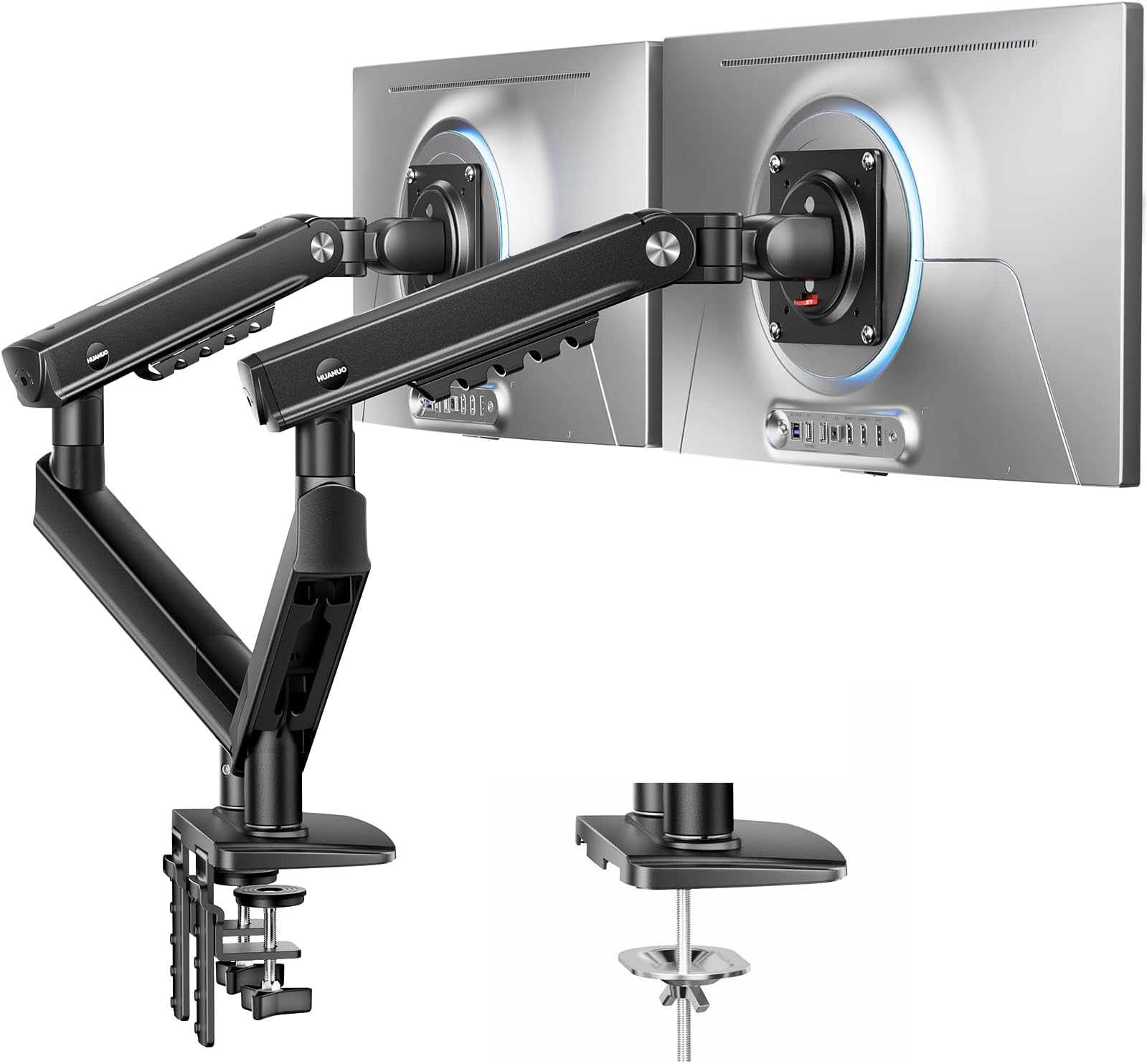
The HUANUO FlowLift Pro Dual Monitor Mount supports two 13–27" monitors up to 15.4 lbs each with a durable 90% metal frame and MechaSpring arms for 2× longer life. Featuring tool-free InstaMount, LockSteady one-finger adjustments, and a PrecisionView tension indicator, it offers ergonomic height, tilt, swivel, and rotation backed by the American Chiropractic Association to reduce strain. TÜV Rheinland certified and tested for 3× load safety, it’s designed for professionals seeking a sleek, stable, and health-conscious dual-monitor setup.


| ASIN | B0GK6DT5SF |
| Best Sellers Rank | #42 in Computer Monitor Arms |
| Brand | HUANUO |
| Color | Black |
| Compatible Devices | Monitor |
| Customer Reviews | 4.5 out of 5 stars 2,844 Reviews |
| Enclosure Material | Aluminum |
| Item Weight | 9.3 pounds |
| Manufacturer | BESTQI INNOVATION (HONGKONG) TECHNOLOGY CO., LIMITED |
| Material | Aluminum |
| Maximum Tilt Angle | 85 degrees |
| Maximum-Supported Screen Size | 27 inches |
| Mfr Part Number | HNDMA119B-DS-EU |
| Minimum-Supported Screen Size | 13 inches |
| Model Number | HNDMA119B-DS |
| Mounting Type | Tabletop Mount |
| Movement Type | Tilt, Swivel , Rotation, Height Adjustment |
| Number of Items | 1 |
| Number of Packs | 1 |
| UPC | 840478869033 |
| Warranty Description | 5 Year |
B**Y
An incredibly well engineered and well built dual monitor bracket setup. A bargain for the quality
This is an incredibly nice dual monitor bracket, especially for costing less than $100. Honestly, this is probably a lot heavier duty bracket than I really needed for my dual monitor setup........but, since my monitors were slightly heavier than the 20lbs each that the next model down from these same folks was rated at, I decided to go with this model. The parts are very heavy duty, well made and fit together perfectly. The amount of adjustment is amazing. I was very impressed and it takes a lot to impress me. Every part you could need is included, as well as the tools you will need to do the assembly as well. The instructions are easy to read and cover everything if you study them and pay attention. As others have mentioned, there is an adjustment screw in the upper arm that is only revealed and can only be adjusted once the bracket system is fully assembled and installed. You have to push the upper arm down and then it will be easily revealed. Once you see the adjusting screw, it will be marked to turn one way to lower the upper arm and the other way to raise it. They give you the proper Allen wrench to fit this adjusting screw and it works very well. My two monitors are only about 27" wide and each weighs about 22lbs. You could easily accomodate much wider (and taller) monitors. I think I remember that it said up to 40" wide and quite a bit heavier than these. Seeing how well built and heavy duty this dual monitor bracket is, I can see where that would be no problem at all. Seldom, have I been as impressed with a product of this nature, as I am with this one. I would strongly recommend this bracket to anyone wanting to go to a dual monitor setup. This bracket setup even has removable plastic covers to help route and hide the monitor cables for a cleaner look. I am very happy with my purchase. See pics below
J**A
Great quality
Sturdy and easy to set up. I can move my monitor to almost any position with just my finger. Pricy compared to other options, but worth the money.
M**T
pretty good
I recently purchased this and thought i'd share my initial impression. If I feel differently about it later, i'll edit it. First off, I have dual HP Omen 27" monitors weighing just under 18lbs each. The VESA mount on these monitors is rotated 45 degrees, so it is like a diamond on the back of the monitor instead of a square. I initially freaked out because I couldn't rotate the mount at first to fit the monitor, but as it turns out, it was just nice and tight and needed to be connected to the arm for me to get enough force on it to spin it. The arms come in 2 pieces, we'll just call them the lower arm, which connects to the table mount, and the upper arms which connect to the monitor. The lower mounts are static and have no adjustments. The upper mounts do have adjustment. The screw you will be looking for is on the side that connects to the lower mount, and you will have to assemble them, and then use a little muscle to push the arm down so it exposes the adjustment screw. I have not yet had to make an adjustment to this to support my monitors. The adjustment that is going to give you the most amount of grief, imo, is the one that tilts the monitor front/back. One side was just fine straight out of the box, but the other one kept dropping down. Here are my tips to get this fixed: 1) the range of motion on these is very picky. I had to use a little bit of force to get the tilt to articulate its full range of motion. 2) the adjustment screw for these was very tight. make sure you have the allen too FULLY seated before cranking on it, otherwise you run the risk of easily stripping the head on the adjustment screw. I needed to tighten one of the screws to stop my monitor from tilting down. When I first tried, I thought there was no more adjustment left because the screw would not tighten anymore. So, I actually loosened it a little bit, realized this screw is just very tight and then I tightened it again. It was very tight, but I was able to tighten it some more to get it to stay still. Some ladies and men with delicate hands might have a little trouble with these adjustments, but I think they can be made with a little strength and finesse. I got my arms set up, and they have not moved at all. I used the grommet mount, drilled a hole right through my table. I also have what is essentially a giant mousepad over my whole table. I just poked a hole in it and put the mounting stud right through it, and clamped it down. It is quite sturdy. I am not worried about this stands ability to hold up 36lbs of monitors. It has 2 USB ports.... ok. The cable management is ok. I have 3 large gauge wires coming from my monitors and the hide them just fine with some room to spare. Finally, yes, the arms do stick out the back a little. My 27" monitors are side by side in landscape and the arms stick out about 5" from the back. Granted, my table is a gaming table, so I have plenty of room to work with. With the grommet mount, I was able to mount the stand about an inch inside the edge of the table, a little further in than the clamp mount. I don't regret this purchase, and i'd reccommend to a friend. Hope this review helps in your search!!
M**.
Great dual monitor mount 💯
This was incredibly easy to assemble. I only needed a bit of help attaching my monitor to the arm, but aside from that, I didn’t require many adjustments. I have two KTC 27-inch monitors, and the stability is excellent. It's versatile and adaptable to any position I need, making my WFH set up much smoother and more comfortable.
T**Y
Great brand, I have two models
I have the single arm widescreen for my wife and the double arm widescreen for myself. These are great. There are a few caveats. If you want two 35" side by side, it might be a tight fit, they may not fit if you want them high up.... for ultrawides definitely going to be pushing it. I have a 35" ultrawide and a 27" normal aspect ratio monitor and I can fit them side by side if they are adjusted a bit lower than I want them. At the height I want them (eye level, I am a 6'4 man though) I use the widescreen horizontal and the turn the normal AR screen vertical and I game on the widescreen and use the vertical one for webpages/etc while gaming. as you can see from my picture i can probably get more wiggle room by moving the mount over to the right further and extending the widescreen further out. but I don't still dont think it would be enough for a horizontal side by side without dropping the height a little. which if I really cared I would do, but I'd prefer to have them eye level in this configuration. They work for my needs but any larger and I would have to move the arms down to have them side by side even with one vertical. How well will two normal AR 35" screens fit side by side? I'm not sure I think they will fit but you may need to lower them a bit below eye level. actually another user with what a picture of what looks like fairly large wide screen monitors side by side but as you can see from his picture the monitors are only like an inch or two off the desk. as a 6'5 man with a relatively low desk it takes up a lot of length just getting them to my eye level. That's fine though I don't mind having one vertical. these are the best ive seen that weren't several times the price level. If these wont work for you nothing reasonably priced will (at the time of this review). That said these are the most accommodating and best well built gas spring dual arms I've used. If you really want two screens horizontal side by side and your use case is bigger than you think will work, you may want to consider putting them on individual arms instead so you can space them further apart. That said, these arms are very good build quality. the gas spring in them is powerful, I have my wife's older pretty heavy dell ultrawide on a single arm one and it lifts it with ease w/out being topped out on the adjustment. You will have to push the arm down to the desk all the way to find the adjustment for the spring. I think a lot of people don't realize this and think it's not up to lifting their monitor because you can tighten it up some out of the box for heavier monitors. The arm should be able to accommodate any modern monitor given how light they've gotten and some pretty heavy older ones. all the adjustments are smooth and easy to do, the least smooth adjustment is the vertical tilt that happens right behind where the vesa bracket is, but its still pretty decent. the swivel and height of the gas spring are effortless. it looks nice, it feels heavy and durable. I'm an i.t. guy and ive used a lot of monitor mounts and these are well above average quality. Just need to decide if you want a double mount or two singles for your needs. id not recommend anything cheaper or anything pricier. this brands higher model/widescreen ones are the ones you want price/performance they are the sweet spot
J**Y
Sturdy, adaptable, and clean looking
Purchased for setup with two 32 inch monitors for my work computer and also bought a 2nd one to recreate the same setup at home for remote working. If you've read the other reviews and questions, you'll know the instructions aren't the best, but sufficient to get the stand assembled. I read enough comments here to understand the process to adjust the counterbalance for the weight of my monitors. Judging from the amount of adjustment I had to do to keep the monitors from springing up when released, I would say the stand will probably handle every bit of weight claimed and maybe more. As others have mentioned, this can't be placed too close to a wall because it will restrict the positioning of the monitors. With 32 inch monitors, I had to pull my desk at home about 7 inches from the wall for clearance. With smaller monitors, you might need even more space to bring the monitors together. I didn't see the stand has USB ports in the base before I bought it, so it was a nice extra. Depending on what you want to plug into them, you might want to verify the orientation of the plugs before you secure them in and mount the stand on the desk. I didn't and I have a thumb drive that fits, but I would turn the port over to make it a little easier to take the drive in and out if I were installing it again. Removing the monitors and stand from the desk to turn them over now is more hassle than I want to mess with since it isn't absolutely necessary. Internal routing of the monitor cables was easier than I expected. The covers in the upper part of the arms have a single screw holding each of them in, while the covers in the lower part can be removed and replaced with a simple squeeze of the tabs. All in all, the stand gives me what I wanted: easy adjustability while reclaiming some desk real estate.
M**K
Great dual monitor stand for 27 inch monitors!
This! piece of equipment has worked out extremely well for me so far. I've been using it for about a week now, and I set it up and break it down every day because I work in different offices from one day to the next. The unit is reasonably portable, but more importantly it has worked on every desk (three) then I have tried it on and it's very sturdy very solid and very fast to set up. I also really appreciate that the unit came with mounting plates to screw onto the Vega attachments on the back of my two 27 inch monitors allowing me to very quickly attach the monitors to the monitor stand arms. Even if I were in one office all the time, I think this would be the monitor mount that I would want to use
D**T
Not the most versatile mount out there
This mount is not as versatile as I though it would be. You are limited by how close you are to the wall and the fixed base of the arms. It does a good job as a mount but it's fixed base doesn't allow you to position it how you want if you're desk is against a wall.
S**D
المنتج رائع و عملي جداً ذو جودة عالية
V**5
Ein super Haltearm für zwei Monitore!
Leicht zu montieren und durch die Druckgasfedertechnik lassen sich die Monitore spielend leicht nach Wunsch verstellen! Super Konstruktion!
A**S
Excelente braço para dois monitores, robusto e fácil de ajustar
Este foi um dos melhores upgrades que fiz ao meu setup. A qualidade de construção é excelente, com materiais sólidos e um acabamento premium que transmite bastante confiança. A montagem foi simples graças às instruções claras, e todas as ferramentas necessárias já vêm incluídas. Os braços movimentam-se de forma muito suave e permitem ajustar facilmente a altura, inclinação, rotação e distância dos monitores. É muito fácil encontrar uma posição ergonómica e, depois de ajustados, mantêm-se firmes sem descer ou perder a posição ao longo do tempo. Outro ponto muito positivo é a gestão de cabos integrada, que ajuda a manter a secretária organizada e com um aspeto muito mais limpo. Além de libertar bastante espaço na secretária, o braço também facilita a limpeza e torna o setup mais funcional. Utilizo-o com dois monitores e ambos ficaram perfeitamente estáveis, sem qualquer vibração durante a utilização normal. O sistema de fixação à secretária é muito robusto e inspira confiança. A qualidade justifica plenamente o investimento. É um produto muito bem construído, resistente, fácil de ajustar e que melhora significativamente o conforto e a organização do espaço de trabalho. Recomendo sem qualquer dúvida a quem procura um suporte duplo de qualidade para monitores.
G**.
Solid product
Set up in about an hour, no major issues except the USB cables don't seem to fit as shown in the instruction but as I wasn't using them it didn't cause me any problem. The arms and desk C clamp hold the monitors very securely, move freely and feel very solid. My only concern was that I had to tighten the bracket plate holding the monitor vertical to the absolute limit to prevent my main monitor 'drooping' even though it is weighs 20% less than the limit given.
P**Z
calidad precio
Material resistente, fácil de armar, recomiendo 100%
Trustpilot
2 months ago
1 month ago