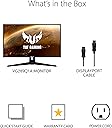
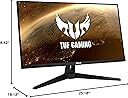
🔥 Level up your visual game with ASUS TUF VG289Q1A – where every pixel counts!
The ASUS TUF Gaming VG289Q1A is a 28-inch 4K UHD IPS monitor designed for gamers and professionals seeking ultra-high resolution and color accuracy. Featuring Adaptive-Sync and FreeSync technologies, it delivers smooth, tear-free gameplay. With 90% DCI-P3 color gamut and HDR10 support, it offers vibrant, lifelike visuals. Exclusive Shadow Boost enhances visibility in dark scenes, while multiple HDMI and DisplayPort inputs ensure broad compatibility. Ideal for those who demand premium image quality and responsive performance in a sleek, durable design.


| ASIN | B083Z2RPB9 |
| Adaptive Sync | FreeSync |
| Additional Features | What's in the box: DisplayPort cable, Power cord, Warranty card, Quick Start Guide, freesync monitor;adaptive sync monitor, gaming monitor;computer monitor;28 inch monitor;pc monitor;4k monitor;displayport monitor;hdmi monitor;led monitor;desktop monitor;28 monitor;lcd monitor;hd monitor;external monitor;dual monitor;uhd monitor;monitor with speakers;ips monitor;eye care monitor |
| Aspect Ratio | 16:9 |
| Best Sellers Rank | #3,754 in Electronics ( See Top 100 in Electronics ) #129 in Computer Monitors |
| Brand | ASUS |
| Brightness | 250-350 nits |
| Built-In Media | DisplayPort cable, Power cord, Quick start guide, Warranty Card |
| Color | BLACK |
| Compatible Devices | Computers (laptops and desktops), Gaming Consoles |
| Connectivity Technology | HDMI, display port |
| Contrast Ratio | 1200:1 |
| Customer Reviews | 4.4 out of 5 stars 1,064 Reviews |
| Display Resolution Maximum | 3840 x 2160 Pixels |
| Display Technology | IPS |
| Display Type | LED |
| Hardware Connectivity | DisplayPort, HDMI |
| Has Color Screen | Yes |
| Image Contrast Ratio | 1200:1 |
| Is Electric | Yes |
| Item Dimensions D x W x H | 18.13"D x 25.18"W x 8.42"H |
| Item Type Name | monitors |
| Item Weight | 12.6 Pounds |
| Manufacturer | ASUS |
| Model Name | VG289Q1A |
| Model Number | VG249Q1A |
| Mounting Type | Wall Mount |
| Native Resolution | 3840x2160 |
| Number of Component Outputs | 2 |
| Picture Quality Enhancement Technology | HDR10, FreeSync, Shadow Boost |
| Processor Count | 1 |
| Refresh Rate | 60 Hz |
| Resolution | 4K UHD 2160p |
| Response Time | 5 Milliseconds |
| Screen Finish | Matte |
| Screen Size | 28 Inches |
| Screen Surface Description | Matte |
| Shape | Flat |
| Specific Uses For Product | Gaming, Personal, Photo Video Editing |
| Total Number of HDMI Ports | 2 |
| UPC | 192876953457 |
| Viewing Angle | 178 Degrees |
| Voltage | 240 Volts |
| Warranty Description | 3 Year Warranty with ARR |
| Warranty Type | 3 Years Manufacturer Full Warranty |
R**U
Excellent Monitor and Great Value!
Great monitor and excellent price to value ratio product. This monitor doesn't have any backlight bleeding problem which is even common on other high end IPS monitor I had. The color coverage and brightness level put it comparable with other HDR400 certified monitors. At least I didn't notice any difference between the HDR content generated by this and Acer XV 282K (it has peak brightness around 450 nits). The gaming experience is great overall, especially you play 3A games instead of FPS games which require higher refresh rate, but highly recommend to set the monitor to higher level overdrive to reduce response time. The only down side is its relative low refresh rate. You will notice some lags in motions when playing competitive FPS games. Watching shows and daily work (like programming, Word, Excel) are also very enjoyable on this monitor. I feel like the contrast ratio is better than the stated measurement when I watch shows, perhaps because it doesn't have any backlight bleeding problem. The experience with this monitor makes me feel other high-end monitors are way overpriced. I even bought another Acer XV282K to compare with, but I only kept this one.
R**S
Excellent display...no issues and looks great.
Not a gamer so really don't have anything to share on that. However, this thing looks great. Colors are vibrant and sharp, the resolution makes text easy to read. Been working quite well and better than the previous Asus display I had. I tried to order a 2nd one this same size (28") but that doesn't seem to be available any longer.
M**Y
Excellent choice. High quality, well priced!
I'm switching from 2021 Sam sung 4k 28" monitors that both failed right after the warranty expired. I've always had good luck with Asus products, so I chose to go back to Asus on my monitors as well. No regrets with buying two of these to replace them! 1st improvement is that these do not have wall warts or power supply bricks, so cabling was a breeze with the standard PC 3-pin power cables. 2nd feature I like is the super thin, almost frameless design. While the viewable size isn't the size of the actual display when off, it adds for a sleek look, especially when running two side-by-side. The image quality is excellent, brightness is good, and response time is perfect. I have a gaming PC connected to both, A PS5 to one, and a Raspberry Pi 4 and MS Surface connected to the other. The monitors transition seamlessly from one input to the other as things are powered on.. a feature with my Sam sungs that was a pain because I had to cycle inputs manually behind the monitors. The stand has 4 screws holding it in that can be used for the VESA mounting which is a great design. Last but not least, these have a gaming mode.. so playing hardcore in COD, the displays have a customizable and adjustable on-screen sight to assist. Love it!
N**T
Nice Monitor For Editing
This is a very good monitor for editing, though like all monitors it has a few quirks. As a gaming monitor I can understand why they put the power indicator LED facing downward, but that makes it completely useless in a well-lit room. With my AMD Radeon graphics card using display port I had to disable ULPS [used Afterburner] so the monitor would wake from sleep – YMMV. Not all the settings are available for every mode and setting individual RGB levels is only available using the Asus Display Widget Lite software, and then only in 3 of the modes. The monitor’s settings let you save favorites or presets, but that does not save those RGB adjustments. The Widget software hangs “Loading” if you have the monitor set to User mode, and it has a bug: if you change the OD level or amount, it will change the monitor settings according to the monitor’s settings menu, but when you run the software again it will always show 100%. The Widget software does not show an option for HDR, and it’s grayed out in the monitor’s settings menu until you enable it in Windows 10 Settings. Oddly, the Asus web site does not offer the Display Widget Lite download for this monitor with the height adjustable stand – no idea why or if it’ll work with that model. Windows 10 automatically sets scaling at 150%, which is fine for most of the apps I run, but I also increased the text size [under Settings -> Ease of Access] to 120. *For me*, reducing the monitor’s VividPixel from 60 to 40 improved text legibility. Using a SpyderX Pro calibrator & software I can only get 98% sRGB, though again YMMV, and setting RGB levels individually helped overall, though it didn’t affect that 98%. I wound up with Brightness = 51, Red = 70, Green = 67, & Blue = 71 -- YMMV. The gamma curve is close, but there are competitively priced monitors that do better. Setting the monitor to sRGB mode I get the same 98% coverage, but you can’t adjust anything in that mode, and the brightness was measured at 167.8 cd/m^2 – the software recommends 120 cd/m^2, which matches what I print, while 167.8 is too bright and does not match well at all. [You may or may not ever print anything, but I think that 120 is sort of a standard offering the greatest compatibility, so everyone else sees what you see, which is important for editing.]
A**C
Good monitor
Good monitor but base is a strange shape.
G**.
Excellent 4K IPS monitor at a reasonable price.
I bought this primarily for gaming (for PC and PS5). This checked all the boxes for me. IPS panel, 4K resolution, HDR, coming in at 28' - not too big and not too small. It's also reasonably priced too! So, how is it? So far so good. The out of the box performance is fine, HDR is decent, and the colors are excellent. The colors can be slightly over saturated, but not enough to ruin image quality. It's extremely vivid and sharp. The display can be adjusted if needed, but I was pleased with stock settings. Response time is good, and ASUS's Overdrive does a good job at reducing ghosting and such. Keep in mind I only used it for casual gaming. If you're more competitive minded, shop for a high refresh panel. This monitor is only 60Hz, so keep that in mind. Overall, I'm happy with this purchase. I would recommend this if you're shopping for a reasonably priced 4K IPS 60Hz display. It's incredibly good for the price.
K**R
Didn't work as advertised. 60Hz ran poorly.
I recently installed an EVGA 12GB RTX 3060 in my PC. The video card worked surprisingly well on my cheap Vizio TV. It runs in PC mode at HDR10 4K@60Hz and HD 1080p@120Hz. I had zero lag, zero tearing. The only problem is the colors are a little washed out. I bought the ASUS VG289Q1A thinking it would be at least as good running 4K@60Hz as the Vizio TV and blow it out of the water in regard to color. The colors did blow away the Vizio TV but the 60Hz refresh rate couldn't compare to the cheap TV. 1. I can stream in 4K UHD from the RTX3060 via Windows 10 Pro using the Vizio but this ASUS monitor would no how no way go in to 4K UHD mode. I tried the HDMI port and the DisplayPort and neither worked. 2. The ASUS would not go in G-sync mode and it clearly says it will with the RTX 3060 when you go to the Asus web site. I tried the HDMI port and the DisplayPort and neither worked. 3. The speakers sound significantly better on the Vizio. The speakers on the VG289Q1A are a joke. It sounds like you have a cell phone on speakerphone. 4. The ASUS does not support 120Hz at all no matter what resolution you choose unlike the Vizio which supports 1080p@120Hz in PC/Gaming mode. The ASUS is locked at 60Hz and lower depending on the resolution you choose. I was testing this with Fallout 3 (no mods) in 4K HDR mode with Ultra Settings. It's an old game and runs flawlessly at 60FPS on the Vizio but the ASUS couldn't handle it. If a brand new 4K monitor hooked to an i7 6700K w/48GB RAM with an EVGA 12GB GDDR6 RTX3060 can't run that old game smoothly at 60Hz then that's pretty sad in my opinion and I don't feel bad for returning. The TV I am using is a 40" Vizio V405-H19. It works significantly better than the ASUS TUF Gaming VG289Q1A 28" IPS PC monitor refresh rate wise and is about the same price. Color vividness wise the Vizio can't compare but it's really not that bad especially watching true 4K HDR content. I was able to eventually get 4K content to work with Youtube on the ASUS but no other streaming services would. With true 4K HDR content the only difference I could see was the ASUS blacks were a little blacker maybe than the Vizio TV. Color wise I couldn't see much difference at all in 4K UHD mode. Where I saw the difference was with non UHD content. If you are a pro gamer or have money to burn then go out and spend a couple grand for a fast refresh rate IPS monitor. If you can live with colors that aren't quite as vivid in HD mode then you'll be perfectly fine with a TV. FWIW, I also tried it on an LG 4K TV and it worked great too and it's a 55" TV with better colors than my Vizio but I didn't like the larger screen so I stuck with the 40" Vizio.
D**N
Great Budget Monitor
Great monitor if you’re on a budget. Bought this model for my PS5 and gaming desk. Picture is crisp and clear. Only does 60fps, if you’re looking for 120fps on this model it wont go that high. Got this model on sale for a new gaming desk and is my first gaming monitor purchase. Pick this model for the $250 price and am very happy with it, no issues to speak of yet. Will eventually upgrade in a few year to the 144hz asus tuf model but could not afford to drop the $600 on that model. This is a great alternative for the casual to moderate gamer. Highly recommend for someone on a budget.
M**G
WOW! Amazing Monitor! READ THIS !!
You should buy this one, it's best for the price. Try using SVP software, it made my monitor look 10 times better after adjusting brightness, contrast & saturation settings in my media players (you also need to setup the proper codecs in media players or HDR will not work at all, google how to get your media players to work with SVP to get HDR to work... mine wasn't even working even though I thought it was). I seek through the video to a dark spot and set your brightness, contrast and saturation in the media player there. After this, the darks and brights are so unbelievably awesome because there is 60 times more color than SDR, and the rest of the colors makes a difference too. I never had a clue it could look this good!! Use the DisplayPort Cable they give you in the box (it is superior to hdmi). Also, make sure you go Windows > Settings > System > HDR Option (turn on), and click above that option for more HDR options. There, the windows "HDR/SDR brightness balance" slider controls the SDR still visible (only the HDR pictures and videos can be HDR, so the rest is SDR, and therefore that slider does not affect the HDR at all. Change settings in monitor before switching to HDR mode in Windows, because you cannot change any monitor settings in HDR mode. (choose different modes in "GameVisual" category, I think Cinema Mode and Racing Mode or something allows you to change brightness, contrast, and even saturation.) After that, you never would have guessed it could make such a difference! Just remember to turn the HDR back off and on. Also, it literally gives off any heat at all somehow even though it's so huge and powerful! It even has cheesy speakers don't expect much there though haha. The DisplayPort cord they gave stopped working (or something? idk haha) It's just a cheap cord, you should buy a good one! Overall, since I always use headphones, not the speakers, I give this monitor 10 out of 10 in everything else.
W**Y
ASUS monitor ... this was a great buy
i love this 4K monitor i originally bought two on April 1, 2022 ,....but one died luckily i bought an Amazon 4-year insurance package and was refunded for the broken unit
A**R
Great product
Works just as mentioned 4K 60 FPS I tried with Mac and Windows systems using digitalport wire and StarTech USB C to DisplayPort Adapter with Power Delivery - 4K 60Hz HBR2.
C**R
Bare minimum of 4k... but not bad
For the money, this is very okay. I use this moniter for both video/photo editing, along with some gaming (fall guys, black ops 1, world at war, etc...) Positives: - Easy set-up - Asthetically it looks cool - Great value for the price - Built in speakers (pretty weak but better than nothing) - Brightness/Contrast in "user" mode has a huge range Negatives: - I found that most of the built in profiles make the screen feel very washed out - Bare minimum requirement for 4k (but still 4k nevertheless), 60hz, 3840 x 2160, 8-bit colours Overall, it does it's job good enough and it's a very well made solid montior
B**E
les image ne correspond pas au spécification
les image ne correspond pas au spécification a 165 hz a 1ms il est de 60hz par second pour 5ms!PAS FUN ,j ai meme validé ecran avec un autre site (best buy)il disait avec le numero artic ASUS TUF Gaming VG289Q1A que la vitesse est de 1ms second.alors la conclusion de cela est avec des image éronné sur amazon et la description sur Best Buy fait en sorte que j ai pas les propriété voulu!je voulais 165 image seconde ou plus avec 1ms second en 4k!une autre remarque les troup assemblage pour support mural ne se centre pas avec ecran de la meme marque asus vp278!tres bon produit!merci
Trustpilot
1 month ago
4 days ago