Buy anything from 5,000+ international stores. One checkout price. No surprise fees. Join 2M+ shoppers on Desertcart.
Desertcart purchases this item on your behalf and handles shipping, customs, and support to Congo.
🚀 Upgrade your PC’s WiFi game — don’t get left buffering!
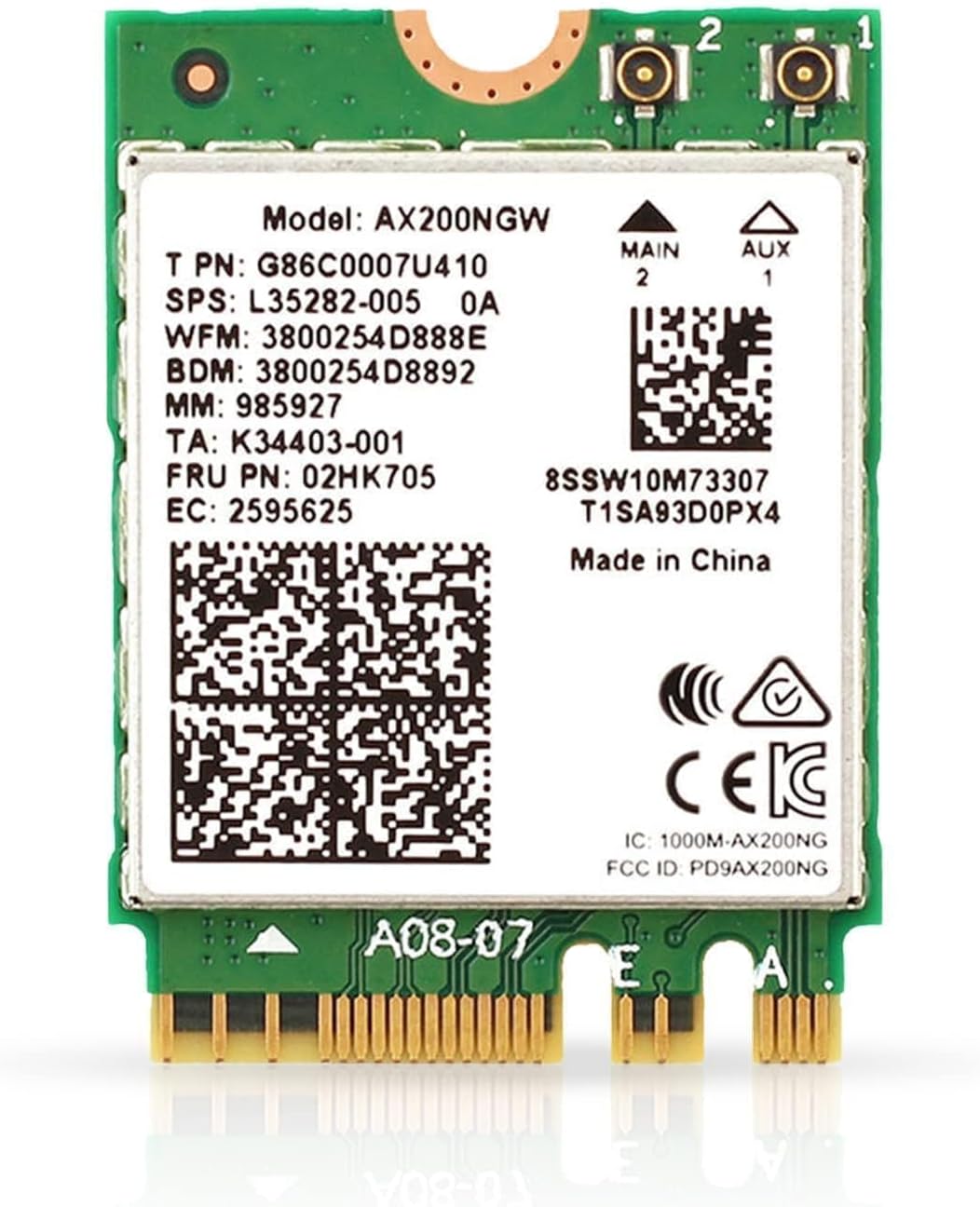
The HighZer0 AX200 Wi-Fi 6 Adapter is a compact M.2 PCIE card delivering dual-band 802.11ax connectivity with speeds up to 2.4 Gbps. It supports Bluetooth 5.2 and is compatible with Intel and AMD systems on Windows 10/11 and Linux. Featuring WPA3 security and MU-MIMO technology, it ensures fast, stable, and secure wireless connections ideal for gaming, streaming, and multitasking.


| ASIN | B096QSC4F3 |
| Best Sellers Rank | #91 in Internal Computer Networking Cards |
| Brand | HighZer0 Electronics |
| Built-In Media | Network Card |
| Color | Green & White |
| Compatible Devices | Most Laptops, Notebooks, and Desktop PCs |
| Compatible Operating System Family | Linux, Windows |
| Customer Reviews | 4.5 out of 5 stars 704 Reviews |
| Data Link Protocol | IEEE 802.11ax, IEEE 802.11ac, IEEE 802.11n, IEEE 802.11g, IEEE 802.11b, IEEE 802.11a, Bluetooth |
| Data Transfer Rate | 2.4 Gigabits Per Second |
| Hardware Interface | PCIE x 1 |
| Item Dimensions L x W x H | 1.18"L x 1.26"W x 0.1"H |
| Item Weight | 0.16 Grams |
| Manufacturer | HighZer0 Electronics |
| Mfr Part Number | HZ-AX200.NGWG.NV |
| Minimum Required Operating System Version | Windows 10 |
| Model Number | AX200NGWG |
| Product Dimensions | 1.18"L x 1.26"W x 0.1"H |
| UPC | 655360797697 |
| Unit Count | 1.0 Count |
| Warranty Description | 30 Days |
F**H
Works perfectly with Acer Aspire 5
The Acer Aspire 5 (Model 515-44 AMD Ryzen 7) came from the factory with a Qualcomm 344A-AC network interface. The Qualcomm card has always been a bit flaky and after I upgraded to an Asus Wifi6 router, it was taking 30 seconds to establish the connection on start-up. Wasn't sure if I could upgrade to a Wifi6 card but the Acer support website provided both Qualcomm 344 and Intel AX200 drivers for this model. So, I ordered the card and hoped for the best. Opening the back of the Acer was by far the only minor challenge and that is because you have to be gentle after the screws are out and you're prying the edges up and off the snap connectors. The network interface installation was literally remove old and insert new. Reconnecting the antenna leads is always a little tricky for those of us with big hands. Restarted the system and, naturally, it couldn't connect to the web. New card means the networks and password settings have to be reentered. The system immediately recognized both the new WiFi and the new Bluetooth but ran them with default Microsoft drivers. Fortunately, I had already downloaded the Acer AX200 WiFi and Bluetooth drivers so I just executed the installer for each (WiFi first) and restarted the system. First thing I checked was the link speeds between my laptop and the router. I found that the new card has increased the speeds by about 50% to 1155Mbps transmit/receive. Also had to set up my Bluetooth by re-pairing my ear buds but that went smoothly and they work perfectly. All-in-all, easy peasy ... $20 and an hour of my time to bring my old laptop up to modern WiFi standards.
K**R
Great Lenovo upgrade for Wi Fi
This gave me wifi 6 , 5 Ghz in an old Lenovo ideapad 300-17isk, no problems at all!! I'm so happy. And this seller is trustworthy.
P**L
Relatively good wifi card, double connect is okay
For some background info, I recently moved into a new rental unit. The wifi speeds were already not great (I don't pay for it, wifi was already installed when I moved in) but I wanted to make sure the connection from my pc to the router was as lossless in connection as possible. My pc is too far away from the router to use an ethernet cable, and I was not able to use a PCIe wifi card due to not having any open PCIe slots on my motherboard, so I resulted in swapping over to m.2 wifi since my motherboard had a slot for it. I was initially using a Tplink Archer T3U Plus which would get the job done but my connection would not be stable. I would have to limit the amount of programs running that were using the internet, watch twitch streams/youtube videos in 480p, and have to primarily play offline games due to ping spikes. After looking into solutions, I decided to try the AX210. Even after installing it with two 9dbi antennas, the card was no better than the T3U plus, in fact it was even worse. After that, I decided to take a gamble and buy this AX411. Using the same antennas, this one is way better. From having to watch twitch streams in 480p and having the stream lag/crash often, I am now able to both watch a youtube video and a twitch stream at the same time both in 1080p without lag and having the youtube video render far ahead. I believe that this is largely due to the fact that the AX411 has double connect (connect with 2.4 and 5 GHz at the same time) but I find that it's a lot slower using the 5 GHz to download games compared to 2.4 GHz since I am far away from my router. I'm not sure how to change which band is used for downloads or if it's even possible to do so. My ping in games is a lot more stable, a lot less ping spikes which I would honestly say the spikes that I see are on the wifi's end, not on my hardware. For all of the hardware I used, I optimized the settings in device manager to fit my situation. If you wish to do the same, intel explains each wireless adapter setting on their website. In terms of installation, it is a very tedious process. It is an extremely small connector for the cable. The parts are so small and hard to see. I have lots of experience working on computer hardware and it was still tough for me. There are times where you think its connected but the connector just falls off. You need to listen and feel for the click, if you feel it's in and it looks like it's in but you didn't hear or feel the click, it's likely not connected right and will just fall off easily. In the end, patience is key. This card being only around $5-10 more expensive than the older models (AX210,AX211 etc.) it's value for money increases immensely. Definitely do your research and check for compatibility with your system before buying though. Edit: When playing a multiplayer game or downloading something, it switches the network to the 5 GHz band. When you are not doing either of those, it is on the 2.4 GHz. This may be convenient for others, but for me it is not because I am very far from my router. In my case, if I am playing a game and have a youtube video playing, the video will lag because 5 GHz is slower for me. You are easily able to switch this by changing your preferred band in device manager.
T**D
AX200 Upgrade Worked Perfectly in Older Toshiba Laptop
I upgraded the Wi-Fi card in my Toshiba Satellite C55-C5270 (originally purchased in 2015) with the AX200. The old card maxed out around 75 Mbps, but after the upgrade, I’m now seeing speeds up to 866 Mbps—huge improvement! Installation was straightforward. The new card is a bit wider than the original, so the plastic bracket that held the old one didn’t fit. I left the bracket off, and the new card is working perfectly without it.
R**E
Drop-in replacement for Realtek in HP Pav Gaming Laptop
I purchased this WiFi adapter to replace the internal Realtek adaptor in my 2020 HP Pavilion Gaming Laptop (Ryzen 5600h, GTX 1650.) Removal and replacement was very straightforward and easy. Be careful disconnecting the antennas from the WiFi adapter. My laptop has 2 antennas-yours may not and that's fine-if you only have 1 antenna connect it to 'Main.' Operationally the WiFi is wonderful! I replaced the Realtek because of poor signal strength. This is so much better it's unbelievable. I can actually get my Internets rated speed of 500mbps down 25up using this card. Excellent link rate, great signal strength. I had Drivers on a USB ready to install but Windows Update picked it up on startup so I didn't need to do anything. 5ghz AC link rates are 867mbps. This is 2x2. Haven't tested AX. Current Intel driver is rock solid stable. Literally couldn't ask for a better card Shipping time: Item was expected to arrive 4/1/2022 but came early on 3/30/2022. Great work, excellent seller and would buy from again.
A**R
Works with my wifi 7 MLO router.
I picked up a MiniPC to replace an older one and one of my component upgrades was to get a wifi7 card (the computer came with wifi6) as I've got a Wi-Fi 7 capable router. Initially I picked up the CNVio3 version, not knowing that it was not the proper one to get, so I returned and got the PCIe version. Once installed, the computer noticed the card and the drivers were already installed. Connecting the card to the computer was easy, but the antennas took a little time and patience to connect to the card. Card is faster than the Ethernet connection on the computer. The Wi-Fi speed has been stable with no drop-outs. AS mentioned, the card is fragile and delicate, especially the antenna connections, so be patient when attaching them. I have an MLO (TPLINK) enabled router which allows the Wi-Fi card to use more than one band. Very pleased with the performance. The card is priced fairly in the marketplace.
K**K
AX21O
Upgraded my old Z370-E MB. SOOO MUCH FASTER!!! Wifi and BT. Works flawless with windows 11 and a i5-8600K 8th gen CPU on this MB
M**K
Intel BE200 Wireless Wifi7 / Bluetooth v5.4 Ethernet Card
Intel BE200 Wireless Wifi7 / Bluetooth v5.4 Ethernet Card Pros: –Easy replacement on Windows 11 23H2 and Lenovo IdealPad3 laptop using an Intel CPU but connecting the antenna wires requires patience. Router is wifi 6 with FIOS internet. –This is an upgrade from bluetooth v5.2 to v5.4; purchased this card to take immediate advantage of v5.4 for my mouse and earbuds –The laptop arrived with wifi 6 using AX201NWG adapter, this wifi 7 BE200 card still communicates well with the wifi 6 router so this purchase is future proofing for me. Internet speeds remain fast and stable –Very pleased BT v5.4 increased distance earbuds continue receiving signal away from source –Downloaded and pre-installed latest Intel wireless/bluetooth drivers so installation was seamless. –I would purchase this card again, it’s a good investment for current use and future proofing Other thoughts: –Did not expect but had to un-pair and re-pair the bluetooth mouse and earbuds after switching out the adapter–determined that from trial and error so that should be first on anyone’s troubleshooting list before thinking the card is defective –Research indicates it will be late 2024 when MS releases Windows 11 update 24H2 which will include wifi 7 drivers and support. Until then, we operate with wifi 6 or 6E. –People are still reporting issues using the BE200 platform with some AMD CPUs but that varies between CPU models
T**S
Card wifi
Componente Wi-Fi del PC discreta ma fa il lavoro che deve fare.
G**T
aanrader
aanrader zelfs op oude laptop werkt hij dan maar zonder de extra,s snlheden zijn enorm
W**G
Muy bien. Recomendado
Por desgracia, no hice fotos de este producto como me gusta hacer para todas las reseñas, pero en este caso particular no creo que sea relevante porque es un producto bastante genérico y que acaba dentro del PC. Sencillo de instalar, bien embalado y funciona perfectamente. Se conecta directamente en la ranura M.2 del PC. Alinear las patillas y encajar. Luego se asegura con un tornillo y listo. Posteriormente, se conectan las dos antenitas a los respectivos puntos de conexón y a funcionar. Envio rápido. Recomendado!
M**O
AX210 Wi-Fi 6E
Sostituita con facilità nel mio Thinkpad. Subito riconosciuta senza scaricare driver (WIN 11). Inizialmente prestazioni non soddisfacenti ma dopo avere impostato la scheda sulle prestazioni massime ( disabilitato il risparmio energetico nel Driver scheda) ho ottenuto prestazioni adeguate alle aspettative
M**E
Do not Buy this Product if you are using AMD 5900HX!
Not compatible with AMD laptop motherboards. Instead, it enables plugged-in mode and bypasses Optimus.
Trustpilot
5 days ago
1 month ago