🎵 Elevate Your Audio Game!
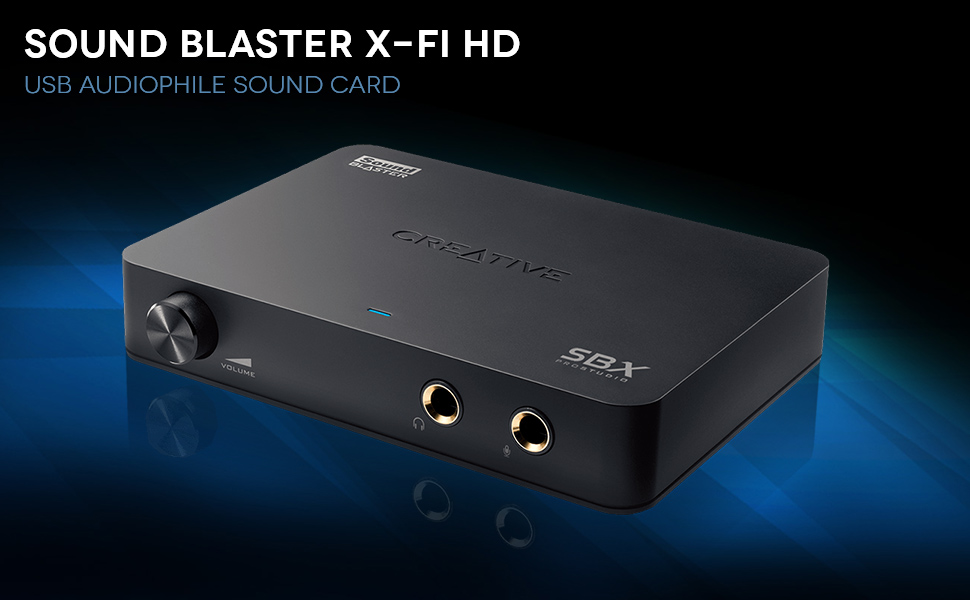
The Creative Sound Blaster X-Fi HD USB Audio System is a high-performance audio solution designed for audiophiles and music enthusiasts. It features a phono preamp for vinyl conversion, gold-plated USB connectivity, and THX TruStudio Pro technology, ensuring an unparalleled audio experience. With a signal-to-noise ratio of 114dB and a maximum sample rate of 192 KHz, this system is perfect for both casual listeners and serious sound engineers.


| ASIN | B004275EO4 |
| Audio Output Mode | Dolby Digital, Stereo, Surround Sound |
| Best Sellers Rank | #215 in Computer Internal Sound Cards |
| Brand | Creative |
| Built-In Media | USB Audiophile Sound Card |
| Compatible Devices | Personal Computer |
| Customer Reviews | 4.0 4.0 out of 5 stars (428) |
| Global Trade Identification Number | 00054651170742, 00546511707422 |
| Hardware Connectivity | USB 2.0 |
| Hardware Platform | USB |
| Item Type Name | Creative 70SB124000001 Sound Blaster X-Fi HD USB Audiophile Sound Card |
| Item Weight | 1.12 Pounds |
| Manufacturer | Creative |
| Maximum Sample Rate | 192 KHz |
| Mfr Part Number | 70SB124000001 |
| Model Number | 70SB124000001 |
| Platform | Windows 7, Windows Vista, Windows XP |
| Signal-to-Noise Ratio | 114 dB |
| Surround Sound Channel Configuration | 5.1 |
| UPC | 809186266510 661901287718 666669986033 041114201594 012300428651 801200935020 806293524021 100012778314 808111675014 809185809909 054651170742 809385661505 546511707422 786453978423 801940086921 012304314998 163120594931 493212295096 804066559881 044112736259 172302806458 807030491002 168141621574 763615974950 012302900544 804892145852 052590680193 257637837930 |
| Warranty Description | 1-year Limited Warranty |
B**N
HiFi on a budget
That's the best way I can describe this external soundcard by SoundBlaster. It may not be "audiophile" in the way that "audiophiles" demand, but it doesn't cost thousands of dollars either. For a mere $80, it delivers amazingly good sound. I bought this box mainly to archive all my old vinyl records, and for that purpose it really shines. To my regret, I had gotten rid of my turntable many years ago, figuring I would never play records again, but lately I'd been staring at all the boxes of records I never did seem to get rid of, including many from my wife's collection, and thought, "Hmm, I wonder what those would sound like after listening to CDs all these years?" I kept hearing how vinyl is superior to CDs in sound, so I decided to embark upon an experiment and hear for myself. Most of my albums are 30-40 years old, and it seemed only fitting to play them on a turntable from that era (the build quality back then was much better than the schlock you can buy today at a reasonable price.) So I picked up a vintage, 38 year old refurbished Technics SL-1400 turntable off eBay for under $200, slapped on a Shure M97xE cartridge ($70), and then used the SoundBlaster X-FI HD to convert all my old records to digital, recording them at 24 bits / 96 kHz, the max the SoundBlaster can handle. The result? If you have records that are in mint or near mint condition, or at least very well maintained, I can attest that, yes, indeed, the vinyl records sound better than their CD counterparts. I have CDs of some of these old albums that I've purchased over the years, and compared to what I recorded of off vinyl at 24/96, the CDs sound a bit dull, a bit harsh. In contrast, some of my old vinyl albums sound refreshingly smooth and sweet. They are great to listen to. As CDs are a step up in quality from MP3s (which I can't stand to listen to more than ten minutes), recordings from vinyl sampled at 24 bits / 96 kHz are likewise a step up from CDs. The best way to describe the difference is that the hi-def recordings are "more alive", "pleasant" and "easy to listen to." Not all my albums sound that good. Many were well played back in the day, having been ground down to just the semblance of their original tracks, and many have lost their highs. Recording at a high-definition like 24 / 96 is a bit of a waste for them. Even so, at least the digitization isn't adding any more noise and distortion to these old recordings. The X-FI HD comes with software that you can use to help record your albums, and it's passable. Many people alternatively use the free, open source software package called Audacity to do their recordings. But beware, Audacity can't really record and play back at 24 bits / 96kHz on all Windows systems. It depends on your setup. Worse still, it may look like you are recording/playing back at 24/96, but underneath, you are really getting 16 bits / 44.1 kHz (CD quality!) The software that comes with the SoundBlaster does not have this problem, but I found it a bit hard to use, especially when splitting up tracks. The waveform window for this task is simply too small to make this anything but cumbersome and tedious. Also, I found the click repair functionality a bit too heavy handed, degrading the sound too easily. Likewise, I found Audacity's click repair to be marginal. Do yourself a favor. Bite the bullet and spend $30 on Vinyl Studio, (google it). I've tried lots of different products, but Vinyl Studio is hands down the best, and it's only $30. It's click repair functionality isn't as good as that offered by another product -- Click Repair (google it), but it's adequate for most records. And unlike Click Repair, Vinyl Studio does more than just remove clicks. It's a complete solution to the problem of digitally recording a large collection of albums. It makes the task as painless as possible. If you've got a lot of albums to archive, the above setup: A vintage turntable, a good cartridge, the SoundBlaster X-FI HD, and Vinyl Studio will leave you smiling, and won't bust your wallet (comparatively speaking.) By the way, I have downloaded numerous hi-def digital files from places like HDTracks, and ProStudio Master, and these 24 bit / 96 kHz files derived from studio masters sound awesome on the SoundBlaster X-FI HD, especially when played through yet another software package -- JRiver Media Center, ($50 hi-def media player software). The first time I heard "Nights in White Satin" by the Moody Blues through the X-FI HD and JRiver, I was completely blown away. It sounded that good -- and this is through budget headphones (I paid a mere $70 for the cans I use.) Likewise, hearing "In Memory of Elizabeth Reed" by the Allman Brothers sent chills down my back. Imagine what these songs would sound like through a good amplifier and a good set of speakers (or at least a good set of headphones). Is it "audiophile quality?" Depends how much you want to spend. People say that 24 bit / 96kHz files are overkill. Not to my ears! Even through a pair of $70 headphones, I can hear the difference, mostly in the form of: "pleasant, clear, easy to listen to." You won't necessarily hear this difference using any old sound card that supports 24/96 samples. But the SoundBlaster X-FI HD is good enough to deliver that difference, and for $80, that makes it a bargain. The SoundBlaster X-FI HD is not for everybody. It's not a true "standalone unit" -- it has to be plugged into a running computer to work. But if your goal is to digitize your vinyl collection on a budget -- and still have quality sound, it's just the ticket.
F**N
Great sub $100 DAC, can be a pain to set-up though
There are not many reviews for this product, so I am going to go ahead and write a fairly in-depth one. Like other reviewers, I only got this because it is a high quality DAC (digital to analog converter) in the $100 price range. I am not ready to shell $300+ on a DAC yet. I may use the recording feature in the future to rip video game music, taking advantage of the SPDIF in port. When I do I will update this review. The reason why I picked this DAC over other ones within the price range (like the Nuforce headphone amps) was because of the SPDIF in port. I did not want a DAC for just my computer. I wanted one that I could hook up my game consoles and TV to as well. Sound quality is huge to me; I find sound quality to be more important than picture quality. A good picture looks nice, but great sound is really what makes you feel like you are there. That is where I thought this DAC would really come in handy. Now on to the actual review, since I have made clear why I bought this item. This DAC is high quality. It sounds better than the Realtek HD Audio on my motherboard, it sounds better than my Insignia 32'' LCD, it sounds better than using analog output from my game consoles, and it sounds better than my Hanns G 21'' monitor (yes, that actually has a headphone out port that I can hook to speakers). Like all other reviewers who favor this item, I can hear all the more subtle parts of my music. If you have good speakers (I am using a pair of Alesis M1 Active 520s) and/or headphones, then you will hear the difference. After all, what is the point of having a high quality DAC if your playback equipment is not built to accurately reproduce music? In case you are not someone too familiar with sound systems, I can not stress this enough: Make sure you have good equipment before buying a DAC! For music playback, this DAC is easy to set-up - simple plug and play (I'm using Windows 7, 32 bit). Just plug your device into the USB port, wait for the generic drivers to install, and you are done! Even with the generic drivers, you can output 24 bit/96 KHz on both optical out and line out ports. The line out ports are the standard, stereo RCA out ports. In addition, it has a 1/4 out jack for devices that use TRS cables. However, by using the generic drivers, you do not have an EQ. In that case, just use the EQ of your music player. There is a neat little feature that allows you to boost a certain bass frequency by a certain amount (such as 50, 75, 200 Hz up to levels like 3dB, 6dB, 12dB) in the windows console, and I found that to be incredibly useful for making my speakers output more bass, as I do not have a subwoofer. Using the SPDIF in however, is much trickier and that is where I took off a star. As of writing this review, there is no documentation on making use of it, at all. I would know because I spent at least 3 hours searching through the manual and the creative knowledge base and I did not find anything. If you want this device to decode digital signals from some sort of entertainment device other than a computer (like a PS3), follow these steps: -First off, before we begin, know that this does NOT decode dolby and DTS surround formats. For instance, if you are watching a DVD/Blu-Ray, make sure that you are NOT outputting the Dolby/DTS surround formats. It only decodes two channel, stereo, PCM. -Replace the generic windows drivers of the soundcard with Creative's drivers by installing the drivers located in the installation CD. -From the same CD, install Creative Entertainment Console and Creative Audio Control Panel. -In Creative Entertainment Console, go to Mixer, and under playback, uncross SPDIF in. This passes anything that comes through the SPDIF in port to whatever speakers/headphones you have connected to your DAC. -Make sure that under the recording tab in the windows console (when you right click the speaker icon and click on recording devices), you do not have, "Listen to this device," checked off for SPDIF in. There will be weird delay issues if you have "listen to this device" checked off in the windows console and SPDIF in enabled under the mixer tab in the Creative Entertainment Console. -While you are under the recording tab in the windows console (when you right click the speaker icon and click on recording devices), make sure you have SPDIF in set as the default recording device. This tells WINDOWS to accept the input coming in from SPDIF in instead of the other inputs: Line in, Phono in, and Microphone. -In the windows console, make sure you have the sample rates for SPDIF in and Speaker be the same. Another reason why I took off a star is because, as of writing this review, you can not download the drivers for this device from the website. This soundcard was designed with netbooks in mind, and guess what? Netbooks do not have CD drives! If you are planning on using this device for a computer without a CD drive, make sure you have access to a computer with a CD drive so you can rip the installation files. Stuff like this is why Creative support has such a bad rep. In conclusion, great DAC. Simple plug and play if you are using it for a computer, but can be a huge pain to set up for other devices. I will update this review when I use the recording features. Even though I have not fully tested this product's features, I thought it would be helpful to at least say that it works, and works well, for music playback since this device does not have many reviews. Update 8/6/2011: I've used this to record video game music with the RCA line in ports, and I've connected my guitar and bass guitar to the 1/4'' microphone input and recorded myself playing. Perfect. No issues here whatsoever. I also want to add that if you want to be able to record music that's playing directly on your computer (say you want to rip audio from youtube), this device has the "What U Hear/Stereo Mix" option. Just know that you need to install creative's software to activate this feature.
F**N
Use este combo de Amp/DAC para escuchar musica con unos BeyerDynamic DT770 Pro 80 Ohms. Funciona a la perfeccion. Antes con mis audifonos directo a la PC, cuando ocurria un sonido muy fuerte, el sonido se ahogaba. Con este combo no sucede mas eso. Ademas, el bajo es mucho mas potente y los sonidos mas claros. La instalacion fue sencilla, hay que buscar los drivers en la pagina de Creative, o mas sencillo instalarlos desde el CD o rippearlos.
M**L
This is definitely a product for audiophiles....which i am...I wanted to play my mp3's through my laptop and high end stereo....in a workout room - I love my bass, and my stereo is very high end - and I play things loud...rock concert loud and I expect near perfect sound- problem is my laptop sound card made everthing sound iffy at best ....I didn't have high hopes - but this thing works - and it is a very good buy - it has spectacular software that works with the unit as it will disable your internal soundcard. Superb bass - clear highs - and software that will emulate different halls or venues as well as an equalizer that actually doesn't suck. The unit hooks up to any usb port -which is also power for the unit. It does come with other software for organizing mp3s - that did not want to install - but no worries as I'm using musicmatch soundbox 10. Downsides - creative does not have call in tech support - it is all online and for some reason neither software would register properly with creative for warranty support - but it doesn't have to for the unit to use it.
P**R
I use the Logitech Z623 2.1 speakers. It makes a huge difference using the sound card the sound is crisp and the bass is deep.
M**E
Solo la tengo para mejorar la salida de audio de PC, y puedo decir que es la tarjeta de audio mas barata que cumple siendo BBB, no mete ruido ni his, es detallado para apreciar la musica (uso monitores sencillos pero buenos BX5 D2). Tiene salidas RCA que se agradece. Su salida de audifonos es igual de buena, no creo que muevas unos audifonos super exigentes pero da buen volumen con buen amperaje para audifonos medianos. Recomendada abajo de 2500 pesos
P**R
It's cristal clear sound.
Trustpilot
3 weeks ago
4 days ago