Protect Your Tech in Style! 🌟
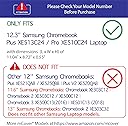
The iPearl mCover Hard Shell Case is a high-quality, lightweight protective cover designed specifically for the 12.3" Samsung Chromebook Plus XE513C24 series. Made from shatter-proof polycarbonate, it offers robust protection while maintaining a sleek profile. With its easy snap-on design and model-specific fit, this case is the perfect accessory for professionals on the go.


| ASIN | B073T3D9QZ |
| Additional Features | Heavy Duty Protection, Lightweight |
| Age Range Description | Adult |
| Best Sellers Rank | #2,876 in Laptop Hard Shell Cases |
| Brand | mCover |
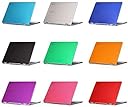
| Color | Green |
| Compatible Device Size Maximum | 12.3 Inches |
| Compatible Devices | Laptops |
| Customer Reviews | 4.2 out of 5 stars 742 Reviews |
| Enclosure Material | Polycarbonate |
| Form Factor | Case |
| Item Dimensions | 11.14 x 8.82 x 0.65 inches |
| Item Weight | 8.7 Ounces |
| Manufacturer | iPearl Inc |
| Material | Polycarbonate |
| Mfr Part Number | mCover-SamsungChrome+XE513C24-GREEN |
| Model Number | mCover-SamsungChrome+XE513C24-GREEN |
| Pattern | Solid |
| Shell Type | Hard |
O**Z
Good price, well designed, good protection from scratching the laptop. Not much protection from a drop.
My 11 yr old daughter wanted something to protect her Samsung Chrome Book from getting scratched as she takes it to school. The case is flexible hard plastic that fits really well and easily snaps onto the top and bottom of the computer. Perfect for keeping the laptop from being scratched. Probably not much protection from damage if the laptop is dropped. The aqua color is nice and semi transparent so we you can see the silver color of the laptop slightly through the cover. Looks good and I am sure my daughter will like it.
M**W
This cover is excellent, outstanding if you want to keep your Chromebook ...
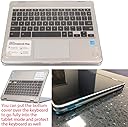
So I read all the reviews about this product before purchasing and one of the biggest complaints I heard is how this cover will not allow you to use the Chromebook in the tablet mode, with the screen rotated 360 degrees where the top actually touched the bottom of the device. This is true, but it is not a design issue with the protective cover. The hinge on the Chromebook has almost zero extra space when the device is rotated 360 degrees. In short, the thickness of any cover would keep the Chromebook from rotating 360 degrees. With that said, you can still leave the top cover on and remove the bottom cover and place it on the keyboard side of the device and then get the 360 degree rotation. Read it again, this cover will allow for tablet mode. Just read the directions for the cover. Yeah, most of us, me included, do not do this. I don't often write reviews, but I just felt it was necessary to clear up the misconception of this Samsung Chromebook cover. So my review of the cover is incredibly short. This cover is excellent, outstanding if you want to keep your Chromebook outer case clean an free from wear and scratches. It is not made to offer drop protection, so don't expect that. For anyone looking to keep their Samsung Plus or Pro looking new this cover will do just that, and do it very well indeed.
A**S
I like it.
It fit great. It’s not fully opaque when you open the package but when it snaps on you can’t tell. Nice and light weight good for the price. As expected my chrome book doesn’t fully flip back with the case on. But does when the bottom cover is snapped off. Not a big deal for me but it may be for others.
S**8
Bottom works great for using in tablet mode!
I bought this for the Chromebook Pro, and this does work for this as advertised, and not just the Plus as the title suggests. I bought the Chromebook Pro to serve as a more powerful tablet replacement, so I mostly use the Chromebook Pro in tablet mode. I bought this hard shell case to both give extra protection to the Chromebook Pro, and also because the page advertised as being able to use the bottom over the keys. As far as the protection goes, it seems somewhat sturdy, though it is a somewhat flexible plastic. It should definitely protect from scratches and possibly small falls and bumps. Unfortunately, the Chromebook can not be flipped into tablet mode when either the top or bottom half of the case are on the "outside" in laptop mode. This makes the top part of the case useless for me. I would slip it on over the screen when I'm not using it, but the top half of the case is pretty difficult to get on and half (the bottom part is much easier), so the top half of the case has been sitting on a shelf gathering dust in my case. The reason I kept this case, though, is because of the bottom part of the case. You can put the bottom half on over the keys when in tablet mode, and this gives the Chromebook a much more "tablet-y" feel, since your fingers are not bumping into exposed keys. I greatly enjoy this and think this makes the case worth having if you use your Chromebook Pro or Plus mostly in tablet mode. I will also but the bottom part on the bottom of the tablet when using in laptop mode, since I feel this gives a bit of extra protection to the device and also keeps it cleaner, especially if the surface I am using it on is a bit dirty. Unfortunately, it would not be worth it to put the top half of the case on in these circumstances since it is much harder to remove. Overall, I think this is a good case and should provide some extra protection to your Chromebook. I have removed a star because the top half of the case has proven useless for me. I would love if they either re-designed the top half of the case and made it so you could still fold the Chromebook into tablet mode while it was on and/or made it so it was easier to take on and off and could be used to protect the screen when in tablet mode and not in use. Barring any re-design to the top half, I think it would be nice to sell a cheaper bundle that just includes the bottom half, since I feel I am wasting some of my money by buying a product I only use half of. Overall, if you can afford the $20 for the case, I would recommend it, especially if you are using it mostly in laptop mode and don't mind struggling a bit to remove the top half when you want to use it in tablet mode. Even if you are using it in tablet mode, I think the bottom half is worth having to give you a better tablet experience, even if at the moment you have to waste some of your money for a top half you likely will not use much. I have included a picture of the back half on for you to see how it works.
C**L
Solid case
Fits perfectly without any fuss. As others had pointed out, you cannot flip to tablet mode fully with this case on. I rarely need to use the full tablet mode, so that wasn't an issue for me. The color is really nice, and the case has done a great job protecting from scratches and bumps in the time I've had it. In the instances I've wanted to remove it to use the tablet option for my chromebook, it's come off without much trouble.
A**R
Rubbish in tablet-mode
The covers fit nicely on the screen and back of the chromebook but it all goes wrong when you try and use it in tablet mode. I had been told that I could use the bottom cover to flip it over for the keyboard and that's ok but you cannot put the screen completely flat against the cover. There's at least 3/4" of a gap between the edge of the screen and the bottom because of the cover. I had the same issue with the same product for my Acer R11. I will use the cover out of necessity until I get something better and then it'll go into the bin unfortunately.
T**.
Zero complaints
I can verify the 'stress marks' on the case at the hinge from the flexing to put it on, but I wasn't very mindful about it when I put it on. I imagine if you install it on the hinge side first, it would alleviate this problem. I personally don't care, because it's not very noticeable to me, and I didnt buy it for cosmetic reasons anyway. It's very good quality, and is easy enough to remove for tablet mode or the other configurations. I don't know where the complaints about it covering ports come from, because it doesn't on mine. It slightly covers the SD card slot, but I installed a 128GB card for more storage so it was a one-time thing so I could care less. Very satisfied with this product and purchase. I bought another one for my spouse's Chromebook.
C**A
One half too many
Pros Fits Pro 2 Lightweight Cons Hassle to take on and off Clear color is actually frosted Only two pads on the bottom are anti-slip It fits the Pro 2, which is good. Unfortunately it doesn't fit tablet mode when both pieces are attached (as others have pointed out). It fits fine when you're only using the bottom half. Too bad there isn't an option of buying just the bottom piece at a reduced rate. (The option of covering up the keyboard was the most attractive feature of this case to me.) I plan on traveling with the Pro 2, so I'm still deciding whether or not I should keep the case. It would be good for scuffs and scratches, but not much else. Taking both covers on and off seems like a hassle. It might even increase the probability of dropping the book. If you're primarily using the Pro 2 in laptop mode, than removing the cover is not an issue. I bought the clear one because I thought it would actually be transparent, not translucent. I wanted something that isn't frosted. Also, as others have pointed out, only two of the pads are non-slip. It's annoying if you're used to all 4 pads being non-slip. I use the book in all sorts of surfaces, and sometimes I only have 3 points of contact so it's important that all 4 pads are non-slip for the most security.
Trustpilot
2 weeks ago
1 week ago