Buy anything from 5,000+ international stores. One checkout price. No surprise fees. Join 2M+ shoppers on Desertcart.
Desertcart purchases this item on your behalf and handles shipping, customs, and support to Congo.
🔌 Power your productivity with confidence—never get caught powerless again!
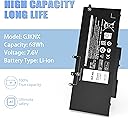
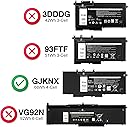
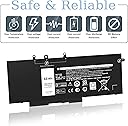
This 68Wh GJKNX replacement battery for Dell Latitude and Precision 15 series offers a robust 7.6V output with 4-cell lithium-ion technology. Engineered for longevity with over 1000 recharge cycles and comprehensive safety features, it ensures reliable, fast charging and stable performance. The package includes essential tools for a hassle-free installation, making it the perfect upgrade for professionals seeking dependable mobile power.


| ASIN | B0B3M8HK74 |
| Antenna Location | Laptop |
| Battery Capacity | 68 Watt Hours |
| Battery Cell Composition | Lithium Polymer |
| Battery Cell Type | Lithium Polymer |
| Battery Weight | 14.4 Ounces |
| Best Sellers Rank | #3,095 in Electronics ( See Top 100 in Electronics ) #8 in Laptop Batteries |
| Brand | VNYUNQWE |
| Built-In Media | Battery, Two Free Screwdrivers |
| Compatible Phone Models | latitude 5490 battery; latitude 5580 battery; latitude 5480 battery;latitude 5590 battery; gjknx |
| Customer Reviews | 4.5 out of 5 stars 1,405 Reviews |
| Item Dimensions | 9.37 x 4.05 x 0.27 inches |
| Item Weight | 0.42 Kilograms |
| Manufacturer | DongGuan Simer Electronics Co LTD |
| Model Name | GJKNX |
| Model Number | GJKNX |
| Number of Batteries | 1 Lithium Ion batteries required. |
| Recommended Uses For Product | Laptop |
| Reusability | Rechargeable |
| UPC | 794094162163 |
| Unit Count | 1.0 Count |
| Voltage | 7.6 Volts |
M**P
Great Product
If you own a Dell XPS 13 9360 and have been struggling with a battery that barely holds a charge, look no further: this replacement battery is exactly what you need, at a price hard to beat. I installed this battery on my Dell XPS 13 9360, and the difference was immediately noticeable. Battery capacity is now back to like-new performance, and I no longer find myself tethered to a power outlet throughout the day. The installation was straightforward, and the battery was recognized by the system without any issues. For the price, this product delivers exceptional value. Purchasing a third-party replacement battery at a fraction of the cost of an OEM unit, while achieving the same functional result, makes this an easy recommendation for budget-conscious users who do not want to retire an otherwise capable machine. The build quality appears solid, and the battery includes built-in protection circuits for overcharge, over-discharge, over-temperature, and short-circuit conditions, which add a meaningful layer of safety and peace of mind for everyday use. Overall, I highly recommend this product to any Dell XPS 13 9360 owner looking to breathe new life into their laptop. It works as advertised, delivers on its promise of restored battery performance, and represents outstanding value for the money.
J**E
Perfect fit, worked w/out issues after installed in Dell. BUT 7 month failure.
This battery replacement for my Dell Inspiron 15 7000 2-in-1 laptop worked perfectly after installation. Installing it was easy, just the tedious removing all the screws on the back of the case and swapping the battery old-for-new. No stickies to pry loose, just remove three screws and disconnect the cable and then reverse for install. After sealing the case up I booted the laptop and had no issues. It charged quickly and acts like a new laptop battery, holding power for over 5-6 hours (the same as the original one when I am using the laptop unplugged). 6/5/25UPDATE: Well, here I am 7 months later and the battery turned into a dead brick. And I think I know why: I was running my laptop, with the power charger plugged in, but also with a personal USB face-fan plugged in and running off the power from the laptop battery. I set the laptop aside (but still running) and took a nap and when I awoke the fan was off, the laptop was off, and the laptop refused to boot. Removing the USB fan and letting the laptop "charge" for four hours produced nothing, so the battery is a deader. I'll bet the USB fan overdrew its capacity and fried it. Otherwise the battery has performed great, so its hard to blame the battery for this failure. I will order another, because they are cheap and see if I make it to 2026, but without USB fans from now on.
G**.
Fits perfectly. Performs well.
Fits the laptop perfectly. Great battery discharge rate.
K**E
Perfect!
Perfect for old, still viable laptop.
R**S
Product is a good, sound, and inexpensive replacement. Recommended. 4.5 Stars I give it.
My laptop is a Dell Latitude E5570. The product works fine if you know what you are doing, have the manual, and pay attention to detail. I now have a working battery in my laptop again. Installation takes 15-20 minutes. My original battery was no longer charging and I found out why. The original battery had almost exploded. It was probably pretty close. One cell had expanded to the point where the heat shields had popped off. It was ballooning. Anyway, step one for battery removal and installation is download the Owners Manual for the Latitude E5570 Laptop from Dell if you don't have it already. My laptop is refurbished and didn't come with a manual. It gives explicit instructions on how to remove the old battery and install a new one. The instructions are really good. This battery comes with NO INSTRUCTIONS. Use the Dell instructions. You won't need the star screwdriver, just the small Phillips head. The kit comes with a white guitar pick thing. Discharge the old battery down to 5% by disconnecting the a/c and letting it discharge to almost nothing. Flipping the laptop over so the top is facing down and with the back facing you, after unscrewing all the back plate screws, use that guitar pick thing to pry between the cover groove starting at the back right corner, where it's easiest. The cover snaps on, so you have to break it out off the back. Just do it slowly with even pressure. Then once you've got the back cover off, simply follow the Manual instructions to remove the old battery. Once you remove the old battery, I recommend doing a hard reset by pressing the power button for 45 seconds to remove all static electricity in the laptop and it does other things that will let your laptop recognize the new battery. Install the new battery per the manual and put it back together. Make sure you take the green film off of the battery heat shields before installing. Also make sure that the battery cable is fit into the battery connector fully, and also the end of the battery cable that goes to the circuit board connector. I failed to properly seat the cable into the circuit board connector the first time and thought I had a bad replacement battery. Snake the cable between the cells. Hook up the a/c and charge to 100%. Then disconnect a/c and let it discharge to 5%. You might want to do that at least twice. It's sets the battery and increases battery life, just like a phone battery (same thing actually). My battery is charging to 100% as I write this. It had 46% charge when installed. So for the product, I recommend it. I only gave it four stars because there were no instructions of any kind. They could have at least provided a link to a video on YouTube or something. Not everyone is an electronics technician. I recommend this product. There IS some information you should read in the product information on Amazon. One last thing, it might not be a bad idea to take off the back cover before you order to make sure that the replacement battery is exactly the same specification's as the original. They vary. The replacement battery should have all the same specs as the original (as written on the battery). Update: After charging to 100% the battery life is showing as just under 11 hours at current power settings. The old battery before it started taking a dump would only give me two hours at best. I'm happy. Now I need to let the battery run down to 5% and fully charge it again.
T**T
A doable job if you're somewhat handy with tools.
The user manual did not cover installation, but then that's really dependent on the model of the laptop, so no points off. I googled my hp laptop's model number and came up with an excellent YouTube on how to install the battery. The only hard part was separating the bottom of the computer from the main part. But the battery came with the right Phillips screwdriver (which I needed) and torx driver (not needed on my model). Also included were two guitar picks which helped greatly with separating the bottom from the main part. The project is very doable by anybody somewhat handy with tools. The new battery lasts many hours before needing to be charged.
J**E
Restored mobility to my 2017 Dell XPS 13 laptop
Love my XPS 13" laptop - awesome resolution and touchscreen display, but can't update the OS anymore. Still want to keep using it but really didn't want to spend $100 plus on a Dell labeled battery so I replaced the original battery with this $45 knock off. Original battery declined to the point I had to keep laptop plugged into AC power. After installing this replacement - was able to charge it to 100%. Initially hovered over the battery and it said 8:45 battery life 98% remaining. Ran powercfg /batteryreport. The original battery had 59,994mWh when new. This new battery, after being used for 30 minutes has 58,000mWh. While writing this review, battery showing just a slow drain. Not sure how it'll hold up but it's a good start. Oddly, I also noticed that while running on the new battery the fan hasn't kicked on like it did with the old battery. The old battery was probably constantly requesting to be charged increasing the heat. Not expecting this thing to run as cool as a Macbook, but this could be another advantage having a fresh battery (less heat / less fan noise). Worthwhile investment.
F**M
Worth it.
Easy installation. Fits perfectly. Lasts about 5-6 hours before needing a recharge.
J**W
Goed product
Blijft goed op pijl
P**E
Good value battery for an old laptop.
Exactly the same from my 7 year old (laptop)battery. Good for another 7 years.
L**6
Produit de très bonne qualité
Produit conforme au descriptif
T**Z
Guter Ersatz
Einbau problemlos, passt perfekt - hervorzuheben ist: - notwendige Schraubendreher (Torx und Kreuz) sind anbei - Plektron zum Öffnen eines Laptopgehäuses ist auch anbei - Genaue und korrekt übersetzte Anleitung für das initiale Akkutraining und die alltägliche Arbeit ist auch anbei (bravo!). Ein Video über den Einbau in HP Pavillion-Geräte findet man leider nicht beim Hersteller, aber über den Titel "HP Pavillion 14 replace battery" oder ähnliches kann man so etwas finden, falls gewünscht. Nach dem Einbau ist ein CMOS-Reset fällig, ggf. vorher die Einstellungen des BIOS bzw. UEFI notieren. Der Akku und alles oben Erwähnte machen erst einmal einen wirklich guten Eindruck bei sehr gutem Preis-/Leistungsverhältnis, über die Langlebigkeit / Abnutzung des Akkus kann ich noch nichts sagen. Daher erst einmal 5 Sterne, in 1/2 - 1 Jahr werde ich hier evtl. auch noch etwas dazu sagen können.
D**A
Excelente presentacion
Recién puesta y en función. Se ve de muy buena calidad.
Trustpilot
3 weeks ago
1 week ago