Buy anything from 5,000+ international stores. One checkout price. No surprise fees. Join 2M+ shoppers on Desertcart.
Desertcart purchases this item on your behalf and handles shipping, customs, and support to Congo.
✨ Light Up Your Life, Sync Your Style 🎵
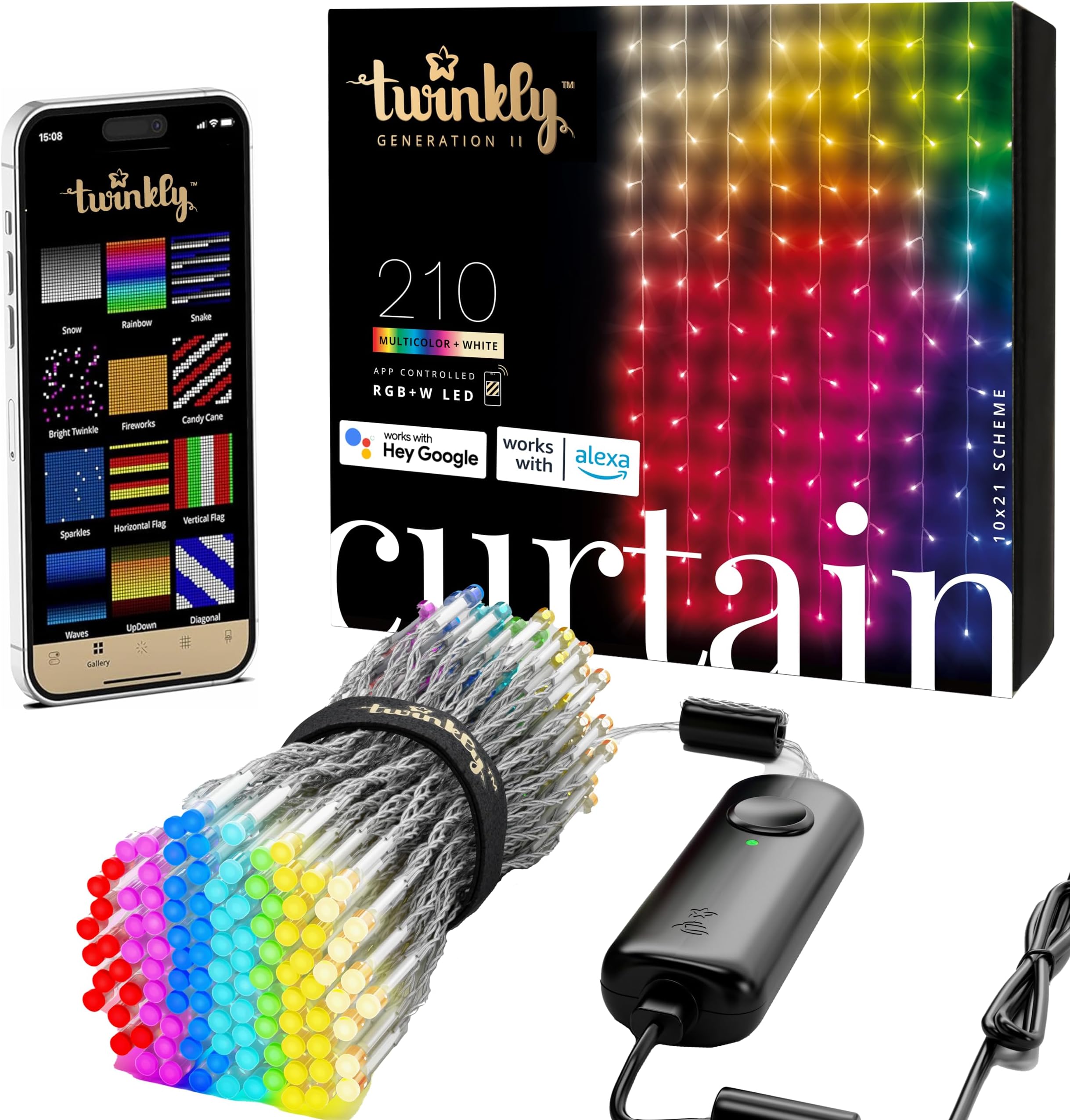
Twinkly Christmas Curtain Lights feature 210 vibrant RGB+W LEDs controlled via a sophisticated app with Bluetooth and WiFi connectivity. Compatible with Google Assistant, Alexa, and Apple HomeKit, these IP44 waterproof lights offer advanced music sync and customizable animations, perfect for creating mesmerizing indoor and outdoor holiday displays.


| ASIN | B086XJJRXR |
| Additional Features | Color Changing, Waterproof |
| Best Sellers Rank | #665,613 in Home & Kitchen ( See Top 100 in Home & Kitchen ) #1,444 in Indoor String Lights |
| Brand | Twinkly |
| Brand Name | Twinkly |
| Bulb Base | E10 |
| Bulb Shape Size | B10 |
| Color | Multicolored |
| Connectivity Protocol | Bluetooth, Wi-Fi |
| Connectivity Technology | Bluetooth, Wi-Fi |
| Control Method | App |
| Controller Type | android,app,app-controlled |
| Customer Reviews | 4.4 out of 5 stars 471 Reviews |
| Form Factor | Curtain |
| Included Components | 36-feet Twinkly Curtain Light String with 210 bulbs and RGBW LED lights |
| Indoor Outdoor Usage | Indoor, Outdoor |
| Indoor/Outdoor Usage | Indoor, Outdoor |
| Ingress Protection Code Rating | IP44 |
| Item Length | 36 Feet |
| Item Weight | 0.77 Kilograms |
| Light Color | Multicolor + White |
| Light Source Type | LED |
| Manufacturer | Twinkly |
| Manufacturer Part Number | TWW210SPP-TUS |
| Material Type | Plastic |
| Model Number | TWW210SPP-TUS |
| Number of Items | 1 |
| Number of Light Sources | 210 |
| Occasion | Christmas |
| Power Source | Corded Electric |
| Product Style | Modern |
| Seasons | Christmas |
| Smart Home Compatibility | Smart Home Compatible |
| Special Feature | Color Changing, Waterproof |
| Theme | Christmas |
| Unit Count | 1.0 Count |
| Voltage | 120 Volts |
| Water Resistance Level | Water Resistant |
| Wattage | 42 watts |
| Wireless Communication Technology | Wi-Fi |
| hanging_pattern_layout | Linear |
J**E
So many options, top-notch app. I am using three curtains in a row.
I bought three curtain style lights on a whim to fill up four windows. The app allows you to treat multiple sets of lights as a single entity so I grouped my three curtain lights together into one called "Living Room Windows". To get a better effect, I chose to shut the shades that are installed in the windows so the lights created a glow behind the shades. My neighbors love how it looks. You can set them up to show a single color or animated styles, and you can also set them to run through several animations in a row like a playlist and define how long to play each animation (20 seconds for one, 40 seconds for another, etc). You are limited to what the lights' memory can handle at one time so mine are limited to a playlist of about 8-12 animations at a time so I will change the playlist every few days to keep things fresh. The app is extensive and really well designed with some excellent features. The lights aren't cheap, but they look great!
R**C
Reliable, sophisticated lighting system. Recommend highly
Fantastic light system that works flawlessly. Automatic mapping and coordination of 7 curtain sets by using cell phone camera. Brilliant, sophisticated software with ability to rotate each curtain in X, Y or Z axis. Not a bulb failure yet, despite third year of use for the oldest set. Enjoy having RGB+W.
J**J
It has everything
I tried 3 sets of lights. Some didn't dim, some only worked on 2.4 internet with no other option. Twinkly is the best hands down. Pros: Endless colors. Bright, but also dimable. Programmable and decently easy to learn to program. Vibrant colors. Doesn't color visually blur when you see them out of the corner of your eye the way cheaper lights do (where you can see color green separate into blue and yellow). Button on the wire to rotate through preset patterns. Cons: Short. I only needed 5ft of lights though, so this was okay. Works on either 2.4 internet (NOT 5G), or the internet from the lightbox. This was a con for me as i didn't know this until I got the box. I can still use it even though my internet is not 2.4, but this means I have to loose internet on my phone and jump on the twinkly network (that comes in the lights) to use the phone app. Control box can get warm. Not hot, but warm (and blinks. I covered my light with tape) Personally, the cons are miniscule compared to the pros. I have not released each individual curtian strand yet, still bunched in it's ties, but the work wonderfully so far. Would recommend the splurge if you can.
A**T
"210 multicolored,LED curtain lights".
I am satisfied with my purchase of 210 multicolored,LED curtain lights,with button,and app control light changing settings.
F**C
Expensive but eye catching and worth for the flexibility
Absolutely love these lights! I’ve been using these for months as an interesting backdrop/mood lighting for streams and they’ve definitely been worth the cost based on the animations, color options and brightness. I’ve used cheaper $30 curtain lights from amazon previously with poor results, and I can say that these definitely are so much better and more flexible even though they’re expensive. You get a decent amount of lights on one string, I was able to cover a 79x59 inch tapestry area with it. The technology behind syncing your lights layout to the app only requires pointing the phone’s cam at the lights while it records and analyzes how your lights are laid out, so patterns can work pretty well no matter how your lights are placed. In my case, the curtains were a little longer in length than what I needed, so I folded the excess back up to blend in with the rest of the lights (so each strand had a “U” shape) and the patterns were able to work fine this way. Some patterns are harder to read though with only one string of lights, such as the “emoticons” and “heart” animations. If you really want detailed patterns/drawings like those, you will definitely need more quantities of lights. For just stripes, gradients and other abstract patterns, one string could be enough. Max brightness used white/warm everyday lighting results in a nicely dim lit room, not so dark that it feels like it’s lit by a nightlight but bright enough to be used as standalone dim lighting imo Only complaints are the app is a little buggy and could be improved. Sometimes the Bluetooth disconnects from the strings when turning it on/off in the app after long periods of time, and creating your own pattern is a little wonky and could be more user friendly. Also sometimes the patterns will animate correctly in the app, but will appear broken on the actual lights. I’ve been able to work around it by either restarting the app or changing between patterns which does take some time depending on how complex the animation is, it’s still usable albeit annoying. Color selection on these is huge as you can use almost any tone/brightness of the rainbow. I’ve had these lights set anywhere from bright cool white to dark navy blue. Overall I’ve been very very pleased with these lights as my main lighting solution, its great environment lighting you can truly personalize.
B**S
Good - But Not Perfect
I should mention at the start, I'm not using these as traditional holiday decoration. Instead, they are attached to the back of an Ikea Kallax storage unit, and will be used year around as part of a background set for livestreams on Twitch. They'll be on for roughly 16 hours each week. I'm also syncing them with Razer Chroma. Because of how they're installed, I didn't really get to take advantage of the whole "take a picture to map your lights" feature. The lights were dead simple to get setup with the Twinkly app. I plugged them in, launched the app, and it walked me right through setting them up. The lights respond to input in the app immediately, and it is very easy to download and add new scenes. The app itself has a few UI bugs, causing some text to overlap, making it difficult to read. The lights themselves can be incredibly bright, the preloaded and downloadable effects are really nice as well. But the color accuracy isn't spot on. The colors aren't too off, but they don't quite match my Razer and Hue lights (which are both very consistent with each other). Google Assistant integration kind of works. Sometimes I am able to turn the lights off and on by voice command, though it's hit or miss. Sometimes it works, sometimes it doesn't. Playlists inside of the app are a cool idea, but it seems some effects take up considerably more memory on the controller, which can limit you to just two or three scenes at times. The playlists are nice, though, as you can set the length of time you wish each effect to play. Finally, value. TBH, these are NOT truly worth $110. Granted, these are far more complicated than standard holiday lights, but the price premium is a bit excessive. I could have purchased some addressable LEDs and made my own kit for a quarter of the cost. At around $60 to $70, considering everything you get with the app, these would be a much better value. Overall I am very pleased. I'll update the review if I run into any problems with long term use. Would have been a 5 star review if it weren't for the price and iffy Google Assistant integration.
K**N
Best Lights for a GREAT and Winning Display!
These are the best Lights I have ever seen, and they were part of our huge, winning, Christmas display. They are impressive to see with their amazing function options. What can I say... Long Live TWINKLY!!
P**N
Mapping is terrible at best and joining 2 or more is complete failure. Support worse than worthless.
Good: Much easier to get set up than v1 and works if you just have one set and don't map it. Bad: Everything else Product has been added on with little to no support in their software. Mapping is horrid with a single set and entirely unusable with two. I've heard that it does work ok with iPhone's but forget it if you have even the highest end Samsung. And the only way I can even get the single set to map most of the lights is if I switch the phone to 5ghz while the lights are connected on 2.4ghz. If I leave the phone on 2.4 the mapping only picks up a few lights and often fails entirely. If you get one, Do Not map it. It works fine if you don't do that. If you do you can get results all over the map that don't make sense like sections of the string lighting up out of order and some strings going up from the bottom while other go from the top. You'd think this product would be the easiest thing in the world for them to map as unlike a tree, it is a set number of rows in a specific order that that go from top to bottom. Even if it got one light it should be able to guess two. With 2 sets (or more) is where this really goes wrong. With one set, as I mentioned, you can just skip mapping and it will work. But with two, when you don't map them, they work fine individually but when you join them, things go haywire for no logical reason. The software shows the shape as a tree, not curtain. One starts going sideways and the other does its own thing. Attempting to map is much more useless than a even a single string so that won't fix it either. Given the fact that it shows a tree and unmapped grouping fails so jaw-droppingly bad, one can only conclude that they never even bothered to update their software before or after releasing this product. Even worse is their "support". I contacted them talking bout the frustrations and highlighting all the things I did that were from the support pages FAQ's and beyond and asked them specific questions about whether joining curtains is actually supported. The answer I got back was your standard cut and paste response that a poorly written bot would have sent based on the keyword 'mapping'. I had addressed the fact that I had already done everything in the suggested FAQ's but the support person couldn't be bothered to read what I wrote prior to commenting. I replied pointing out that I had already addressed all her points in my original email and I needed answers to the questions I asked. Next reply was even more worthless so I then asked for my request to be forwarded on to someone who could answer it and has used this specific product and never heard back.
C**.
Looks and Works Great
I bought these for interior use and they look great. The lights have great color and brightness. The app is where this product really shines however. It allows you to select from a large variety of existing colors and effects. It also allows you to adjust brightness, set timers and even power on and off the lights remotely. It also uses your camera to take a real time layout of your lights as you have hung them in order to more accurately display your chosen effect. If I had more room I would buy more of these without hesitation.
V**S
Versatile, customizable, instant serotonin boost
This curtain is amazing, I have it strung through the curtain clips for an iridescent shower curtain I got at Walmart, so I can pull it aside to go out my patio doors. The cord is very long and discreet, clear and thin, easy to hide. All the options through my phone are sweet, plus it has an auto on/of feature set through it. Very peaceful!
D**N
Awesome
The lights that came with our Christmas snowman malfunctioned after 1 month so I thought I would replace the 200 white LEDs for 210 led TWINKLY curtain and it looks amazing. So much brighter and it mapped perfectly the first try. Now we just gotta wait until November to put it outside and show it off. It's going to make a great addition to my other 20+ TWINKLY devices 😀
M**E
Great lights
I love my curtain lights, it makes an amazing decor in my living room 😍🔥
D**E
Fusssssssssssy
I have two complaints which takes the pleasure of using these lights to the next level of pain. #1 and foremost is that the instructions for setting the timer is really nonexistent “open the app and follow the instructions”. Although it should be self evident, there has got to be a step missing to actually activate the timer and close the lights off until the timer kicks in. #2 A minor complaint but a nuisance is that you are limited to I believe 25 preset displays and if you need to add a new one you must delete the any presets starting with the mist recent ones. No selection of the ones you choose to delete, start at the most recent and work your way backwards. #3 I forgot I have a #3 complaint. Had timers set on both sets of Twinklys (I don’t know how) and then there was a power outage for about a minute. This caused my timers to disappear. I as able to reset the timer on the Dots (again don’t know how) but I am still piddling around with the Curtain set. I have two sets which are both gen2. Dots and Curtain. I also have a set of Ghouly and a set of Govees. Both of those recovered on their own. IF you are IT proficient then go ahead and play with the Twinklys. If not then try another brand.
Trustpilot
2 weeks ago
1 week ago