🖌️ Elevate your creativity anywhere — don’t just keep up, lead the digital art wave!
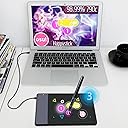
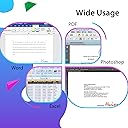
The HUION 420 is a sleek, budget-friendly graphics tablet featuring a 4x2.23 inch active area, 2048 levels of pen pressure sensitivity, and 200 RPS tracking speed. Designed for beginners, students, and remote professionals, it offers plug-and-play USB connectivity compatible with Windows and Mac OS. Its compact, lightweight form factor and customizable stylus button make it an ideal tool for digital drawing, photo editing, note-taking, and even gaming like OSU, enhancing productivity and creative expression on the go.


| ASIN | B00DTPYWBG |
| Active Surface Area | 10x5.6cm (4 x 2.23 pollici) |
| Best Sellers Rank | 12,474 in Computers & Accessories ( See Top 100 in Computers & Accessories ) 38 in Graphic Tablets |
| Box Contents | Keybord |
| Brand | HUION |
| Brand Name | HUION |
| Colour | Black, White |
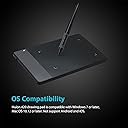
| Compatible Devices | Computers running Windows 10, 7, and Mac OS 10.8.0 or later, including supported desktops, laptops and tablets. |
| Connectivity technology | USB |
| Customer Reviews | 4.1 out of 5 stars 8,267 Reviews |
| Display Type | LCD |
| Global Trade Identification Number | 00520324307390 |
| Item Dimensions L x W | 10.2L x 5.7W centimetres |
| Item Weight | 125 Grams |
| Manufacturer | HUION |
| Manufacturer Part Number | 420 |
| Model Name | uk huion 420 |
| Model Number | Huion 420 |
| Model name | uk huion 420 |
| Native Resolution | 4000 LPI |
| Network Connectivity Technology | USB |
| Operating System | Windows |
| Operating system | Windows |
| Pressure Sensitivity | 2048 Levels |
| Pressure sensitivity | 2048 Levels |
| Product Features | Portable |
| Product Warranty | Manufacturer warranty for 1 year from date of purchase. |
| Screen Size | 5.6 Centimetres |
| Special feature | Portable |
| Specific Uses For Product | Digital art creation, note-taking, online schooling, remote work, web conferencing |
| Target Audience | Children, beginners, remote workers, students and professionals |
| UPC | 520324307390 760352094842 |
| Unit Count | 1.0 count |
P**G
Great Tablet - I love it!
This was my first experience of using a graphics tablet, aside from a very basic one many years ago. I'm a beginner in photoshop in a lot of ways - I have the basics but I'm still learning. I ordered a tablet because I was finding a mouse too inaccurate for compositing work. I was planning on buying a Wacom, but after doing some YouTube research discovered Huion. The tablet comes in a quality package - it feels like it should cost more than it does. This extends into the product, which is solidly made and has a quality feel. ALthough light the plastic is solid with no creaks or flexing. Let's talk usage. I expected a long learning curve and I was wrong. After 1/2 hour I was using the pen instinctively. It's very accurate and responsive to direction changes and pressure.. The speed it brings over a mouse is hard to describe - everything is faster and easier. After a day of use I can't live this without this thing! My photoshop skill have grown more in 2 weeks of using it than they have in six months. When you factor in the pricing it's an amazing tool! Are there any downsides? Not that I have encountered. I find I tend not to use the buttons (aside from Zoom in and out) and prefer to use the keyboard. Similarly I don't use the pen buttons much (they feel a little awkward, but I suspect that's my clumsiness). I have not programmed the soft buttons, I think I might as they would suit my way of working. Honestly this ins brilliant, wish I had discovered it before now. It'll be a while before I outgrow it, but when I do I'd buy another Huion in a heartbeat.
E**K
Purchased in 2014 - Pros and Cons
I purchased this product in 2014. I still use it every now and again because it's excellent for Osu! Here's a few pros and cons to help you: Pros: Light, portable, very sensitive, smooth panel to draw on Cons: USB wire is in the top left when placed on its side (this is very annoying and impractical), I found the pen was a little bit thick (although it's great for its price), if you don't have the proper software (I'd recommend Manga Studio 5), drawing on the tablet for pictures is rather annoying. Hope this helps you decide, thanks!
R**T
In-Depth Review for OSU
-First off, this tablet is (probably) enough for OSU (for most people). You don't have to spend a lot of money on a tablet just for OSU, and this comes in at a perfect price point. The small form factor also makes this tablet great since most people playing osu will have their tablets next to a keyboard and you only need a small active area available anyway. The pen is comfortable and you will get used to it in time coming over from a mouse. Tablet is just so much better than using a mouse on OSU, BELIEVE the hype around tablets vs mouse. -With that said I will come onto the biggest con of the tablet, the EXTREMELY bad placement for the micro-USB port on the tablet. With it being on the left of the tablet, you have to give up more space next to your keyboard for the slack of the cable. Not too mention the cable then effectively needs to run under the keyboard. Very poor design choice. There is an easy fix however, you just need to enable left hand mode in the device's driver and then you can turn the tablet upside down and use it normally, which means the cable is now in the bottom right, and runs away from the keyboard. Not everyone will find this to be an issue, but I'm putting this out there for people to know who are in my position. -This leads me onto my second con which is installing the drivers were a pain for me, however I think this was a problem for me exclusively due to other factors. However I do strongly recommend downloading the drivers from the HUION website as opposed to the ones provided on the disk, since the disk ones are a little out of date compared to the website one.
E**E
Didn't work on Windows 10 for me!
I bought this in a Lightning Deal as my old Wacom graphic pad did not work with the version of Windows 10 on my new computer, though it was fine on Windows 10 on the old one! It was fairly easy to install and get running and works to a large extent, but it does seem to have some bugs in the software, such that sometimes it freezes and no changes to key functions can be made from its control panel, while in software such as Photoshop or Affinity Photo it keeps failing with individual tools and just moves the whole image as the pen moves, instead of the action required (e.g. dodge, burn, select etc). The only way to get it back working is to restart the computer, so not happy as this is a bit annoying. It is cheaper than Wacom but may prove to be a false economy. In view of the other good reviews it may be that I have a faulty unit or that I am doing something wrong, I will update the review if necessary. UPDATE: Having had continuing problems, it is too frustrating to be worth persevering with, and still having received no response from my email to Huion, I have reluctantly decided to return the unit and try another brand!
T**S
The disk was unnecessary, as windows has native tablet device support
Functions perfectly plugged in straight out of the box. The disk was unnecessary, as windows has native tablet device support, and the Huion420 seems to work with that just fine. The drivers just made my experience worse. The shipping itself was mostly fine. Package took about twice as long to arrive than estimated, the exterior packaging was busted up pretty roughly around the edges, but It was thick solid cardboard, so the product box was mostly intact, except for a moderate bump on the bottom of the box, all of that, however, is a non-issue. As for the tablet itself, it's a very solid tablet for the price, much more so than I expected. The input is very responsive and feels easily comparable with my low latency gaming mouse in delay time. The input resolution is phenomenal, as I'm only using about 1/4th of the tablet active area for my entire desktop as the full area is too tedious to swipe around for desktop use, and It's not too difficult to hit a tiny task-bar icon, which on the active area measures about 1/4th of a millimeter! I mainly bought this tablet for playing 'Osu!' with, and it just feels.. 10/10. I mean, it's something you'd expect from a tablet after playing with a mouse. Again, comparing to a 2ms latency mouse, the 3ms of the tablet feels negligible, it's exactly the same. And to add on top of that, 'Osu!' has native Huion420 integration, as in, scaling up the mouse sensitivity option scales down the active area, pretty intuitive! I'm not too much on the artistic drawing side, but I've tried writing and sketching a bit, and it just feels finicky. The area feels too small to draw consistently, as any amounts of shaking on the hand get well exaggerated, again, by the small area. However as mentioned, point to point motion is where this tablet shines at. Disclaimer: in my opinion. Osu!? - Get this tablet, drawing? - get something with a larger area.
Q**S
I suggest getting a different one but eh
A little funky to set up and it’s a shame that it is basically the screen so if your pen is in the corner of the tablet then it’s in the corner of the screen it’s not like if you move the pen it moves the mouse it just puts it where you put the pen
S**A
Cheap, great tablet
Brilliant, works great on my laptop running windows 11. Tip for buyers: For the pen to work it needs a battery, it doesn't explain much in the manual lol
S**N
Drawing Tablet
Good product functions as expected
S**E
Super !
Un tablette ultra fine, ultra légère, au rapport qualité/prix exceptionnel que je me suis décidé à acheter après avoir tenté de ressortir ma vieille Wacom intuos M du placard, et que le pilote Wacom, me balance après installation un message du style « votre tablette est trop vieille, merci d’en acheter une récente » !!! Mon sang n’a fait qu’un tour, et après une rapide recherche, la marque HUION est vite apparue comme la meilleure alternative ! J’ai choisi la H610X pour des besoins spécifiques, 8 boutons programmables me suffisent, et la taille convient à mon usage (sculpter des mesh 3d essentiellement) et elle est récente - permet un contrôle bien plus précis qu’une souris, c’est vraiment top. Niveau installation, le pilote se télécharge en 2s depuis le site du fabricant, son installation et sa configuration sont parfaitement guidées et simples. Quelques autorisations à accorder sur macOS Sequoia, et en 3mn, la tablette est opérationnelle. Le réglage de la sensibilité du stylet ne prend guère plus de temps. La fluidité du geste et la réactivité sont parfaites. Le rapport qualité/prix est exceptionnel. Parfaits pour les petits budgets sans sacrifier la performance!
S**K
Five Stars
Good product
S**E
Paragonabile alla Wacom Intuos 4 Pro, ma con delle differenze
Sono un digital painter ed illustratore, posseggo da anni una Wacom Intuos 4 Pro medium, e visto che ultimamente stava dando segni di cedimento e non volevo spendere una cifra enorme per continuare a lavorare senza problemi in questo periodo di crisi, ho puntato su questa entry level della Hunion. Il confronto coin la wacom mi viene spontaneo, e quindi sarò avvantaggiato in questo proprio perchè sono anni che lavoro con la wacom. Punti in comune con la Wacom Intuos 4 Pro medium: - Molto simile l'area di disegno per consistenza e grana. - la penna è quasi identica e non farete difficoltà ad utilizzarla subito, anche i pulsanti sono reattivi e personalizzabili, veramente una buona penna. - La forma della tavoletta grafica con il design ricurvo verso il basso è simile a quella della intuos 4 pro - Pennini di ricambio come per la wacom - Pulsanti preimpostabili sulla tavoletta come per la wacom, gli expression keys vengono gestiti anche qui dal driver/software della tavoletta grafica - Inclinazione della penna presente - Packaging ottimo come per la wacom Punti a favore della HUION H610PRO V2: - Superiori livelli di pressione rispetto alla wacom, quasi quadruplicati. - Costo irrisorio - Penna molto più leggera di quella della wacom (per non parlare del costo della penna nel caso vi rompa, che è circa 1/5 di quella di una intuos. - I pulsanti preimpostabili sono più comodi della wacom, perchè sono distanziati tra di loro nella giusta proporzione, al contrario della wacom intuos 4 pro dove gli expression keys sono pressoché attaccati l'uno all'altro. Questo dei pulsanti più distanziati e ben equilibrati tra loro vi permetterà di evitare di premere per errore un pulsante per un altro. - Dimensioni della struttura esterna sono più piccole rispetto alla wacom medium, 1 cm in meno di larghezza e 1 cm in meno di lunghezza, e non è poco se la utilizzate insieme ad una tastiera in una scrivania per pc molto piccola, sarà molto molto utile quel centimetro in meno. - L'area attiva per disegnare è più grande di quella di una intuos wacom. - In questo modello HUION H610 Pro 2 non c'è il ring a sinistra, che nella wacom si poteva utilizzare per esempio per ruotare il foglio in photoshop, e menomale che non c'è! Sono stati inseriti 2 pulsanti + e - con i quali possiamo zoommare in avanti e indietro, questo è utilissimo in photoshop mentre si disegna. Comunque potete impostare uno dei pulsanti (expression keys) con il tasto "R" della tastiera, in questo modo utilizzerete il comando di photoshop per ruotare il foglio..e sinceramente è molto più comodo di quello della wacom che al minimo tocco della mano sul ring partiva la rotazione. - ALTRO PUNTO A FAVORE: la possibilità di poterla utilizzare sia con un tablet che con uno smartphone, significa trasformare questo gioiellino HUION in una tavoletta grafica portatile (la tavoletta si autoalimenta dallo smartphone o tablet, quindi vi consiglio di portare un powerbank a carica veloce sempre con voi, che non è necessario, ma solo consigliato. Differenze con la Wacom: - Il porta penna è leggero, sarebbe stato il caso di fonirlo di zavorra interna per tenerlo molto più stabilmente su una scrivania... fa però il suo lavoro egregiamente, ma fate attenzione a non intrupparci per sbaglio perchè cadrà. - Sempre il porta penna non ha la gomma anti scivolo nella parte inferiore, sarebbe stato opportuno metterla. - La tavoletta grafica tra la parte magnetica dove disegnate e la scocca inferiore credo sia vuota e meno piena di materiale plastico rispetto ad una intuos, infatti anche il peso della HUION è notevolmente inferiore, quindi sono stati utilizzati materiali più leggeri che comportano una leggera flessione della tavoletta quando disegnate ed appoggiate la mano con troppa forza. Ma fate attenzione, avendo molti livelli di pressione non potete andare con la mano pesante, vi abituerete comunque a dipingere e disegnare in digitale in pochissimo tempo e non vedrete più flettere la tavoletta appoggiando la mano. - In sostanza la Wacom sembra più di plastica di qualità rispetto la HUION, ma del resto ci passi sopra perchè il prezzo della HUION è bassissimo. - Non è presenta il pulsante "gomma per cancellare" nalla parte alta della penna, ma del resto c'è qualcuno che veramente la utilizzava nella wacom? A chi può servire questa tavoletta? - A principianti di sicuro, è un approccio ottimo al digital painting e all'arte digitale in generale - A chi come me vive e lavora di illustrazione e pittura digitale che non vuole spendere cifre enormi e comunque lavorare tranquillamente con delle caratteristiche tra le mani niente male. Ripeto, una cosa che noterete è solo la differenza di peso e leggerezza della scocca, ma ci potete passare sopra tranquillamente, perchè è un'ottima tavoletta grafica per lavorare e divertirsi. Vi ho messo un filmato qui nella recensione dove mostro come e quanto flette la scocca verso il basso.
E**N
Mayor calidad, menor precio
Vengo de usar una intuous draw tamaño s, utilizo la tableta para programas de dibujo y zbrush y estoy encantado. En 24h no se puede sacar todo el jugo a nada, pero la sensación es fantastica desde el principio. No podía ecitar tener mis dudas. Al tener una wacom. Me temía que en comparación fuese a peor, pero la verdad es que es al contrario. Lo primero es, que entra por los ojos. El embalaje es sobrio y bonito y la tableta en mano, dá la sensación de ser un producyo robusto pese a su ligereza. El tacto de la superficie de trabajo es mebos consistente que en la wacom, pero al ser algo mas suave, la sensación con el boli es fantastica, muy similar al lapiz real. Al tener un area de trabajo de tamaño casi A4, es muy comoda para trabajar y las express keys funcionan genial. El "boli" me resulta también mas comodo que el wacom. Quizá por la punta que tiene un tacto mas gomoso que las wacom y eso hace que rasque menos al pasar por la tableta, ademas, claro de tener 4 veces mas sensibilidad a la presión y eso se nota una barbaridad al trabajar. En resumen, un producto que a falta de ver como se comporta con el tiempo. De monento es una compra muy recomendable Ah! Lo olvidaba el tema drivers. Es tan sencillo de utilizar como cualquier raton u otro periferico. Te bajas las drivers de la pagina oficial y eso es todo.
A**A
Bardzo wygodny
Dla osób które nie wymagają zbyt dużo nada się idealnie. Wszystko działa jak należy, jakość dobra, nie zacina się przy rysowaniu i jest bardzo wygody w użyciu. Polecam :)
Trustpilot
2 months ago
3 weeks ago