Buy anything from 5,000+ international stores. One checkout price. No surprise fees. Join 2M+ shoppers on Desertcart.
Desertcart purchases this item on your behalf and handles shipping, customs, and support to Congo.
🎤 Own the room with pinpoint precision and effortless control!
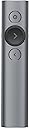
The Logitech Spotlight Wireless Presentation Remote redefines professional presentations with its advanced digital pointer, dual USB/Bluetooth connectivity, and a 30-meter operating range. Designed for seamless compatibility across all major platforms and apps, it features a gyroscope-enabled cursor for intuitive control and a smart timer with vibration alerts to keep you on schedule. Engineered in Switzerland and endorsed by TEDx, this sleek, rechargeable remote empowers managers and professionals to deliver flawless, engaging presentations every time.

| ASIN | B06WP4QCKT |
| Antenna Location | Presentations, Teaching |
| Are Batteries Included? | Yes |
| Are Batteries Required | Yes |
| Battery Average Life | 3 months |
| Best Sellers Rank | 5,889 in Stationery & Office Supplies ( See Top 100 in Stationery & Office Supplies ) 13 in Presentation Remotes |
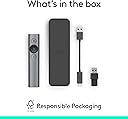
| Box Contents | USB-Receiver |
| Brand | Logitech |
| Brand Name | Logitech |
| Button Quantity | 3 |
| Colour | Grey |
| Compatible Devices | Laptop, Personal Computer |
| Connectivity technology | USB |
| Country of Origin | China |
| Customer Reviews | 4.4 out of 5 stars 1,718 Reviews |
| Embellishment Feature | LED |
| Enclosure Material | Plastic |
| Global Trade Identification Number | 05099206070011 |
| Hand Orientation | Ambidextrous |
| Hardware Platform | Laptop, PC |
| Item Dimensions L x W | 13.1L x 2.8W centimetres |
| Item Weight | 1.73 Ounces |
| Manufacturer | Logitech |
| Manufacturer Part Number | 222A672 |
| Minimum Required Operating System Version | Mac OS 10.12 Sierra, Ubuntu 16.04 Xenial Xerus, Windows 10 |
| Model Name | Spotlight |
| Model Number | 910-004861 |
| Mouse Maximum Sensitivity | 800 Dots per Inch |
| Movement Detection | Gyroscope |
| Movement detection technology | Gyroscope |
| Network Connectivity Technology | USB |
| Number of Batteries | 1 Lithium Polymer batteries required. (included) |
| Number of buttons | 3 |
| Operating System | Windows, macOS, Linux, iOS, Android |
| Power Source | Battery Powered |
| Product Features | Wireless |
| Product Finish Type | Matte |
| Product Warranty | 2-year Limited hardware warranty |
| Range | jusqu'à 30 mètres |
| Special feature | Wireless |
| Style Name | Single |
| Theme | Presentations |
| UPC | 190017120867 |
| Unit Count | 1.0 count |
S**A
Great tool for presentations
The Logitech Spotlight presentation remote is a handy tool for anyone who gives talks or presentations. Its wireless range is impressive, letting you move around freely in a large room. The digital laser pointer feature is neat, making it easy to highlight important points on your slides. Dual connectivity options, like Bluetooth and USB receiver, make it versatile and compatible with various devices, whether you're using a PC, Mac, Android, or iOS device. The built-in timer is a nice touch, helping you keep track of time during presentations. On the downside, the price might be a bit high for some, but overall, it's a solid, reliable remote that makes presenting easier and more professional.
L**C
QUALITY! And great functionality!!
It’s expensive as others go, but it’s beautifully made and the little tricks it can do are EXCELLENT! The software allows you to magnify / zoom / adjust volume and host of other functions. I was worried it didn’t have enough buttons to do things I need but the reality was most of them I didn’t use, this has everything I need and some. Recently used for some team presentations and everyone loved it! The magnify function caused quite a storm and now everyone wants one! Really solid build quality too!! Yes it’s expensive, is it worth it? In my view - YES! Definitely pleased I chose this one over the R700. Works on Bluetooth so even though it has a dongle, you don’t actually need it
B**Y
Very easy to install with bluetooth or the dongle
Works almost as well as advertised - the interface is intuitive and the highlighting and forward and back buttons work well. Very easy to install with bluetooth or the dongle. A few things that could be better - clicking the pointer/highlight button briefly will advance the slide - despite there being a slide advance button to do this. This is too easy to do by mistake. There should be an option to switch this behavior off - sadly there isn't. - it would be good to have the option to set the cursor shape (eg to a permanent laser pointer) during presentations - it can otherwise be tricky to pick out where the cursor is on screen and therefore where the highlight will appear. - the long hold feature for the f/b buttons to select a secondary function option doesn't seem to work reliably making what might be a useful feature not one I can rely on during a presentation. -speed of the magnify feature - it is a little slow compared to the highlight feature making it a little shaky in use. The power cable supplied uses a special long USB C adaptor casing and while a normal one does work it is tricky to plug it in. Overall nicely designed and useful product, if the long hold worked for f/b page in browsers it might even replace the mouse when web browsing in some situations.
M**H
Very high quality but costly, there’s cheaper alternatives
The Logitech Spotlight Wireless Presenter is a great device shows really well made the buttons have great feedback and the connection is really strong. This offer included whilst good for highlighting parts of the slide does feel like it slows down the presentation. If you’re after a very high quality roommate I recommend this however there are cheaper alternatives which do just as good a job.
B**M
Digital laser pointer!
Super product but you may need a USB extension cable to move the receiver closer to the user in a large room.
M**M
Not plug and play.
It take a bit of getting used to. I was hoping that it would be plug and play. Instead you go through a complex registration process, with passwords etc to get the advertised features to work. I had hoped that you could plug the receiver into any computer and it would run. The receiver is USB A only while other cheaper pointers use USB A or USB C. Many Laptops no longer have USB A ports. Bluetooth is a little fiddly if you have a laptop and an iPad you have to take care it is pairing with the one you want. If you only use one laptop once set up it works brilliantly. But if you give talks where you are required to use someone else’s equipment I suspect it will take too long to setup. While these are small issues I just feel let down after having paid the highest price I have ever paid for a wireless presentation remote. The advanced presentation features like the three types of pointing were fun but the enlarge circle did not work the same on an iPad as on a laptop. On the Pad the whole screen enlarged rather than it working as a pointer.
L**D
The software makes the difference!
This is an awesome remote for presentations - but it's only awesome if you can install the additional software (which needs admin permissions on your PC). Without the software it's a nice looking and ergonomic remote that goes forwards and backwards with your slides. It doesn't even have a laser-pointer. Wkith the software you can highlight/magnify areas of the screen and all sorts of other fancy stuff that will increase the impact of your presentations. It charges with a custom USB-C cable (which is a bit annoying if you lose it). The remote dongle fits neatly into the base of the remote and it comes with a carrying pouch to keep it tidy. In use it feels very slick. The ergonomics have clearly been thought about. But it is very expensive for a remote. Worth it if you're regularly presenting to large audiences on a stage - not so useful is you're in a meeting room huddled round a desk with your laptop in front of you.
I**.
Utter Quality
Feels great in the hand. Magnifier extremely useful. Expensive, but to me it was worth every penny. Some people who borrowed it had problems as they held the buttons down, but I found it intuitive to click.
L**K
Bello e affidabile, il miglior puntatore sul mercato
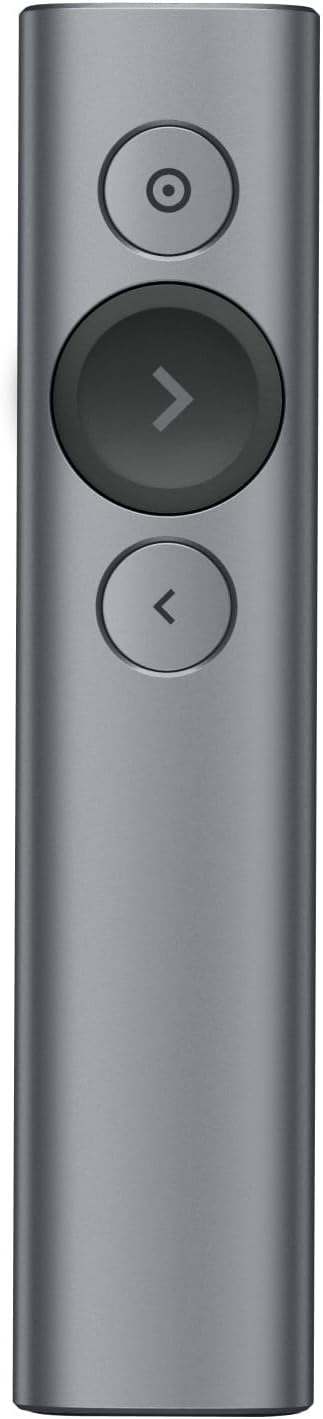
Cercavo un puntatore per il mio MacBook Pro 13”, e ne volevo uno collegabile direttamente via Bluetooth: su MBP ho solo 2 porte USB-C e durante una presentazione tipicamente una serve per l’alimentatore e l’altra per il monitor/proiettore. +Design+ Il più bello e funzionale di tutti. 3 soli pulsanti, di cui il più importante (“avanti”) in rilievo e ben evidenziato, in modo da trovarlo facilmente e con sicurezza anche senza guardare. +Connettività+ Come dicevo, è possibile connetterlo al Mac direttamente via Bluetooth. Basta un click sul telecomando per risvegliarlo (niente pulsanti on/off) e in un secondo un popup su Mac vi avviserà dell’avventura connessione, che è stabile e affidabile. È comunque dotato di ricevitore usb estraibile per connetterlo anche in maniera “classica”. +Software+ Vi parlo dell’esperienza su mac, ma credo sia analoga anche per Windows. Il software di accompagnamento si installa molto rapidamente e vi guida nell’associazione del dispositivo via bt. Comparirà un’icona nella menu bar, e da lì potrete regolare tutti i settings delle funzionalità Spotlight, il timer per le vibrazioni temporizzate, e molto altro. L’interfaccia di questo sw è una delle più curate che abbia mai visto, chapeau. +Batteria+ Non dovrete mai preoccuparvene: dura tantissimo, e anche nella malaugurata situazione in cui a 5 minuti dalla presentazione vi trovate spotlight scarico no worries: con 1 minuto di carica (letteralmente un minuto, il sw vi mostra anche un conto alla rovescia) avrete fino a 3h di autonomia dichiarate. Lo stato di carica è sempre visibile cliccando sull’icona su Mac/pc. +Spotlight+ Last but not least, veniamo alla funzionalità che mi ha fatto propendere per questo pointer. Spotlight permette di muovere il cursore (proprio la freccina) sul computer; per farlo basta tenere premuto il tasto in alto sul telecomando. A questo punto il sw su Mac vi permette di usare 3 tipi di puntatore, passando da uno all’altro con un doppio click sul tasto superiore: -Spotlight (da cui prende il nome), ovvero un cerchio di diametro impostabile al di fuori del quale tutto è oscurato -Lente di ingrandimento, stesso cerchio ma con zoom su quanto contiene -red dot, che sostituisce il puntatore laser (colorato a piacere) Nota finale, che mi ha convinto del tutto: è possibile fare dei click su computer usando il pulsante sul puntatore. Di fatto potete usarlo come mouse - nel mio caso lo uso come telecomando per Netflix e VLC sulla tv di casa quando connetto lo schermo esterno. Se non si fosse già capito.. consiglio ampiamente! Ps. Amazon propone una custodia rigida da associare all’acquisto, ma c’è una custodia morbida (foto) già inclusa nella confezione
A**R
Needs software
I like it. Works great on Mac. The only important thing is that there is no classic laser built in. You need to install Logitech Options+ to have laser point on your screen. There is a good side of that... no one use it to play with cats;)
J**N
Prodigioso
Superversatil. Marca de confianza. Acabado profesional. Quizá le falta un poco de velocidad de respuesta compara con un laser convencional.
S**R
Absolutely perfect!
Nice tool for presentations. With the Mac app the magnifier doesn't work - it magnifies your desktop image, but not your presentation.
L**R
Prix équivalent à la qualité
Produit magnifique compatible avec Mac. Cher on va dire mais ça en vaut le prix. Vous ne serez pas déçu en l’achetant.
Trustpilot
3 weeks ago
1 month ago