


Buy anything from 5,000+ international stores. One checkout price. No surprise fees. Join 2M+ shoppers on Desertcart.
Desertcart purchases this item on your behalf and handles shipping, customs, and support to Congo.
Product Description Video Converters Transfer VHS Home Videos to PC Record from Old Devices Transfer videos from VHS and camcorders straight to your PC hard drive. The August VGB100 video capture card is the simple solution for digitising your old videos. Turn VHS tapes into MPEGs to preserve your memories. To transfer files from VCR's, DVD players, set-top boxes and camcorders simply connect them via the RGB or S-Video inputs and use the straight forward software to create digital video in your choice of format. Simple to Use To transfer your files from VHS, DVD Players, Camcorders etc, simply connect them via their composite or S-Video outputs into the VGB100's inputs, and use the straight forward software to create a modern, digital video in your choice of format. Share with Friends With digital files, you are free to share your memories via Facebook and YouTube, stream them to your Smart TV and create edited highlight reels using the provided software. With the VGB100, you aren't limited to digital video capture, audio and digital stills can also be created from your video tapes. Also create into DVDs to share with your family and friends, whether together in front of the big screen or creating multiple discs to share around. You have a wide range of possibilities when sharing your beloved memories with those closest to you. The included software allows you to record and store your favourite moments from over the years. Memories captured on old analogue devices can be digitalised and brought on to your home computer. Edit this captured footage into home videos for you to share with family and friends. Use the software to add transitions and credits, giving these home videos an added bit of flair. Support & help available for installation & use Need help with installation or use? A PDF document automatically installed on your computer's desktop during installation. It will be of great help to you in the conversion. System Requirements Operating System: Windows 11 Home and Pro, 10 / 8 / 7 / Vista / XP CPU: P4 1.4Ghz or higher RAM: 256Mb or higher Graphics Card: 512Mb or higher Free Hard Drive Space: 1Gb Additional requirements: Microsoft DirectX 9.0+ / Sound Card / CD-ROM / USB 2.0 port Output Formats: MPEG 2 In the box: 1 x August USB 2.0 capture key, 1 x Video extension cable, 1 x Scart adapter, 1 x Quick installation guide, 1 x CD-ROM (software also available online) Device Installation You can find the drivers and software on the supplied mini-CD or download them online (explanations on blue paper in the box). Connect the August VGB100 USB stick to a USB port on your computer Stop Windows Defender, Avast, Norton or other antivirus while installing. Some antiviruses tend to block the installation Launch the "VGB100 VHS to DVD" .exe application and follow the instructions. Authorize all requested access. Software settings When making connections with a video recorder, make sure that the scart adapter used is in the OUT position. The scart socket of the video recorder must be AV1 / TV. When opening the Honestech software, click on the settings button. The video device line must be "Connecting Polaris". The Audio device line must be "Analog Audio In". If you do not see this information, reinstall the drivers or contact our team. Click on the first adjustment button. Select Composite if you are using the red yellow and white cables, or S-Video if you are using the black cable. Click on Control and select PAL_I. Play the video on the video recorder or camcorder in order to see it in the software. Troubleshooting If you can't see the video, you will need to change the camera settings and change the video standard to PAL. For that Completely close the capture software. In your computer's search bar, look for "Change Video Standard" and open the application. Select the desired standard “PAL_I" and press "CHANGE" then "OK" Warning: On Windows 10 access to the camera must be activated in the computer settings Open Windows settings Go to "Confidentiality" then to "Camera" Authorize access If you don't have the video preview Right click on the Honestech icon on the desktop Click on Property Click on Compatibility Check "Reduced colour mode" Select 16 bits Reopen Honestech software As the video plays on the source device, it should appear on the screen. Review: (Review includes troubleshooting for the device) A great, cheap bit of kit! I can record VHS onto PC/laptop in colour! - I bought this August VGB100 video capture cable from desertcart and it has done the trick! I can transfer the videos (from VHS tapes) that I wanted to my laptop. This works fine with Windows 8.1 on a 64 bit operating system. Installing the software was a piece of cake and plugging in the USB was too. The manual does not have enough info. in it. The programme that captures and stores the video is also really easy to use. I couldn't get any picture on the device at first (but I did get sound), then I did! The tricky bit is to get the USB device operating properly. This is what I had to do. SET UP/TROUBLESHOOTING: Put my VHS tape in a video player and set it running (when everything else is ready); Make sure the red, yellow & white phono connections on the USB stick are connected to the Output of the VCR/video player/video recorder (red to red, yellow to yellow and white to white); The settings you will need to select in the programme that is used to capture the video (the programme that came with the device) is - capture device, composite video (not S Video if you are using phonos), Analog Audio In (sound from the USB 2.0 device), regular volume (no other choice), and 4:3 (if you use 16:9 then everyone in the video will appear larger than they are); and Set the VHS going and if everything is OK then you will be able to hear sound from your USB and the video will appear OK. NO SOUND AND/OR NO PICTURE: If not OK then you need to do the following: Check the manual to see that the drivers for receiving and recording sound and video through USB 2.0 have been installed correctly (check your device manager) and that everything else is at it says in the manual; and If it is all set up as per the above and as per the manual then you should be OK. NO PICTURE BUT SOUND IS OK: You are getting sound but perhaps not the video itself/no picture. To get the picture you need to do the following: Keep the VHS running; Open up your device manager and check which video drivers you are using. If you are using the NVidia driver or the Intel driver then you should get a picture. If one of your selected drivers is the Windows video driver then you'll need to change it to one of the ones above to get a picture (I had to do this) - device manager - video drivers - right click the driver you want, select update driver, select search for drivers on this computer, choose select driver from the list and select one of the NVidia or Intel drivers (the latest version you have) and press to install. Once it installs you will get video on the device; Open up the additional options menu on the capture page of the capture video programme; Check that you are getting a number next to the found line and found signal entries (you should be); and If the picture is black and white with vertical lines running through it then choose another video standard. Even if the VHS is in PAL try another PAL version or try Secam. Secam worked for me even though the tape was PAL. You can get the software from here - http://www.augustint.com/en/downloadsoft-9.html - or here (later version) - http://arcsoft-showbiz.soft32.com/free-download/ . And that's it. Hope that helps. Happy video capture and transfer folks! Review: Cheap and simple way to digitise your old videos - Quick and easy way to convert your old analogue VHS and Hi-8 tapes onto your laptop. You'll need to buy the right leads to connect this device to your video machine - usually a Scart-phono plugs lead will do the trick (but use the S-video connection for Hi-8). Works perfectly on my Windows 8.1 64-bit PC. I marked it down a star because it doesn't appear as a standard video source in Windows - you have to install the (supplied) ArcSoft software - don't lose the licence key ID. You can download this if your laptop doesn't have a CD drive. But it seems a bit old-school fiddling about with licence keys, and the ArcSoft software manages to be too complicated for a complete novice, yet too limited for an advanced user - for example there's no way to change the capture bitrate (which is a very high 7 megabits per sec, so creates some file sizes far too big for grainy old VHS) or audio tracks/levels. But perhaps at this low price you can't complain too much.
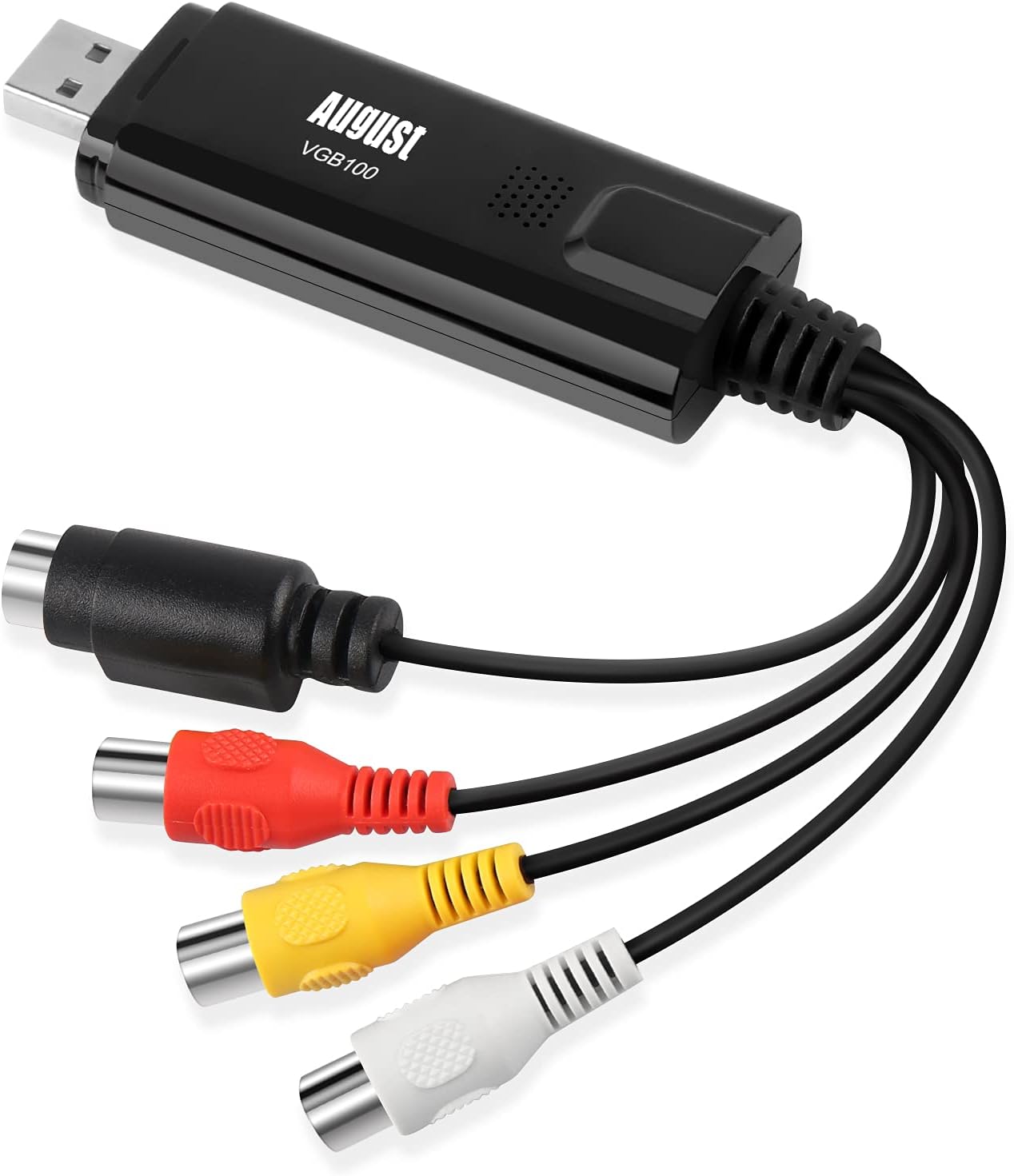


| ASIN | B008F0SARC |
| Best Sellers Rank | 8,637 in Computers & Accessories ( See Top 100 in Computers & Accessories ) 17 in External TV Tuners & Video Capture Cards |
| Box Contents | 1 x August USB 2. |
| Brand | August |
| Brand Name | August |
| Colour | black |
| Compatible Devices | PC |
| Compatible devices | PC |
| Connector Type | RCA, SCART |
| Connector type | RCA , SCART |
| Country of Origin | China |
| Customer Reviews | 3.8 out of 5 stars 9,055 Reviews |
| Global Trade Identification Number | 05053047000927 |
| Input Voltage | 5 Volts |
| Item Dimensions | 8.5 x 2.6 x 1.4 centimetres |
| Item Weight | 40 Grams |
| Item dimensions L x W x H | 8.5 x 2.6 x 1.4 centimetres |
| Manufacturer | August |
| Manufacturer Part Number | FBA_VGB100 |
| Model Number | FBA_VGB100 |
| Nominal Power | 10 Watts |
| Number of Items | 1 |
| Number of Ports | 1 |
| Package Quantity | 1 |
| Power Plug Type | No Plug |
| Product Finish Type | Matte |
| Smart Home Compatibility | Not Smart Home Compatible |
| Specific Uses For Product | VHS Tapes, Camcorders, Video Recorders, Retro Game Consoles |
| Specific uses for product | VHS Tapes, Camcorders, Video Recorders, Retro Game Consoles |
| Unit Count | 1.0 count |
| Warranty Type | Limited |
M**.
(Review includes troubleshooting for the device) A great, cheap bit of kit! I can record VHS onto PC/laptop in colour!
I bought this August VGB100 video capture cable from Amazon and it has done the trick! I can transfer the videos (from VHS tapes) that I wanted to my laptop. This works fine with Windows 8.1 on a 64 bit operating system. Installing the software was a piece of cake and plugging in the USB was too. The manual does not have enough info. in it. The programme that captures and stores the video is also really easy to use. I couldn't get any picture on the device at first (but I did get sound), then I did! The tricky bit is to get the USB device operating properly. This is what I had to do. SET UP/TROUBLESHOOTING: Put my VHS tape in a video player and set it running (when everything else is ready); Make sure the red, yellow & white phono connections on the USB stick are connected to the Output of the VCR/video player/video recorder (red to red, yellow to yellow and white to white); The settings you will need to select in the programme that is used to capture the video (the programme that came with the device) is - capture device, composite video (not S Video if you are using phonos), Analog Audio In (sound from the USB 2.0 device), regular volume (no other choice), and 4:3 (if you use 16:9 then everyone in the video will appear larger than they are); and Set the VHS going and if everything is OK then you will be able to hear sound from your USB and the video will appear OK. NO SOUND AND/OR NO PICTURE: If not OK then you need to do the following: Check the manual to see that the drivers for receiving and recording sound and video through USB 2.0 have been installed correctly (check your device manager) and that everything else is at it says in the manual; and If it is all set up as per the above and as per the manual then you should be OK. NO PICTURE BUT SOUND IS OK: You are getting sound but perhaps not the video itself/no picture. To get the picture you need to do the following: Keep the VHS running; Open up your device manager and check which video drivers you are using. If you are using the NVidia driver or the Intel driver then you should get a picture. If one of your selected drivers is the Windows video driver then you'll need to change it to one of the ones above to get a picture (I had to do this) - device manager - video drivers - right click the driver you want, select update driver, select search for drivers on this computer, choose select driver from the list and select one of the NVidia or Intel drivers (the latest version you have) and press to install. Once it installs you will get video on the device; Open up the additional options menu on the capture page of the capture video programme; Check that you are getting a number next to the found line and found signal entries (you should be); and If the picture is black and white with vertical lines running through it then choose another video standard. Even if the VHS is in PAL try another PAL version or try Secam. Secam worked for me even though the tape was PAL. You can get the software from here - http://www.augustint.com/en/downloadsoft-9.html - or here (later version) - http://arcsoft-showbiz.soft32.com/free-download/ . And that's it. Hope that helps. Happy video capture and transfer folks!
R**.
Cheap and simple way to digitise your old videos
Quick and easy way to convert your old analogue VHS and Hi-8 tapes onto your laptop. You'll need to buy the right leads to connect this device to your video machine - usually a Scart-phono plugs lead will do the trick (but use the S-video connection for Hi-8). Works perfectly on my Windows 8.1 64-bit PC. I marked it down a star because it doesn't appear as a standard video source in Windows - you have to install the (supplied) ArcSoft software - don't lose the licence key ID. You can download this if your laptop doesn't have a CD drive. But it seems a bit old-school fiddling about with licence keys, and the ArcSoft software manages to be too complicated for a complete novice, yet too limited for an advanced user - for example there's no way to change the capture bitrate (which is a very high 7 megabits per sec, so creates some file sizes far too big for grainy old VHS) or audio tracks/levels. But perhaps at this low price you can't complain too much.
I**S
Works a treat!
External USB Video Capture Card - August VGB100 - Transfer VHS Home Videos to PC / Capture Xbox 360 and PS3 Gameplay / S-Video and Composite In This works a treat. Transferring from VHS tapes using an old Funai VHS player to my HP (Windows 10) laptop. All the cables and connectors required are included, scart connector with the leads to conect to the actual VGB100. Installed the software from the mini disc, which also has the activation code on the envelope. Just follow the instructions and don't worry if it appears that nothing is happening.... it is! After re-starting the laptop and having opened the program I connected the player to the laptop using the cables. The next thing you need to check is that the switch on the scart connector is set to Output. Press play and select Capture. At this point I could see the video playback was poor. I went to the settings and chose PAL I which is UK and Ireland. I also chose the audio out put at that time. Tried again and it was almost perfect. Once the video is playing press the red record button. To stop recording press the green stop button. Drag and drop the thumbnail clip of your recording to the editing section, this is where you can select the actual conversion i.e MP4. I did a practice run and then copied the converted file to my mobile phone (Android 7.1) Moto G5 and it worked great! The VHS tape(s) that I am copying from are over 20 years old and this piece of kit is brilliant, for £20 including Prime next day delivery. Eat your heart out Ebay! I'm far from being a techy so, if I can do this, just about anyone can! Great product.
A**R
Only worked once and then gave up
I spent ages setting this up and to he honest, it was my fault for not connecting before installing software. I then managed to capture one short section of my vhs tape. However, I then tried the next tape and there was no preview at all. I tried everything from turning off, disconnecting, rebooting etc to no avail. It did capture in the background but the quality was absolute rubbish. I then used a trial version of Golden Videos, which, using this capture card worked well but the trial only records 5 mins. After that, you have to buy just the software for $39 dollars which I was not prepared to spend on top of this product. It proved that the physical capture device worked but the software was not capable plus it will only capture as wmv and I wanted .mp4. It might just not be compatible with Windows 10 but no good to me so sent back.
B**S
Excellent, effective capture adapter
This small device has functioned flawlessly allowing me to digitise a large number VHS-C home videos. Once the driver & rendering prog (downloaded) where installed on a Win10 laptop the adapter was discovered and available to encode the output from my VHS player. The purchase included the USB adapter; Scart to Composite adapter and set of RCA&S-Video extension cables (4 cores) all that's needed for a standard hook-up to the VHS player. The software provided is ArcSoft (circa 2009) but very easy to use for the capture which takes place as mpeg2 format initially. If required this resulting output can be rendered to other standards eg mp4 etc later within the software. I chose to send the mpeg output to a Mac where used a fast render to mp4 using Wondershare Ultimate Video converter. Result was very good considering the age and source material and of course the price of this little adapter.
J**X
How to be patient
Item arrived safe and secure. (Looks no different to item on sellers page so not going to insult you with photos) Comes nicely boxed, some instructions. With cable kit inc scart, 'mini dvd software' and USB image grabber device. I'm 'using' it for VHS and Hi8 video transfer betweeen player and PC. Sold as straight forward plug N play item. Well it is easy to 'plug in' and set the cables up correctly. It is easy to install the software. The software is an all in one, free to use screen capture, editor and DVD burner. Works with Windows inc version 10 🤗. Well for some it does! If you hit any hicups you better have a lot of free time and be in no rush to transfer the tapes. Or you could try this, 'one person used it on their old Win 7 PC with no issues' Tip - If you plan on going on a learning curve I found it best to leave the free software to one side. Download and learn basics for OBS suite a lot less messy with more in depth tutorials care of Youtube to get you up to speed. August do offer an updated driver for this item, you have a bit of a trawl to find it as they have been bought by another company who have similar products at higher cost. Even after downloading updated drivers. Running reinstalls/reboots etc I found it would work sometimes and not others. Sometimes no sound, sometimes no video. Yes all cables checked and triple checked. The USB screen capture works, as I found out using OBS suite, both images and sound. So I will be keeping this item. However for the £24 price tag (Dec 2020) I would advise you to look at similar products that are much cheaper or befriend someone with a PC running Win 7 😃
M**S
It works, at least for me.
I bought the VGB100 after trawling through all the different offerings out there. All seemed to have mixed reviews, and I decided this one would be as good as any if I was taking a chance that it would actually work. The product came well boxed, with good instructions, it was actually better build quality than I expected. I had dusted off my old windows laptop to try and install this on. And as other reviews did mention, there was a couple of challenges to overcome. However, I had read through the trouble shooting print out, and actually they resolved my issues. Some things to note: 1) It states to plug in the device before installing drivers. 2) Disable antivirius. 3) Make sure the scart adaptor switch is set to output. 4) Find a port that the capture card actually registers on (noticed the first usb port I tried didn't pick it up). 5) Change video capture to PAL-I. 6) Change sound capture to the card, or the scart - for some reason I had to change this, but once I did, either option seemed to work. After all that, I was pleasantly surprised, the quality seems 'as is' on the tape, so it doesn't seem to lose what little quality there is (these are VHS so by todays standards when projected onto a big screen its very grainy, but on the phone looks good). Couple failed attempts at capture (e.g. in the settings it tells you how much of a certain format, e.g. WMA, or dvd you can record in one go), I let it go beyond this, 1hr, 09 mins, and only after realised it did not save the capture just seems to lose it. Work around this is to capture in chunks, like 30mins, and then edit them back together and saving them off as one unbroken recording. Also had to see what format my computer, phone etc. could play, ended up sticking with WMA. After recording over 10 tapes (childhood, and old basketball games) I can confirm this is working well, and getting the old footage onto the cloud to share with friends and family is good fun. Tried this as punt, to avoid having to send selected tapes to a vhs converting service, which can charge ten pounds per tape. Saved myself a lot of money, and honestly have to say, recording the old tapes and watching them, putting titles on them etc. with the editing software is good fun. I wouldn't say the software is the best out there, but it works, and at the end of the day thats the most important thing. I can also understand why some people may find this doesn't work, as it could be computer compatibility issues, or there is a step from the trouble shooting guide they missed. I work with computers, so would probably be slightly above average in terms of technical know how. Anyway, hope this review helps someone, who like me, wasn't sure if this would work for them, it did for me is all I can really say at the end of the day, and for the money was definitely worth it, will probably lend to friends after I am done!
S**R
Good value, some limitations
I bought this device to transfer material on VHS and S-VHS tapes to MP4 files, using a Linux computer. No drivers are provided for Linux, but several of the chips used in EasyCAP devices have drivers built into the Linux kernel. The problem is that there is rarely any information given on the chip itself, so I took a bit of a chance with the August VGB100, which one reviewer had indicated worked with Linux. In the event, the chip identified itself as a Conexant CX23102, which is supported in Linux, via the cx231xx driver. I tried to capture the video and audio with VLC and immediately ran into problems: 1. The S-video input gave only a monochrome picture although the composite video (somewhat lower quality) produced colour 2. The picture aspect ratio was roughly square instead of 4:3 and I could find no way to correct this 3. The resulting captured video was noisy (white flecks) In fairness, the suppliers do not claim support for Linux, so running out of time, I resurrected an elderly Win XP machine and loaded up the drivers and the supplied software - ArcSoft ShowBiz. This was much more successful and did not suffer from any of the above 3 problems. However, despite the manual claiming that the video could be captured in several formats, dependent on the codecs installed, I could find no way of setting the format to anything other than MPEG-2. This plays OK on the likes of VLC, but is not the format I wanted and the file size is quite large at around 35-40MB per min. Transcoding to MP4 with ShowBiz is possible but with no control settings available it results in a file of double the size. With no other options, I switched to capturing to AVI with VirtualDub, with a view to better quality conversion to MP4 (h.264 codec). This of course results in absolutely enormous AVI files - around 1.25GB per min. Yes I do mean gigabytes. Subsequent conversion to MP4 with HandBrake reduces this to a very manageable 11.5MB per min, or around 700MB per hour. The supplier, Daffodil, did follow up my purchase with an unsolicited customer service email, which was appreciated, but when I asked questions about alternative capture formats in ShowBiz and about the quality of the audio, no response was forthcoming. As it turned out, with standard VHS, which is of relatively poor video quality anyway, there was nothing to be gained from capturing to AVI rather than to MPEG-2 on subsequent transcoding to MP4 via HandBrake. It remains to be seen whether this still applies with S-VHS tapes. The audio quality seems to be quite good just from listening tests, but I used HandBrake settings of 256-bit audio and a quality level of 20 for video. I have since tried the device on a Win 10 computer although it is specified as compatible with Win XP to Win 8 on Amazon's site and Win XP to Win 7 on Daffodil's site, and I can confirm it works fine on Win 10, albeit with the same limitations. In summary, this device works as specified and is good value for the little it costs. For VCRs with just a SCART output, a SCART adapter was provided in the box. I cannot give it 5 stars owing to the lack of technical information, the inaccurate statement in the manual concerning capture formats and the lack of response of the supplier to technical questions.
C**N
Facile à utiliser
Fonctionne bien mais il faut bien lire le mode d'emploi. Facile à utiliser.
D**R
Top!
Geweldig om oude banden terug te zien en natuurlijk te digitaliseren.
S**L
bad product please retake it and give my money back
Bad bad bad product not working in any ways
J**S
Gut und günstig
Der Markt für Video Capture Adapter gibt Einiges her - da sich die Geräte scheinbar alle ähneln, ist man als Kunde leicht verwirrt, für welches man sich denn nun entscheiden soll. In technischer Hinsicht unterscheiden sich die angebotenen Adpater alle nicht sonderlich - es sind im wesentlichen dieselben elektronischen Komponenten verbaut. Ich habe zum Vergleich ein deutlich teureres Set von Magix herangezogen - der dort enthaltene USB-Adapter war nahezu identisch mit dem vorliegenden hier, nur viermal so teuer! Der August VGB100 Adapter hat bei mir auf Anhieb sehr gut funktioniert: Aufgabe war es, einige VHS-Videos von "Ausflügen" mit der Bundeswehr zu sichern bzw. letztendlich auf eine DVD zu bringen. Den Adapter habe ich an einem ca. 6 Jahre SONY Vaio Notebook per USB 2.0 unter Windows 7 angeschlossen. Von der Herstellerseite habe ich mit die aktuelle Software heruntergeladen und installiert. Den Adapter habe ich mit einem Thomson Videorecorder verbunden: Composite Video (gelber Cinch-Stecker) und Audio (weißer und roter Cinch-Stecker). Über das Vorschaufenster in der mitgelieferten Software läßt sich das Videobild abrufen, hier kann man auch ganz einfach die Aufzeichnung starten. In der Regel braucht man auch eine besonderen Einstellungen in der Software vornehmen - bereits mit den voreingestellten Standardwerten lassen sich gute Ergebnisse erzielen. Die aufgezeichneten Videodateien lassen sich anschließend recht bequem bearbeiten, z.B. Anfang und Ende zurechtschneiden. Auch der Weg zur DVD ist einfach und weitgehend selbsterklärend, nur die Gestaltungsmöglichkeiten etwa beim DVD-Menü sind überschaubar - aber es ist alles dabei, was man braucht. Die von mir erstellten DVDs ließen sich bisher auf jedem Player problemlos abspielen! Fazit: Ein sehr guter Video Adapter zum Sichern alter DV- oder VHS-Kassetten auf dem PC. Mit der mitgelieferten Software lassen sich die überspielten Dateien leicht auf eine DVD oder in andere gängige Videoformate bringen und somit für die Zukunft sichern. Für wenig Geld bekommt man hier alles, was man braucht, um alte VHS- oder DV-Archive zu retten.
S**B
Fait le job, qualité suffisante pour moi
Fournie avec mini-CD, adaptateur Péritel/RCA, câble RCA. En ce qui concerne le mini-CD censé fournir drivers et logiciel d'acquisition : d'une part, il ne fonctionne pas dans tous les lecteurs que j'ai pu tester, et d'autre part, il vient avec un logiciel que je ne souhaite pas utiliser, qui installe probablement tout un tas de cochonneries en même temps (et en plus : il oblige à installer drivers et soft en même temps). Clé installée pour commencer sur une vieille machine sous Windows XP exhumée d'un placard (car je ne voulais pas polluer une machine de travail) : j'ai téléchargé les drivers sur Internet (faire une recherche pour "driver vgb100", et on accède au site d'August qui permet de télécharger les drivers seuls pour Win XP, 7, 8 et 10), installation sans problème après branchement de la clé (il faut tout de même savoir installer manuellement un driver sous Windows, depuis le gestionnaire de périphérique). Après cela, j'ai testé quelques logiciels gratuits d'acquisition vidéo, mais ma machine sous XP était trop lente pour encaisser les débits vidéo. Je me suis donc résolu à installer la clé sur une machine récente sous Windows 10 : après branchement, Windows n'est pas capable d'installer les bons drivers tout seul. Donc, là encore, j'ai utilisé les drivers téléchargés pour une installation "manuelle". Après cela, aucun problème : clé reconnue et fonctionnelle. J'utilise finalement le module d'acquisition intégrée à VLC, cela fonctionne très bien (menu "Media" puis "Capture Device" ; bien choisir "SECAM_L" comme format). Au final, la qualité de mes vidéos reste assez moyenne (surtout pour le son), mais : 1. Cela est probablement plus dû à la qualité des vieilles cassettes VHS + magnétoscope lui aussi vieillot. 2. Cela reste tout à fait potable, et appréciable de récupérer des vidéos qui ne s'abîmeront plus avec le temps.
Trustpilot
3 days ago
5 days ago