




Synology DS923+
Product ID: 490809528
Details
- BrandSynology
- ColorBlack
- MaterialPlastic Metal
- Product Dimensions6.54"D x x
- SizeDS923+
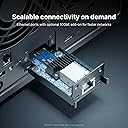
⚡Optional 10GbE for blazing speed
💾4-bay scalable storage
🛠️Expandable up to 9 drives
🚀 Elevate your data game with Synology DS923+ — scalable, speedy, and smart storage for the modern pro.
The Synology 4-Bay DiskStation DS923+ is a versatile, diskless NAS designed for professionals seeking scalable storage solutions. Featuring 4 drive bays expandable to 9, dual 1GbE ports with optional 10GbE connectivity, and dual NVMe SSD slots for caching, it delivers high-speed, reliable data management. Powered by Synology's intuitive DSM OS, it supports advanced RAID configurations including SHR, virtualization, surveillance, and backup applications, all backed by a 3-year warranty and extensive support resources.


| ASIN | B0BM7KDN6R |
| Best Sellers Rank | #30 in Network Attached Storage (NAS) Enclosures #38 in Network Attached Storage (NAS) Devices |
| Brand | Synology |
| Built-In Media | 1 x DS923+ main unit; 1 x Quick Installation Guide; 1 x Accessory pack; 1 x AC power adapter; 1 x AC power cord; 2 x RJ-45 LAN cables |
| Color | Black |
| Compatible Devices | Android, Desktop, Laptop, Server, iPhone |
| Customer Reviews | 4.8 out of 5 stars 3,582 Reviews |
| Enclosure Material | Plastic Metal |
| Is Assembly Required | Yes |
| Item Dimensions D x W x H | 6.54"D x 7.83"W x 8.78"H |
| Item Type Name | Synology NAS |
| Item Weight | 2240 Grams |
| Manufacturer | Synology |
| Material | Plastic Metal |
| Mfr Part Number | DS923+ |
| Model Number | DS923+ |
| Mounting Type | Tabletop |
| Product Dimensions | 6.54"D x 7.83"W x 8.78"H |
| Size | DS923+ |
| UPC | 846504004454 |
| Unit Count | 1.0 Count |
| Warranty Description | 3 Year |
| Weight Capacity | Maximum weight: 4.9 Pounds |
B**R
Great NAS for home office
I replaced an older Netgear 4 bay NAS with this one and the Synology is far superior in most ways. I did add the two NVMe SSDs for read and write cache and upgraded the memory to 8GB. 1) My disks and the unit run cooler. 2) The unit is whisper quiet while keeping everything cool. 3) It is much faster as far as responsiveness, responds like an internal disk or SSD when looking at files etc. (I'm sure the 500GB of SSD cache has a lot to do with that) 4) Using the duel Gbit interfaces in bonded mode I am able to sustain ~ 230 MB/sec write speeds (115 MB/sec from two different systems doing simultaneous backups. 5) User interface is good and easy to use 6) Lots of built in and downloadable apps available for most anything you want to do. 7) Built the 4 disk 56TB RAID 5 and optimized it in 20 hours which is much faster than my old unit with the same disks. 8) CPU seems to have plenty of power for running the extra apps. My CPU utilization is about 26% under heavy dual system backups. 9) The Hyperbackup app works well and was fairly easy to setup to use rsync to a TrueNAS system. Overall I am quite happy with the DS920+ and would recommend it to anyone looking for a great home or home office NAS
G**E
New horse with some new tricks !
First of all, let me start by saying, a RAID is NOT a backup in itself, as RAIDs can also fail, corrupting some or all of the data. This can happen at anytime, in year 10 or year 1 and depend on the hardware, which are a combination of the RAID device (NAS, DAS, etc...), de storage medium (Hard Drive, SSD, etc...), power supply, etc.... However the chances of that happening all at once are less than having no RAID at all. My advice, if you are able, is to constantly replace the olders/smallest drive in your (RAID) array with a newer one. Similarly to changing (pairs of) your road tires on your vehicle, before even 1 shows signs of failure or fails at all. Drives in these devices can get into a sleep mode, but are otherwise constantly on and or running/spinning and thus wearing out. Above is basic knowledge for storage and not just Synology. While there are drives and devices (and cars) that can reach a 20year lifetime, certainly not all can or will. There is a "3-2-1 Rule" for data storage/backup out there, which is: - There should be 3 copies of data - On 2 different media - With 1 copy being off-site (aka at different location) As for the purchase of this device, Synology DS 723+, I'm very satisfied with the performance and features. The price reflects that also, even for home use. My previous NAS/RAID devices are a Buffalo Linkstation (2 drive) and a Drobo 5N (5 drive), both are around 10 years old and an 8 drive Drobo at work, still in use. The 5 bay Drobo for it's time had a nice feature of being able to use all (or most of) the usable space when using drives of different sizes, and also being able to swap out any drive out for any other drive (smaller or larger) and the Drobo device would take care of it ALL (called BeyondRaid). No messing with pools or volumes. You only have to make a folder share. For it's time, this was VERY sophisticated and worth the investment then. Even today with Synology you have to specify manually if and how you want to add a drive to a storage pool, and how you want a volume on one of these pools, and then define your shares. For the home user, you'll need some basic knowledge or just read the manual of course if you have not done this ever before. It's just not as straight forward as with a Drobo. However this is not a bad thing in itself, as you may want to configure this Synology device for different uses and keep multiple volumes on different storage pools for different uses etc... I consider this a Pro, but it will require some more knowledge of the workings of this device. It has many other features and plugins (apps) which I will not go into in this review, but again there is a use for each and every one of them for a specific use(r), depending on your needs. Synology now also has a RAID mode capable of using drives of different sizes, they call it SHR (Synology Hybrid Raid) and works similar to Drobo BeyondRAID. Hardware wise, it has 2x Gigabit ports, which can be used individually, as a fallback or bonded. Some other brands have 10Gigabit networking built in, with this particular Synology it is an optional plug-in upgrade at $110 at the time of writing this. I don't have a 10Gigabit network at home at this time, but I will be upgrading down the road, I think. There are also 2 NVME slots which you can utilize for cache (and storage) and you can also upgrade the RAM (memory) if you plan on using more apps (plugins). For basic nas use, this is not required. 1 con for me is the flimsy plastic of the device and the trays. It might be fine for you, and even if made from titanium would not affect the performance of this device at all. However coming from Buffalo (Metal + plastic) and Drobo (full metal), this is a step down. This is also true with the very flimsy plastic disk trays and clips.......... (Drobo uses a trayless design, you just pop in the drives like a VHS cassette in a VCR !). Other bonus features new to me also are the web interface, which is quite snappy. There are also apps/plugins for remote login etc, you can enable this if you want it. I'm still figuring out many of these. All in all I'm satisfied with my purchase so far and will update this review down the road. Purchased in october of 2023.
M**E
Over the moon with this NAS
Hi Everyone, I have had mine for a few weeks now and I consider myself somewhat of a heavy user and this seems to hold up very well, I work with photography and I moved roughly 40000 images over to the NAS and I have Synology Moments app running and the AI facial recognition is simply amazing and really help me find some order to my life :) I must say the NAS did work hard to catalog all those pictures and the CPU was averaging around 99%. Even though with the high CPU usage I was login and use the system, for the other users that I have created they didn't really notice the overhead on the CPU during this time ( Which took around 2 days for the AI to do it's thing) However I also have the 220J and when I tried adding that number of images, we had to wait for the cataloging to complete before I could do anything. Being able to access my files and photos remotely thanks to Synology's quickconnect/Drive options is simply fantastic, This is also a great option to create backups for your phone/laptop whether you are away or at home for the whole family or colleges. Synology has a great SHR Raid, (Synology Hybrid RAID), thanks to this RAID I was able to expanded my volume without having to rebuild the array and still have 1 drive fault tolerance and zero down time! I haven't had any trouble with mine thus far, it was really easy to setup and connect, it was as simple as going to a find.synology.com from your PC/laptop which is on the same network and either create a synology account or sign into an existing account. I will be looking at the Synology 420+ in the future and setting up a remote/ off site backup and open a lot more possibilities. ( I'll circle back here in a few months or so to add any additional comments. My primarily uses are at the moment are: Phone/ laptop backup and shares (Synology Drive) photography file managing and organization, It's more than a giant hard drive. I also have DNS (Domain Naming service) running on it for the network. Docker, which allows you the ability to build virtual machines within your NAS. (pretty useful) If you are thinking of purchasing this Synology 920+ I can assure you, this a great NAS with enough options to upgrade in the future. As it supports the additional drive unit which can be attached. ( If you go with additional expansion bays, I suggest creating separate volumes for each unit rather than creating 1 volume across both units.) you are also able to upgrade the memory to 8GB and add SSD caching to further improve the performance. If you have any question, please ask. Thank you
M**S
Returned my QNAP!
My last NAS was a Synology 918+ and I was very happy with it. I decided to buy another NAS, and I thought I would try a QNAP as it has 2.5 Gb networking, HDMI out, and a faster processor than the 920+ for about the same price. I have been developing Linux software for 25+ years, and even though I had read the QNAP software was less straightforward to use than Synology, I was sure I could handle it. After a week of battling with it’s poorly designed and tremendously difficult to use software, I returned it and bought the 920+. Synology has always provided a polished user interface, and DSM 7 is even better than the DSM 6 I have been using. Everything is well thought out, easy to use, and for Soho applications this NAS will do everything you need. While I do wish Synology offered faster networking with its Soho class of NAS than the 2x 1GBe ports, the software more than makes up for it. One more thing in Synology‘s favor is support. My 920+ works great, but my 918+ failed to boot about a year in after a lightning strike that also took out my LG OLED :( I called Synology and they had a replacement unit to me in two days, even before I returned the failed one. That kind of support provides a lot of faith in the company. This unit is easy to set up, easy to configure, easy to use. It will do everything from Nas storage to surveillance to VPN to containerized applications. Mac Time Machine and Windows incremental backup are easy to set up, and if you have a computer failure restores are fast and reliable. You can also back up with rsync or iSCSI. It supports shares via SMB, Mac AFP, and NFS, all easy to configure and use. Pretty much everything you could ask for in a Soho Nas is here at a great price. Another advantage is SHR or Synology Hybrid RAID. Since this is a secondary unit for me I only required protection against a single drive failure. In this mode, SHR makes much better use of mixed size drives than you get with standard RAID 5. Having the latest and greatest hardware is attractive, but it’s useless if the software is difficult to use or the support is less than ideal. I am extremely happy with both of my Synology NAS boxes.
A**N
A great Plex server and NAS all in one
Yes, this NAS can do a lot more than just being a Plex server and a file server, but that's all I'm using at this moment. I will update this review if I start adding significantly more features to the NAS. First of all, even with a Celeron processor, it has no problems transcoding 4K video in real time for display on other devices through Plex. When transcoding 4K to my iPhone XR, the CPU usage was around 5%. That means this little NAS could likely handle multiple 4K transcoding streams at once... probably limited more by network bandwidth than CPU power. This is likely because this is a very recent Celeron that just came out in the 4th quarter of 2019. The one thing that really surprised me was the quality of its user interface. It is web-based, but if you put it in full screen in your browser, it looks like (and works like) Linux. They really put a lot of effort into the user interface! Configuring things in the Control Panel has "basic" and "advanced" options, so even beginner users won't be overwhelmed. It's one-click easy to add new "packages" (add-in programs, essentially) to your NAS. Adding Plex is a single click and you're off. I enabled SSH to better communicate with my Linux servers and was surprised that the software didn't automatically create a home directory for my user account. It's easy to resolve, but it was an oversight. A very small one., and about the only thing that didn't work absolutely perfectly right out of the box. Migrating files from my failing 5TB external drive (NTFS formatted) to the NAS was as easy as plugging the drive into the front USB port. The user interface picked it up immediately, and I was able to use the File Station to move the files exactly where I wanted them. I purchased my DS920+ with two 8TB Seagate Iron Wolf NAS drives, with the thought that I can add up to two more in the future. When I need the storage, I will update this review and talk about how easy/difficult it was. Note that the Iron Wolf drives "tick" every 5 seconds or so, so if you are using this NAS in a bedroom, it might be annoying to you. My NAS is in my closet with my other networking equipment so I don't notice the noise.
R**T
Quality, known device. Hardware lags reality, even in the prosumer space
I've used a DS212 for years so I was no stranger to Diskstation 6, which was pretty awesome in every way except expandability and speed. This was my shot to improve both. Within days of installing mine, it upgraded to DS7 which was even better. The UI on the 212 was functional, but lagged into oblivion, The 920 is fast enough on the same network with the same client-side interface (web, browser) that it was easy to forget that you were on a web UI at all. It's SLICK! FOR MY USE, I decided a tricked out 920+ was better than waiting for the 921/922/923.. (Mine is a prosumer network with machines dwarving humans.) I added RAM for VMs and NVMe write caching, well, because I did. $100USD off for Prime Day made it even easier. That gave me a set of known restrictions on aftermarket HD, RAM, and NVMe.. While they take great care to provide everything you need in that pretty web interface, you can also turn on a perfectly functional Linux shell if you're into such things. It's a relatively plain old Linux kernel, now offering up BTRFS which allows nice things like snapshots, previously unavailable. Time Machine images, long a problem for NAS vendors, are possible, but they aren't bulletproof. I have five machines that are flawless and one that keeps needing rebuilt from scratch and I can't figure out the difference why. Others in various NAS forums report similar ghosts in their Synology attics. Buying this on an 8-10 year depreciation schedule, I'm bummed that there just isn't a viable 2.5GBps upgrade path. It's pretty disappointing that there isn't an SFP port on these things so we can replace a couple of $10 1Gbps copper ports for $30 2.5Gbps or $40 5.0 Gbps. That capped speed is my biggest regret/restriction on this product. I've found the synology line and this device in particular handy as: A) A place for Time Machines to live.. B) shared NFS/AFS filestore that's just crazy fast. C) a place for shared apps via Docker to spin up internal applications to share with, um, myself. LAMP instances, Git servers, etc. are all just dead easy. D) (soon) a way for all of the above to be backed up remotely still. E) An easy way to have x86 Linux available house-wide I've made the investment in time to make it all work well and the investment in hardware that I (mostly) have an upgrade path forward. It's not likely that I'll be bummed out by the 2032 equivalent of an RS2121 or HD6500 or whatever. I'm not going to outgrow this product family, so my investment in time won't be totally lost.
A**R
Coming from UNRAID and very happy
Came to the 923+ after talking with a few coworkers and poking around at an older 411 for a while. No it’s not the most powerful NAS, but it’s more than powerful enough to store files, receive and sync backups, serve up media to my TVs, and run a few small dockers. I run some more resource intensive dockers on another pc I have setup for virtual machines, docker and home surveillance and automation. Biggest win for me is going from an older Dell rack mount server that sucks down 200+ watts, to this unit that comparatively sips power at 20-50 watts depending on load. I calculated that I’ll pay for this unit in less than 2 years from the power savings alone! The unit is easy to manage, runs quiet and is every bit as quick if not quicker than my old server hardware. By far my favorite thing is that the software is incredibly stable. I rarely have downtime for this NAS with it being on a UPS. I really only have “downtime” when I reboot for updates or need to move the unit or make a power change. All this without having to log in some what regularly to make sure nothing was hung or needed to be updated and babysat. I run two 512gb Samsung NVMe drives as mirrored cache disks and they made a very noticeable difference in the read/write performance as file metadata are stored there and is retrieved much faster than a spinning disk and makes browsing data on the hard disks feel much faster than if accessing directly from the spinning disks. I believe that writes are improved by writing first to the cache drive, but do not have the ability to max out my 2gb link aggregate listed below to get to the max write speeds of the disks that are limited to 100MB/s of the ethernet link. Lastly I do run the network ports in link aggregation to my UniFi switch without issue. I do wish the built-in Ethernet ports were 2.5gb, but having the option for 10gb in the future is nice. Overall incredibly happy with this unit. Will stick with Synology NAS units in the future for all of the reasons I listed above, and recommend them to anyone looking for a NAS.
A**R
Great at home NAS
For an at home NAS, perfect. Synology works well for backup of my work stuff, photography as well as our phones - helps avoid paying a bunch of cloud fees. now, it does require some work to ensure everything is connected properly, setup and maintained but far outweighs other complications. love the dual LAN ports, speeds are great. placed it out of sight so no noise issues.
A**R
Overall Excellent.
Synology products are amazing. I upgraded from a 2-bay and this one is just what I needed (just had to add more ram). Excellent build quality, performance and it's very easy to use.
M**M
Otimo produto
Otimo produto, perfeitamente como descrito
O**Y
Warmth, Thickness & Sheerness? What odd and somewhat uncomfortable questions to ask me Amazon.
...but let me talk about this SHEER performance of this device! (See what I did there?) After 20 years of using old HDDs to back-up my personal stuff, I was looking for a solution. A box that could address all of my storage and archival needs. This very sexy black box has absolutely done this and so much more! Instead of getting a network attached storage device, I got the possibility of; hosting my own WordPress domain, hosting and managing my own email and cloud based services (think Google but on your desk!) While the sheer (oops, did it again) power of this device will take some time to learn, all I can say is that I'm thoroughly impressed at the speed, performance and user interface that Synology has created here. High quality product, innovative software, sexy hardware and most of all, peace of mind that my data is safe.
H**T
Simply brilliant
I had an old DS414j for a decade, and astonishingly Synology would still deal with support queries. It was time, however, to replace it, so I bought this and have not been disappointed. Setup was a total breeze and its performance is excellent. Given the limited role I have for it, it's basically bored out of its skull most of the time.... but it just works. It's quiet, it's cool (in all senses of the word) and I know it'll be reliable. Brilliant.
L**I
Perfetto
Comprato per sostituire un vecchio ds 115. Installazione semplice e rapida con prestazioni top.
Trustpilot
1 month ago
2 weeks ago