Buy anything from 5,000+ international stores. One checkout price. No surprise fees. Join 2M+ shoppers on Desertcart.
Desertcart purchases this item on your behalf and handles shipping, customs, and support to Congo.
🚗 Upgrade your Mazda, upgrade your drive — stay connected, stay ahead!
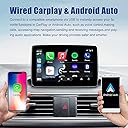
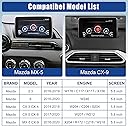
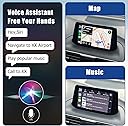
The Mazda Carplay and Android Auto Retrofit Kit (TK78-66-9U0C) transforms your 2014-2021 Mazda into a smart, connected vehicle by integrating Apple CarPlay and Android Auto seamlessly with your existing Mazda Connect system. Enjoy faster iPhone connectivity, 9-12W device charging, and full support for Mazda navigation SD cards, all while retaining original steering wheel and knob controls. This OEM hub ensures a flawless fit and enhanced driving safety, backed by 24 months of warranty and expert support.


| Brand | HMYC |
| Colour | Wired Carplay +Wired Android Auto |
| Compatible devices | Smartphone |
| Connector type | Micro USB, Mini USB, USB Type A, USB Type C |
| Item dimensions L x W x H | 8.6 x 6.6 x 3.8 centimeters |
| Specific uses for product | Mazda CX-3, CX-5, CX-9, Mazda 2/3/6, MX-5 |
A**R
Works well
Very good.
M**R
Easy to install and works perfectly!
Just installed this in my Mazda 3 2016 and works flawless! Great product, just check YouTube for the installation guide!
M**T
Brilliant Update That Works
I installed this is a 2015 Mazda CX5. The device came in very nice packaging and came with everything you need in the box, USB unit, wires, cable ties, foam covers and instructions. The USB hub you replace is an exact copy of the one in my car so once installed you wouldn't know you had replaced it except for a small phone icon on the unit. It was relatively easy to install. The hardest part is getting the USB unit out of the car as it has four clips holding it in. I pulled the front cover off the old unit with a hook tool and then used a flat head screwdriver to push the clips down. It was still hard to get it out but once out the rest is easy. There are YouTube videos with different techniques on how to get it out. Watch them and try the one you think you can do. Follow the the instructions that you get and you can't go wrong. It works perfectly and connects immediately. All the original Mazda controls work to control the CarPlay screen. This is a great update to a ten year old car which I would highly recommend.
B**I
So far working great. Paired this with AAwireless for wireless.
The included hardware+ cable harness feels like OEM. Even the packaging and instructions feels legit. Installation is not for the faint of heart. Firmware needs to be upgraded first before hardware install. Lots of YouTube tutorials out there. I followed the one by @Bk_Bt and @infotainment. The hardware install took about 3 hours. I took my time to not break anything and be meticulous when routing the cables. You'll need plastic pry tools for the moulding, a 10mm deep socket and phillips head screwdriver to remove the screen. The device so far performs great with little to no lag. I've used both AA and Carplay and both are functional and integrates well with my CX5. Charging could be stronger as AA/CP really puts a strain on the phones battery. Any bugs encountered is not the hubs fault but from the phone app software or a bad quality cable. I purchased separately a AAwireless dongle so now I have wireless connectivity. Tip: to speed up the loading, disable contact sync on your Mazda infotainment + remove the maps SD card.
L**L
Funktioniert bisher einwandfrei auf Mazda3 2016
Lieferumfang: - 2 Kabel, die vom Display durch die Verkleidung zum USB Hub verlegt werden müssen - der USB Hub - 9 Kabelbinder - 20 Stücke Schaumstofftape, jeweils 100mmx30mm Einbau: Schwierigkeit einfach bis mittel, ca 1h ohne das Softwareupdate. Es musste nur eine Schraube (10mm Außensechskant), mit der das Display zusätzlich befestigt ist, gelöst werden. Der Rest sind Steckverbindungen, die man vorsichtig aber mit beherzter Kraft problemlos lösen kann. Der Raum hinter dem Display ist sehr eng, die Kabel zu verlegen eine kleine Herausforderung. Geht auf jeden Fall von oben nach unten vor, von unten eine Öffnung zu finden ist praktisch unmöglich. Die Anschlüsse sind zwar selbsterklärend und unmöglich falsch zu verkabeln, einem sollte aber vor dem Verlegen genau klar sein, welcher Stecker auf welche Seite gehört. Das Schaumstofftape reicht um (fast) die gesamten Kabel zu polstern. Ein oder zwei Stücke übrig zu lassen, um die alten Stecker gegen Rattern abzukleben, macht Sinn, weil man das alte Kabel am Kabelbaum lässt. Software: ACHTUNG! Die Firmware der "Head Unit" (des Displays und seinem Computer) muss mindestens Version 70.00.100A oder höher sein BEVOR man den neuen Hub einbaut. (Kann man unter Einstellungen->System->Über->Version Information nachsehen) Nochmal ACHTUNG: Führt ein notwendiges Update auf keinen Fall nach der beilegten Anleitung durch! Das kann die Unit komplett unbrauchbar machen. Wer das generelle Risiko eingehen möchte, kann jedoch auf eine 9-seitige bebilderte Anleitung, die im Internet kursiert, zurückgreifen, der haargenau gefolgt werden sollte. Bei mir hat es ohne Probleme geklappt. Bisher nur Android Auto getestet. Es läuft flüssig und tut was es soll. Fazit: Wer nicht zwei linke Hände oder große Angst davor hat, etwas kaputt zu machen, kann den Einbau locker selbst machen. Apple Carplay und Android Auto sind deutlich moderner als Mazda Connect und bessere Navigation als mit Google Maps findet man 2024 nicht.
M**G
Añade Android Auto / Carplay al Mazda MK3
Unidad perfecta para mi Mazda 3 MK3. Incluye la esponja para aislar los cables y las instrucciones. A tener en cuenta que la versión de firmware del coche tiene que ser 70.xx o superior. Funciona perfectamente en estas semanas de uso.
Trustpilot
1 day ago
1 month ago