๐ Power your network like a pro โ stay connected, secure, and unstoppable!
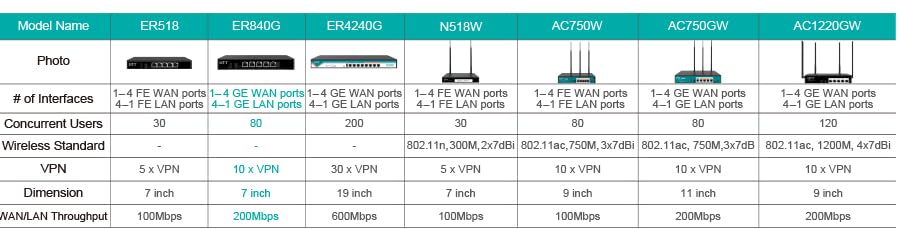
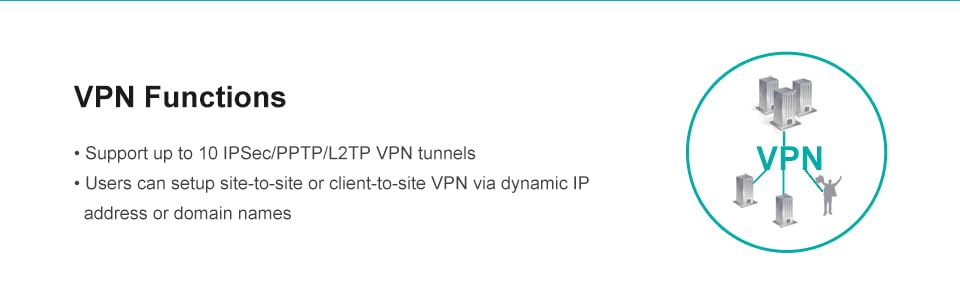
The UTT ER840G router is a compact, high-performance networking device featuring 4 gigabit WAN ports for superior multi-ISP load balancing and failover. Equipped with IPSec and PPTP VPN support, it delivers robust security for home and small business environments. Its proprietary OS ensures optimized performance, while access control features provide customizable network management.


| ASIN | B071CNS6RX |
| Antenna Location | Business |
| Antenna Type | Internal |
| Best Sellers Rank | #122,416 in Computers & Accessories ( See Top 100 in Computers & Accessories ) #2,522 in Computer Routers |
| Brand | UTT |
| Built-In Media | 1 internet wire, AC adapter, User Guide, Warranty card |
| Color | Black |
| Compatible Devices | Personal Computer |
| Connectivity Technology | USB |
| Control Method | App |
| Controller Type | Push Button |
| Customer Reviews | 3.8 out of 5 stars 88 Reviews |
| Data Transfer Rate | 1 Gigabits Per Second |
| Frequency | 5 GHz |
| Frequency Band Class | Single-Band |
| Is Modem Compatible | No |
| Item Weight | 1.37 Pounds |
| LAN Port Bandwidth | 10/100 megabits per second |
| Manufacturer | UTT Technologies Co., Ltd. |
| Maximum Upstream Data Transfer Rate | 1 Gigabits Per Second |
| Mfr Part Number | ER840G-A |
| Model Name | ER840G |
| Model Number | ER840G-A |
| Number of Ports | 5 |
| Operating System | [Proprietary Operating System] |
| Other Special Features of the Product | 4 Gigabit WAN ports, VPN (IPSec and PPTP), load balancing & failover |
| Security Protocol | WPA2-PSK or WPA2-Enterprise |
| Special Feature | 4 Gigabit WAN ports, VPN (IPSec and PPTP), load balancing & failover |
| Warranty Description | 2 Years limited warranty |
| Wireless Communication Standard | 802.11ac |
| Wireless Compability | 802.11ac |
B**R
Been blocking IP addresses like crazy with the IP address filtering option
I did some testing and it does switch over fine with fail over. Easy to setup, Love the Dual WAN and its Web GUI. Had small problem getting second wan to pull dynamic ip then I determined that the modem/router was setup in bridge mode. Changed that and all is well. Works with static or dynamic now. Been blocking IP addresses like crazy with the IP address filtering option. The filtering is blocking those pesky busybox robots dearly love doing that. Be careful not to block yourself or your users that log in. Not sure what the guy wanting 1Gig speed was thinking since the ER840G is only rated at 200Mpps. Plenty fast for me and not too concerned with load balancing as I just need failover protection. I feel like I got everything I needed with this router. My only con would be the age of the firmware and not seeing any updates for it. Time will tell on the firmware. For the price I am going to give them a long try out.
T**Y
UPdate: Cannot get configured, Now I have it working as desired
I have two cellular modems I am trying to configure for WAN 1 and 2. I have tried for hours to get them configured with no success. They are showing connected with up and down traffic but I cannot access the internet through LAN 1. I cannot find any videos or manuals that help me configure this setup. Each cellular router uses dhcp with ip 192.168.1.1. I really want to like this product because the description is exactly what I want (load balancing), but if I cannot get it to work I'll have to return it. Any help would be greatly appreciated. Update: So when configuring a cellular router to this router you need to change the cellular routers IP address to something other than this devices address (192.168.1.1), and add this device in the static IP list of the cellular router. You will need this devices MAC. Some routers require the device to be connected before you can add it to the static list. I was able to configure two different cell routers. I left DHCP on one and disabled on the other. As long as this router has a static reserved IP on the cell router leaving DHCP enabled on the cell router does not seem to matter. On one router I simply disabled the firewall and set it up as a simple modem bridge. On my more featured router running OpenWRT it was much more involved requiring creation of a vlan DMZ, etc... A google search will provide details for bridging cellular routers. So the WAN settings on this router are now static IP, using NAT mode, the reserved IP in the cell router for this router as the IP, the cell routers IP as the gateway, the cell routers subnet, and google DNS addresses. It works perfect after figuring all that out lol. Failover and load balancing are working fantastic. Hope this saves someone the rediculous hours I spend figuring it out.
I**E
Seems like they are out of business, but itโs a great product
I couldnโt find them on the internet and what documentation I had provided dead links. So be aware you are buying a product with no support. But their software is pretty good and far better than the competitors which I tried (tplink). I would still be using this if my situation didnโt change. Easy to setup and get working for me.
S**.
Ethernet ports kept shutting down.
I bought this to set up WAN failover between two ISPs at my house. Initial setup seemed straightforward, but as soon as I started navigating around the GUI the ethernet connection to my laptop would fail and all 5 ports would shut down - no activity lights and no connection response from any port, and it required a hard reboot to get back into the GUI. Happened every time I tried to set up the device even with nothing else plugged in except my laptop on the same subnet. Probably a hardware problem but do not want to deal with trying it again, so decided to go for the Trendnet TEW-829DRU, which is an all-in-one dual-WAN and AC3000 WiFi router. More money, but a much more streamlined setup for a home environment than separate SD-WAN and WiFi routers working in tandem.
A**S
Does what it is supposed to if you can get it set up
First of all, the router that is pictured is not the router I received. Mine has the same model number, but looks different (blue faceplace) and does NOT have a usb port. I really don't need a USB port so that doesn't matter. Apparently there are some earlier versions of this router sitting on the warehouse shelves, so if you need the USB port, be aware that you might not get the version that has one. First the good: This router does what it is supposed to do. It allows me to use two different internet providers without having to manually switch between them if one of them goes down. It seems to be well-built. It has a pretty large set of router features, most of them that I don't use but could which include: Traffic reporting, VPN, QoS, NAT, static routing, rule-based routing, web content filtering, and firewall, wireless device management (although this ISN'T a wi-fi router). You get a lot of functionality for the price. This unit did not come with a configuration manual, but once you get logged into the management pages using the quick start guide, the Help link at the top does give you access to detailed configuration information. Now the not-so-good: UTT is apparently no longer in business. Their website is down and appears to have been down for quite some time. Without the website, there is no access to support or firmware updates. I had a configuration problem and was unable to find any useful information on the Internet. I tried emailing them at their support address and never got a reply. I eventually figured out the issue on my own. While this router does have automated failover capabilities (it will switch to a back up connection if your primary connection fails and switch back once it comes back online), it isn't a seamless switchover. When my primary ISP connection drops, I lose connectivity on all network-connected devices for 3-5 seconds before the secondary one comes online. This isn't usually a big problem, but it does cause ongoing video calls to pause and can cause downloads to fail in some cases. The changeover back to primary is seamless with no downtime. Although it supports static routing for specific IP addresses, it does NOT support static routes with IP masks (such as 192.168.10.1/24) or any type of wildcarding. This means that if you have several or many target IPs within the same IP block, you have to set up a static route for each one. In my case, I need a static route to my Starlink modem but that requires an IP mask to work properly, so I just can't do it. I actually ordered a replacement for this router (TP-Link ER605) because I don't like the idea of not being able to get firmware updates, but found that the primary to backup connection switching time for it was much slower (~30 seconds), so I went back to this one. Overall it's a decent router that does what it's supposed to do. It is less capable than some more expensive units, but for simple home-based or small business networks that just need a reliable failover, it's not a bad choice for the price point.
A**N
An impressively robust multi-network router.
This router does exactly as it advertises. It allows you to use two internet providers and balance between them. It is the first product that I have used that correctly re-writes URL get/post headers to contain the correct session information, so that packets going out to the different internet providers (called WAN's) does not get tagged by the destination as invalid. The VPN tunnels stay up, and the advanced routing features do a fantastic job. The other PLUS for this product is that it shipped with the most recent firmware version, so that I didn't need to immediately update my router. I replaced ubiquiti and tp-link products with this product, and have found this to be the first one that actually does what I want it to do, consistently. I should also mention that the decide captures the DNS responses and maintains a local table so that your browsing is significantly faster. Well done.
A**Y
Load balances reliably. Runs openWRT Linux.
Performs reliably. Xfinity drops out occasionally requiring a switch to Frontier DSL modem. Now if Xfinity drops out, DSL is still running. In other words, my internet is now reliable. Perhaps I should buy another one...
S**D
Out of business - no firmware updates - doesn't work for failover
I tried and tried, but I couldn't get the failover to work. Using with a Starlink system and a 4G unit to offer failover in bad storms. Set it up to ping 8.8.8.8 and even though it shows the wan is offline, it will not fail over to the 4G. Replaced with another brand and it works perfectly. It also appears the company that makes these is out of business since their website has been offline for a while now. No support, no firmware updates. Buy at your own risk. There are better options out there for less money!
T**Y
Excellent for load balancing
Using it to load balance starlink and cable internet. Works great.
Trustpilot
1 month ago
2 months ago