Buy anything from 5,000+ international stores. One checkout price. No surprise fees. Join 2M+ shoppers on Desertcart.
Desertcart purchases this item on your behalf and handles shipping, customs, and support to Congo.
๐ Unlock effortless control with every click โ because your ride deserves the best.
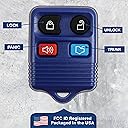
This 2-pack of KeylessOption 4-button key fobs offers a universal replacement solution for 1998-2015 Ford, Lincoln, Mercury, and select Mazda models. Each remote comes fully assembled with a pre-installed CR2032 battery and includes easy-to-follow DIY programming instructions, saving you time and dealer fees. Compatible with multiple OEM part numbers, these remotes deliver reliable performance backed by a warranty and free technical support.


| ASIN | B00KTIYZ5O |
| Automotive Fit Type | Universal Fit |
| Best Sellers Rank | #45,152 in Automotive ( See Top 100 in Automotive ) #255 in Keyless Entry Systems #19,340 in Automotive Replacement Parts |
| Brand | KeylessOption |
| Brand Name | KeylessOption |
| Button Quantity | 4 |
| Color | Blue |
| Compatible with Vehicle Type | Car |
| Customer Reviews | 4.3 out of 5 stars 19,214 Reviews |
| Item Dimensions L x W | 4"L x 2"W |
| Manufacturer | KeylessOption |
| Manufacturer Part Number | KPT1371 |
| Material | Plastic |
| Material Type | Plastic |
| Model Number | KPT1371 |
| Number of Buttons | 4 |
| Product Dimensions | 4"L x 2"W |
| Vehicle Service Type | Car |
H**R
Easy to program, excellent replacement!
Iโve replaced batteries in my wifeโs auto key fob several times. I drive an older 2007 Mustang and mused two weeks ago about not having replaced the battery in my remote. Wouldnโt ya know, a few days later I found my remote refusing to open the door right away! Swapped out the battery, problem solved. Nope. A few days later the same thing happened. The fob is recently departed. I bought this remote and received fast delivery. Programming is easy. Turn the key to โONโ, but donโt start the engine. Cycle the key off/on 8 times in 10 seconds and touch any button on the remote. The door locks cycle to signal success. Two remotes? Do it again, pushing a button on the second remote. Door locks again herald success. Iโm very happy with my new remote! Highly recommended! Addenda. First, mine came with battery installed, but within a month the battery ran out of juice. Who knows how long it had been waiting in a bin? I swapped in a new battery and have had no failures since. Second, the buttons are very sensitive. Just having the remote in my jeans pocket with two keys, it has managed to sound the horn alarm twice and pop open the deck lid several times. Find a dedicated place to leave your keys and use it unless you are about to use them. Other than these, I am still happy with my purchase.
B**Y
SPEED is CRITICAL!
I bought these key fobs for my 2003 Ford Taurus since one key and key fob had been lost. I followed the QR instructions exactly, but neither fob would program to my car despite several attempts. When I looked online again (ignoring the QR code instructions), I found additional information (hitting the unlock button on the driver's side door once in the car with the doors closed), and an emphasis on SPEED (I had not been working fast enough). To program the key fobs for a 2003 Ford Taurus: 1. Only open the driver's side door. 2. Get in the car, close the door and insert key in the ignition (necessary because you are going to have to work FAST once you start). 3. Put ALL of the key fobs (even ones that are already programmed) in your lap since running the programming sequence will reset any key fobs that are already programmed. 4. On the driver's door, hit the unlock door button. 5. IMMEDIATELY after unlocking the doors, turn the key from OFF to RUN (without starting the engine) EIGHT TIMES in less than 10 seconds ending up with the ignition in the RUN position (again without starting the engine). 10 seconds is a LOT shorter than you think, so do this as FAST as you can. 6. Your car should then chime and the door locks will cycle through locking and unlocking over and over again. 7. As soon as the door locks start cycling, press one of the buttons on each of the key fobs you want to program. I took turns with the three I had (one original and these two replacements) pressing each of the buttons on the key fob (unlock, lock, trunk, panic). Pressing the buttons didn't unlock/lock doors, open trunk or set off the horn. The door locks kept cycling through lock and unlock. 8. Once I opened the driver's side door, the locks stopped cycling, and all three key fobs were programmed. They lock and unlock the doors, open the trunk, and set off the panic horn and lights.
B**J
Worked perfectly 2000 Mustang GT. Easy directions.
The directions worked perfectly for my 2000 Mustang GT. The same directions work for a whole bunch of them. Before I did their instructions, I tested my old one. It worked. You don't need a working remote though. As long as the car had one at some point in time, the car supports the remote controls. Here's how it worked. You put the key in, and quickly turn it to the run position 8 times. Leave it on run at the 8th time. If you did it fast enough (under 10 seconds), the car confirms by locking and unlocking the doors. Then, on each remote (even the old one), press the lock button. Turn key back to off, remove key, and your done. All remotes that you programmed should work. Initially I had trouble because I wasn't doing the 8 "off to run" movement fast enough. Off is where you can put the key in and out. Run is the position just before start (where it "bings" but doesn't crank the engine). We all know that, but if you do it too slow, and are sure you did it in under 10 seconds, you'll start to second guess yourself. When I did it 8 times fast and left it in run, the "lock/unlock" was immediate, and the I hit the lock button on my two new remotes as well as my old one - bam, bam, bam. And it worked. I'm not POSITIVE that you need to reprogram the old remote, but the directions said to do it for any existing remotes, so I did. It might be that the car's computer sets a new code or something. So I just did as the directions said and did the old one too. I'm very happy with this. The pair of remotes was really inexpensive. I want to say 10 or 12 dollars for both. I like the idea of having a spare remote in my jacket (or at home or in my desk at work). That way I've got a nice little back up plan if I ever close the door and accidentally lock it with my keys on the seat or something. It seems like these remotes used to cost a lot more, and perhaps they still do. It might be that a big part of the cost is having a dealership tech reprogram them. Anyway - I was very happy with these. Oh - the shipping was fine too. My order was eligible for prime, but I wasn't in any particular rush, so they offered me a dollar credit for an amazon video rental or something. I said sure. So I got the remotes by normal mail in a few days after ordering. So I'll give these guys 5 stars all around.
R**R
Reasonably priced way to replace old/lost key fob/transmitters for many Ford vehicles.
Honest review of 2 KeylessOption Replacement Keyless Entry Remote Control Key Fob Clicker Transmitter โ Black @ $9.85 at time of order. I got these to use for a 2002 Ford Taurus. When I acquired this, it only had one key and key fob, and a lot of the imprinting is worn off of the fobโs lock/unlock buttons. It took about 6 tries to get these programmed following their instructions (which sucked) and watching a how to video (which was much more helpful). Note: Leave your driverโs door open during this programming, at the last key turn, leave the key in the on position, have both fobs handy if programming both for the same vehicle, and have the original fob(s) handy too, if you have one. Watch a video to learn how. You turn your ignition key on and off 8 times in rapid succession, the door locks will cycle, you have several seconds to then press the door lock buttons on each fob. You must also press the fob on the original(s) to reprogram it along with the new one(s). The door locks should work with the fobs. I donโt know why it took these many times to program these. They seem to be working fine, just do not have the distance of the original. Likes: Amazon Prime shipping, returns and refunds available. Reasonably priced for 2 transmitters. Exact replicas of the OEM transmitters. Easy enough programming. (Note: for a Lincoln LS, you will have to go to the dealer). Works with a wide variety of vehicles (1998 to 2016 various models/years), so if I should need them for another vehicle later on, I might be able to use these and reprogram them. Dislikes: Does not have the range of my OEM fob. I do not know if the batteries are weak or if itโs just that these are too cheaply made fobs. Meh: Perhaps not package these with the batteries already in place or have a tab that can be removed to activate the battery contacts. The buyer has no idea how long these have been in storage with the batteries being able to be in the ready/on position. Battery replacement might be a pain without taking the fob off the key ring each time. It seems the fob could have been made to open more easily while on a key ring. They are so thick at the attachment (to the keyring) point, that it makes it difficult to take them off and get them on a keyring. Hopefully this honest review helps someone decide about this product.
A**R
๐
Works great
C**V
Easy to program, work well.
The first set I got of these, one did not work. On this set, both worked just great. And you can't beat the price. I used these on a 2007 Ford Focus SE. This was a standard car. How I did it? Simple. Got into the car. Put seatbelt on (I don't know if the seatbelt was necessary, but I didn't want to take chances) Put my ignition in the On position first (The position where the power comes on, but the car isn't cranking. Then, I twisted the key four times, very quickly. I heard a beep, which told me the car was in program mode. I hit a button (doesn't matter what button, any one will do) on the first remote I wanted to program and heard a beep. then the second, then the third, and the fourth. Then I tested all four remotes I had. All of them worked. Things to keep in mind: You have to turn the key rapidly, but it isn't impossible to do. I'm 55 and I have arthritis in my right hand, and I had no problem You need to twist the key four times. You have to hear the beeps after you're done turning the key in the ignition, this tells you that you're in "Programing mode." As you hit each remote, you will hear a beep which means the remote was programed. No beep, not programed. Test remotes inside and outside of the vehicle. You have to do all remotes you want to work at the same time. Meaning, if you have two remotes programed and then you decide you need another remote, you will have to reprogram the first two along with the third. I have been told four remotes are the maximum. I haven't tested this theory, because all I need are four remotes. The local ADAP and NAPA stores charge fifty dollars for these remotes. If you break the top part (where you put it on your keychain) which happens, they charge 15-20 dollars for just a replacement case. Two remotes for 11 dollars? You can't go wrong with that. Oh yes, they also include a "registration" card that you can register your remotes online. Then, you can attach the card to your keychain with your remote. (this card looks like one of those "Loyalty" cards that stores use) and if your keys are lost, someone only needs to drop it in any mailbox and the keys will be returned to the company, who I assume, will then return them to you . That's a pretty nice feature.
T**O
Really easy to program on my Mustang GT, decent range
UPDATE 2022: Okay, so the second set of these FOBs I ordered has now lasted three years, including one battery replacement. Honestly, the first set got a lot more use than the second set as I haven't driven a lot during the Covid-19 pandemic, still I can say that these are definitely a cheap solution if you don't have the original car beepers. UPDATE 9 months later: Bummer. Both fobs seem to have died within two weeks of each other, one in late August and the other in early September. I'm investigating. There may be a problem with my car's rfid features but, so far, it appears to be the fobsโฆ as one died and the battery from it worked fine in the other one. Now the other one has died too. Ugh. Have to get a new set of these to see if it's the fobs or my car. The original Ford fob seems to not be working either so there may be something else happening here. I've got good CR2032 batteries so that isn't the issue. ORIGINAL REVIEW: I bought a pair of these fobs for a 2002 Mustang GT and they were easy to program, only one key was necessary. The range is approximately 30-40 feet line-of-sight. All four buttons work just like the FoMoCo fob that came with the car. To program the fobs for the 02 Mustang GT, I had to quickly turn the ignition between off and on with the key 8 times. On the 8th time the locks on the car click once to indicate that programming mode had been entered to add fobs. At this point do not switch the ignition to off until you're done programming the fobs. On each fob to be programmed, press the lock button. That's it/they're now synced to the car. Turn the ignition off. It worked for both these fobs on the first try. A good, cheap car fob.
A**A
Instructions for programming were WRONG and incomplete! no paper instructions either...
Shipped fast, decent quality (almost OEM quality), Batteries included! but the big letdown here was the INSTRUCTIONS! they give you a business card with a website to go on to look up the procedure for programming, not a big deal. The instructions for programming were incomplete and therefore wrong! had to google it to find out! I have a 2007 Ford Focus SE 4dr (North American/Gen1.5) and the procedure is as such: โขClose all doors, foot off brake, car in park. Gather ALL remotes you wish to use with the car, INCLUDING currently programmed remotes! โขInsert key into ignition, rotate to run, and then off 4 times (run position is where the key returns to after starting the car, DO NOT START THE CAR) do this in 6-10 seconds โขAfter the 4th on-off cycle, DO NOT LEAVE THE IGNITION ON! the car will beep at you from the instrument cluster, at this point, hit any button on each of the remotes you wish to program INCLUDING ANY PREVIOUS REMOTES YOU WISH TO CONTINUE USING. (the programming of remotes removes any previous programming to the car, all fords this remote is usable with are this way) โขAfter each remote has one button pressed, the car will again beep from the instrument cluster to signal sucsessful pairing! โขComplete programming by starting the car, and shutting it off at your convenience, and testing each remote (moving the key to run, or removing the key from the ignition did not seem to exit programming mode and the remotes did not work until AFTER starting the car and then shutting it off) The instructions from the website explicitly say to leave the ignition ON the 4th time, which will not let you program the remotes, and also do not mention that programming new remotes removes old remotes and thus they must be reprogrammed if you wish to use them! After i followed the instructions i googled, programed all the new remotes in around 45 seconds, easy as pie. GOOD INSTRUCTIONS MAKE ALL THE DIFFERENCE!
S**R
Easy to set up
Nothing to dislike on this fob. Easy set up and no glitches since. Have had it for about 6 weeks. Does exactly what it's supposed to do.
M**I
ุฑูู ูุช
ู ู ุชุงุฒ ููุฌูู ุฑูู ูุช ู ุน ุดุฑูุญู ู ุงูู ุจุณ ุบุทุงุก ูุนูู ุทูู ุชุจุฑู ุฌ
A**A
Muy bueno
Muy buena calidad y facil de programar
I**L
Buen producto.
Funciona bien.
S**N
Easy to program but Trunk Release button didn't work
This took only a minute to program my 2003 Ford Focus ZX5, very easy. The Door Lock, Unlock and Emergency Horn buttons work, the Trunk release button did not.
Trustpilot
1 day ago
1 week ago