Buy anything from 5,000+ international stores. One checkout price. No surprise fees. Join 2M+ shoppers on Desertcart.
Desertcart purchases this item on your behalf and handles shipping, customs, and support to Congo.
🎯 Elevate your game with the ultimate controller that adapts to every move and every platform!
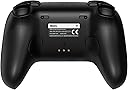
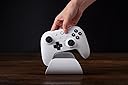
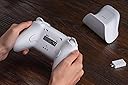
The 8Bitdo Ultimate 2 Bluetooth Controller is a flagship, fully upgraded gamepad compatible with Nintendo Switch, Switch 2, and Windows PC. Featuring high-precision TMR joysticks with RGB lighting, switchable Hall Effect and tactile triggers, vibration and motion controls, plus pro-level back buttons and customizable profiles. Connectivity options include Bluetooth, 2.4G wireless, and wired USB, all supported by a smart charging dock with integrated 2.4G adapter storage. Designed for gamers seeking precision, versatility, and style in one sleek black controller.


| ASIN | B0F194QFT2 |
| Batteries | 1 Lithium Polymer batteries required. (included) |
| Best Sellers Rank | 469 in PC & Video Games ( See Top 100 in PC & Video Games ) 12 in Nintendo Switch Controllers 128 in PC Consoles, Games & Accessories |
| Customer reviews | 4.4 4.4 out of 5 stars (832) |
| Delivery information | We cannot deliver certain products outside mainland UK ( Details ). We will only be able to confirm if this product can be delivered to your chosen address when you enter your delivery address at checkout. |
| Item model number | 1 |
| Language | English |
| Product Dimensions | 10 x 10 x 2 cm; 50 g |
| Rated | Ages 7 & Over |
| Release date | 20 Jun. 2025 |
D**E
Great PC controller with Nintendo Switch 1/2 support
TLDR - Probably the best controller I have used that is compatible with both PC and Nintendo Switch 1/2. After my third Xbox elite series 2 failed, I decided to give this controller a try and for half the price I am so glad I did (£59.99 at the time of review). Pros - + Thumb sticks feel just like the elite (I use the elite with the tightest setting and these feel very similar). + 4 extra programmable buttons in convenient places (no stretching your fingers to press them). + Battery life is great (around 15-20 hours depending on RGB usage). + Comes with the 2.4G adapter for PC. + Trigger stops that don't just block the trigger travel it actually turns them into 'clicky' style button triggers. + Works on Switch 1/2 wireless with motion control (over bluetooth without a dongle). + 3 onboard profile slots you can switch between. + Comes with a charging dock (The 2.4G dongle is stored in the bottom of this). Con - - Thumb stick tension isn't adjustable like it is on the Xbox elite. Things worth knowing - * It is slightly smaller than the Xbox elite controller (this wasn't an issue for me but worth pointing out for those with larger hands). * You need to update the firmware using the 8BitDo Ultimate Software V2 to be able to use it on the Switch 2. * The manual on the 8bitdo website offers a lot more information than the little booklet provided in the box.
B**E
Amazing controller!
An Amazing controller! The triggers can go from regular pressure sensitive triggers, to mouse click triggers by just flipping a switch! The controller itself feels very nice. The extra back buttons and top buttons come in very handy for games. It's very customisable, from buttons to colours to profiles for different players or games. It can be used via Bluetooth or by the receiver that comes included with it so you can use it on any pc (with a usbc port) and consoles like the Nintendo switch 2 (I have not used it with other consoles so I'm not sure how well it works or if it works at all with other consoles.) The controller has a software which is downloaded separately from their website. You use this software to customise most of the aspects of the controller: Macros, Lighting, Trigger sensitivity, Controller Profiles, Button mapping, ect. That being said, there are some things that you can customise without the software, such as pre-set colours and mapping the unused buttons (PL, PR, L4, R4) Sometimes, when I would use the software, it would glitch out and alter my macros, not even let me save my macros, or have a random error pop up that doesn't seem to do anything. I haven't ran into any other problems with it but that's only my experience. I would still recommend you get the software though, it's a good tool for your controller, and If you do run into problems, contact their support and they'll help you out. (I contacted them and they fixed the macro not being able to save glitch) Overall, an amazing controller for many games and platforms and I highly recommend it if you're looking for a one. The software might be a bit glitchy, but it's still useful to have and you can contact support at any time if you find anything odd.
K**E
My Favourite 3rd Party Controller
Proper impressed with this controller. Setup was easy, it connected straight away to my Switch 2 (after the firmware update) and also works perfectly with my PC. The build quality feels solid, buttons and sticks are really smooth, and it feels like a massive step up from the Joy cons. Battery life’s been great too. The included charging dock is nice also. For the price, it’s a brilliant bit of kit and does exactly what I need. The only minor gripe is you can’t power on the switch with the controller, but I think that’s more a restriction on Nintendo’s side. I would still highly recommend this controller.
F**N
Great daily-driver controller, handicapped only by it's lacking d-pad buttons.
I've been using this as a daily driver for both my PC and Switch 2, both of which I play quite often. The main advantages I find are: - Buttons feel tactile and durable. - Ability to switch between linear and non-linear shoulder buttons on the fly has proven handy to me on both PC and Switch - Charging doc with the hidden wireless adapter holder both looks and functions perfectly. - Joysticks feel about as good as they can be. The downsides are: - Software Update process. There's an app but it can be quite unintuitive at times, as well as barebones. But it does work! - If you have any adapters for consoles (e.g. Brook adapter for PS4/PS5 to use XBOX controllers), they WILL NOT work with this controller. - The d-pad is NOT that great. I play fighting games a lot (like Street Fighter 6) and it causes me to do misinputs despite significant training. A circle design on the dpad, similar to the one on the Xbox Series X/S controller, would've been more appreciated. This is the main reason for 4 instead of 5 stars. Overall though? I definitely recommend it.
R**S
Good all round controller on switch 2
All round excellent quality controller that works great with Nintendo switch 2. Setup on my PC was easy. Comfortable for large hands. Good battery life. Only downside is a small issue but it won’t turn on the switch 2 when turning on the controller. Back buttons are good.
C**S
Best Controller I've ever had and works natively with Steam
Best controller I've ever used / owned hands down. Feels just like official Xbox quality wise not 3rd party cheap plastic in anyway, TMR sticks are great and the extra paddles on the back are ideal use them with custom steam inputs on all games (similar to how i do on Steam Deck) and it's a game changer. Also i love the inclusion of L4 and R4 buttons on the back near the top shoulder buttons such a clever placement and much preferred to an additional set of paddles which can be cumbersome - worth it just for that. If you're on the fence looing for a Steam controller it's fully compatible as well, and better than the Xbox Series X controller for features and quality.
D**N
Value and quality
Superb controller for Switch 2. Very comfortable to hold, high quality build, very smooth TMR sticks which should last much longer than regular ones, good-feeling buttons, customisable triggers and backbuttons, a nice charging station which houses a USB dongle if you ever need that, some nice lighting, and all for a great price. The only downside is you can't switch the Switch 2 on using it but it's not a dealbreaker if your console is within easy reach. Highly recommended.
J**.
Avoid
Ceased to work after barely any usage
P**A
8BitDo es signo de calidad
El mando tiene muy buena ergonomía. Se nota robusto, tiene el peso idóneo y tiene muy buen acabado. Los botones se sienten perfectos y los gatillos son geniales. El D-Pad no es lo mejor del mundo pero hace click lo cual te proporciona feedback al pulsar. Una pega importante para mi es que la distribución de los botones + - cuadrado y estrella no son mis preferidos. Me gustaría poder reasignar cuadrado y estrella... (cambiarlos por + y -) pero estos botones no se pueden cambiar en el software. También poder cambiar el resultado de pulsar el botón estrella, ya que hace ciclo entre cuatro perfiles rgb, dos perfiles por defecto, el mío, y apagado. Me gustaría que solo fuese on y off. Respecto a las pegas que pone la gente sobre tener que actualizar... Este mando salió al mercado antes que la switch 2. Es normal que sea necesario.
W**R
The Best Xbox/Switch Layout Controller Currently on the Market
After using it for about 6 months, I can safely say that the Ultimate 2 is the best controller currently available that is in an Xbox/Switch joystick configuration. That said, there are a couple areas for improvement that I want to highlight and comparisons I want to make. Overall, for $70 it handily beats controllers that are much more expensive and even the first party ones. First I want to compare it to the Ultimate 1 for returning people. If you haven't upgraded yet, DO IT. I imagine a lot of the 4.3 overall score comes from the old one as that had many more issues, but almost all of them have been fixed. The bumpers are MUCH better, the D-pad is significantly improved, and the new features such as the extra bumper buttons and trigger stops are great. If you have the Ultimate 1 and are wondering whether this is a worthwhile upgrade, it 100% is. From here I want to highlight each of the areas of the controller in a rapid fire list • The sticks are TMR and some of the best in the market. I still think there could be improvements to the mechanicals (smoothness, snapback, longevity, etc.) but the sensors are essentially perfect. • The D-pad is now tied with the best in the market. It has an extremely tactile feel and ghost inputs (up/down registering when left/right is pressed and vice versa) are possible, but easy to notice. However, if you want something more D-pad focused, get their Pro3 instead which is my number 1 recommendation in that regard. • The bumpers are perfect, literally nothing to say. The triggers are also great, and the new trigger stops work well and use a tactile button instead of just limiting the range. However, there is a slight gap in the mechanicals that makes them feel kinda off. I actually opened mine up and filled in that gap with electrical tape and it feels WAY better but it’s something to note. • The back buttons are super comfortable in my opinion and feel great to use. It might be nice to have 4 in the future, but there’s a tradeoff for clutter. The new extra bumper buttons are absolutely amazing and something I didn’t know I needed. We are finally getting enough inputs in these locations so keeping thumbs on the sticks is actually possible. • The face buttons are… good. Nothing remarkable about them as they are membrane pad based so exactly what you’re used to in almost every other controller. • The software/features are good and easy to use. Setting up profiles and reassigning the extra buttons or using turbo on the fly is extremely simple. However, I really wish that the software allowed for assignments outside its own buttons such as mouse click or keyboard presses. This is probably the biggest downside of the controller and means that the extra buttons can’t ever actually be EXTRA and only repeat buttons which is extremely limiting. • The dock is quite handy and something I can’t imagine living without now. It’s still easy to take the dongle with you on the fly, but for a home setup, the dock is amazing. Never once had a connection issue with it either. In the end, the Ultimate 2 gets my #1 recommendation with what is currently available and I have been through A LOT of controllers. The button assignment limitations are a disappointment and some of the mechanicals could be improved, but I’m running out of things to suggest. If you want a PlayStation layout, I’d recommend their Pro3 over this. However, I’d also recommend checking out the GameSir Tarantula Pro which is different enough to warrant its own purchase and is my current favorite PlayStation layout controller.
D**U
Hall effect sticks and gyro
Good controller with hall effect sticks and gyro.
M**D
Excellent 👌👍👍
Very nice and quality 8bitdo controller 👏👏👏👏👏amazing product
T**L
Bester Switch 2 Pro Controller
Der Preis ist um 10€ günstiger als der originale S2 Pro Controller, bietet jedoch eine ganze Menge mehr. Erstens ist es meines Wissens momentan der einzige Controller eines Drittanbieters, der die Switch 2 aus dem Standby aufwecken kann. Wichtig ist jedoch das man die Beat Firmware von der Herstellerseite bezieht und aufspielt. Diese nämlich unterstützt erst diese Funktion. Die Tasten lassen sich frei zuweisen. Sowohl per App (PC/Mac) als auch direkt über den Controller, was ich als sehr flexibel empfinde. Natürlich lassen dich über die App viele Dinge mehr einstellen, wie der Druckpunkt, Dead-Point und reaktionszeiten einzelner tasten. Darüber hinaus kann man 3 Profile anlegen und diese teilen sich nochmals zwischen Switch, PC und Android auf. Verarbeitung ist sehr gut. Dank der TMR Sticks ist die Steuerung noch genauer als mit Hall Effect. Zudem haben die Trigger linearen Hall Effect und das D-Oad sowie restliche tasten drücken nicht auf Silikon, sondern sind Tactiled. Zudem sind die Ringe der Sticks sind sehr beständig gegen Abnutzung. Der Controller bietet 4 zusätzliche programmierbare Tasten (jeweils zweite bumper und paddles), was nützlich für komplexere Belegung wäre. 6-Achsen-Bewegung funktioniert ebenfalls tadellos (nur mit Switch nutzbar) und die Trigger kann man bei bedarf auch auf minimalen Druckpunkt am Controller stellen. Die RGB Beleuchtung lässt sich farblich einstellen, sowie ein Feuerringeffekt aktivieren. Die Helligkeit lässt sich justieren und bei Bedarf auch komplett ausschalten, was für viele wahrscheinlich wichtig wäre. Was der Controller im Vergleich zum originalen Pro Controller nicht kann, ist das Scannen von Amiibo, aber das kannan auch mit den Joy-Cons tun. Für die meisten daher wahrscheinlich kein Problem. Die im Lieferumfang enthaltene Ladestation ist sehr nützlich und komfortabel. Kann man mit dem beigefügten Kabel direkt an die Switch oder PC anschließen. Am PC hat man den Vorteil, das die Ladestation gleichzeitig der Empfänger ist. Wennan den Controller herunter nimmt, verbindet er sich sofort mit dem in der Ladestation verbundenen Dongle. Finde ich echt super, das 8bitdo soweit gedacht hat, um die Nutzung noch komfortabler zu gestalten. Alles in einem einer der besten Controller für Switch/Switch2 und PC. Kann ich bedenkenlos weiterempfehlen und würde ihn auch selbst wieder kaufen.
Trustpilot
1 month ago
2 months ago